
lopbobjcfpmlcdkkbgmapdidenkaogbd

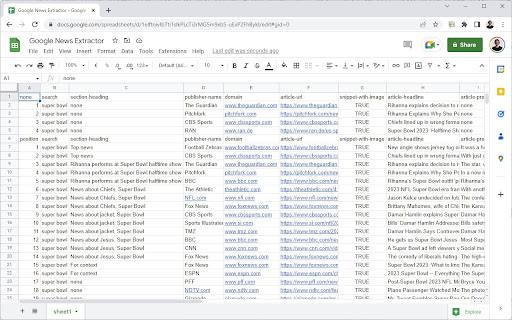
Google News Extractor is the most convenient way to check news ranking in Google Search, Google News Search and on news.google.com You are working as a SEO for a website generating a lot of traffic from Google News and it's related products? And you are looking for a convenient way to extract news ranking and topics from - Google Search - Google News Search - news.google.com? Then we have something for you: Google News Extractor. Google News Extractor (GNE) will be your new favorite plugin. GNE extracts all relevant information about an article directly from the news results. Perform your search, click the plugin logo and paste the data in e.g., a spreadsheet. Use the extension to: - Analyze rankings and ranking changes - Identify articles for re-publishing - Simplify your keyword research How can we make your work even easier?

SEO Plugin - diva-e
Our diva-e SEO plugin gives you a compact overview of all relevant information about your URL at a glance. You can now integrate the ChatGPT API into our plugin! Generate your personal API key in the Open AI profile and integrate it directly into the tool via the settings. And now you have a variety of AI-generated title and meta description suggestions at your disposal. Pro tip: If you click on the ChatGPT button often, you will always get new data. ★ For us, everyone is a premium user! The tool is 100% free (forever)! ★ The installation is quick and easy, so you can get started right away (less than a minute)! ★ Our tool is compatible with multiple browsers (all Chromium browsers)! ★ diva-e SEO Plugin also enables you to view pre- & post-render differences in meta data (with and without JavaScript)! ★ Your data belongs to you! Our plugin does not collect personal data and does not share it with third parties. Here is what you will get from our plugin: ✓ Page Title ✓ Meta Description ✓ Canonical Tags & Canonical Header ✓ Meta-Robots-Tag & X-Robots-Tag ✓ Compression ✓ Protocol ✓ Server ✓ Status Code ✓ Visibility Overview (Sistrix API) ✓ Core Web Vitals diva-e SEO department has been developing the SEO Plugin in-house and therefore it is updated on a regular basis. Should you have any questions or suggestions, please contact us at raymond.eiber@diva-e.com

News Hub kiosk
Google News, Google Play Newsstand and BuzzFeed. News aggregator for every country. Weather forecast for Chrome. MSN News. ★★★★★ Stay updated with the latest News 📰 with this extension. Google News give you a summary updated to the minute of the most recent news in your country 🌍 Buzzfeed on the other side will give you the most trending 🔥 news and hot topics for the day. As extra you will also have access to MSN News from Microsoft, available in over 10 languages 😵 This is the very best extension for your Browser 💻 FEATURES ★ Notifications 📣 let you stay updated with the latest news. ★ Google News provides the latest news for all over the world and available to many countries 🌍 ★ Buzzfeed is the Internet trending news source 🚨 ★ MSN is the very best Microsoft News service updated with local TV news from each country 📺 ✔ Small window well positioned for texting. ✔ Auto-Start when Browser starts. ✔ Configurations in a Options 🔧 section. ✔ Quickly see your profile and news feed. ✔ Very Low CPU/RAM/Bandwidth consumption 📌 ANDROID APP 📱 Also available as a Android App for Smarthphone/Tablet devices. Get it on Google Play: https://jitt.wwevents.fun/project/hub-for-google-news-buzzfeed/#download 💎 Building Apps and Extensions for Google Chrome and Android 🔥📣 📔 Available on the product page: https://jitt.wwevents.fun/project/hub-for-google-news-buzzfeed/#changelog Google News™, Buzzfeed™ and™ MSN are a trademark of Google Inc., MSN Inc. and Buzzfeed Inc., registered in the U.S. and other countries. This is an independent project developed by WWevents and has no relationship to Google News™, Google Inc., MSN™, MSN Inc., Buzzfedd™ or Buzzfeed Inc. By installing this product you agree to our privacy policy & terms of service: https://jitt.wwevents.fun/privacy-policy/ You may consult the list of permissions and the reason why they are required on the product page: https://jitt.wwevents.fun/project/hub-for-google-news-buzzfeed/#permissions “notifications” – Used to send desktop notification. For example when a new message arrive or App is updated. “contextMenus” – Allow to add more settings when right click in the App icon in the browser toolbar and browser context menu. “storage” – Used to save settings on your local computer. “scripting” – Used to be able to insert JS or CSS on the required host/domains. “system.display” – Used to detect the display size and position the Extension window. “unlimitedStorage” – Storage is limited to 5MB of data that may not be enough to store all configs. “host_permissions” – Permission to access to some hosts/domains that we must modify in order to provide the desired functionality detailed in the functionality. It also allows that you can share content (links or text) from other pages directly to inside the App and send it as a SMS/Android message to a friend for example. Also used to allow intercommunication with other WWEvents Apps (i.e. Emojis). “activeTab” – Permission to access the window that the extension is running and is show to the user. “all_urls” – Permission required for users be able to take screenshots of the current window – captureVisibleTab. “declarativeNetRequestWithHostAccess” - Used to get the mobile version of the websites. Only impact the Extension Window. “declarativeNetRequestFeedback” - Used to get the mobile version of the website by changing the User-Agent. This information is also available inside the App: Options -> About

GSC crawl stats downloader
instead of downloading 42 separate CSV files (by response, file type, purpose, Googlebot type and summary) this allows you to download everything with one click (and you can decide wether you want to only use the extension or if you want to backup the original CSVs as well)

View Rendered Source
View source is dead. See how the browser renders a page, not just what the server sends. A lightweight Chrome Extension that shows you how the browser has constructed (rendered) a page's original HTML into a functioning DOM, including modifications made by JavaScript. An essential tool for web developers using JavaScript frameworks like Angular, ReactJS and Vue.js, and for SEOs to understand how search engines see your pages, especially considering Google's dynamic serving workaround. Differences between raw and rendered versions are highlighted line-by-line showing how JavaScript has modified a page at render time. * Raw: The source code sent from the server to the browser before the DOM is rendered. The same as you'll see with traditional 'View Source' in the browser (after minor formatting tweaks) * Rendered: The rendered page after the source has been interpreted into a DOM, including any modifications made by Javascript * Difference: The difference between the rendered source and the raw source. Differences occur when JavaScript has modified the DOM. Adaptive website? If you serve different source code to mobile devices, emulate this easily with a mobile user-agent checkbox. Dynamic serving for Google? (More info: https://developers.google.com/search/docs/guides/dynamic-rendering) Using Google's dynamic rendering workaround designed for Javascript-heavy sites? Just request the raw source as Googlebot and ensure perfect technical SEO. Works with GatsbyJS and Prerender. DM the developer: https://twitter.com/ItsHogg
