
miknfbapjonjdjiomoojegohajbkbpha


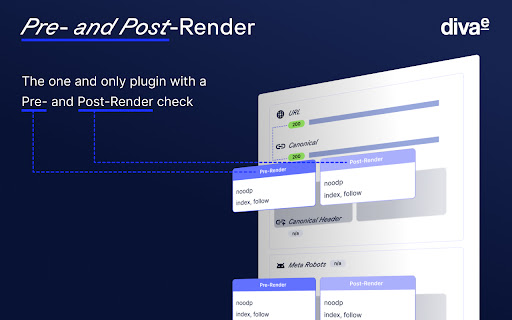

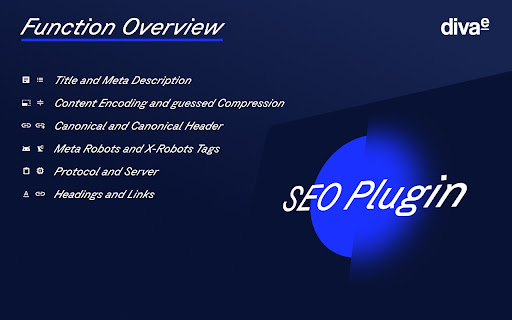
Our diva-e SEO plugin gives you a compact overview of all relevant information about your URL at a glance. You can now integrate the ChatGPT API into our plugin! Generate your personal API key in the Open AI profile and integrate it directly into the tool via the settings. And now you have a variety of AI-generated title and meta description suggestions at your disposal. Pro tip: If you click on the ChatGPT button often, you will always get new data. ★ For us, everyone is a premium user! The tool is 100% free (forever)! ★ The installation is quick and easy, so you can get started right away (less than a minute)! ★ Our tool is compatible with multiple browsers (all Chromium browsers)! ★ diva-e SEO Plugin also enables you to view pre- & post-render differences in meta data (with and without JavaScript)! ★ Your data belongs to you! Our plugin does not collect personal data and does not share it with third parties. Here is what you will get from our plugin: ✓ Page Title ✓ Meta Description ✓ Canonical Tags & Canonical Header ✓ Meta-Robots-Tag & X-Robots-Tag ✓ Compression ✓ Protocol ✓ Server ✓ Status Code ✓ Visibility Overview (Sistrix API) ✓ Core Web Vitals diva-e SEO department has been developing the SEO Plugin in-house and therefore it is updated on a regular basis. Should you have any questions or suggestions, please contact us at raymond.eiber@diva-e.com

View Rendered Source
View source is dead. See how the browser renders a page, not just what the server sends. A lightweight Chrome Extension that shows you how the browser has constructed (rendered) a page's original HTML into a functioning DOM, including modifications made by JavaScript. An essential tool for web developers using JavaScript frameworks like Angular, ReactJS and Vue.js, and for SEOs to understand how search engines see your pages, especially considering Google's dynamic serving workaround. Differences between raw and rendered versions are highlighted line-by-line showing how JavaScript has modified a page at render time. * Raw: The source code sent from the server to the browser before the DOM is rendered. The same as you'll see with traditional 'View Source' in the browser (after minor formatting tweaks) * Rendered: The rendered page after the source has been interpreted into a DOM, including any modifications made by Javascript * Difference: The difference between the rendered source and the raw source. Differences occur when JavaScript has modified the DOM. Adaptive website? If you serve different source code to mobile devices, emulate this easily with a mobile user-agent checkbox. Dynamic serving for Google? (More info: https://developers.google.com/search/docs/guides/dynamic-rendering) Using Google's dynamic rendering workaround designed for Javascript-heavy sites? Just request the raw source as Googlebot and ensure perfect technical SEO. Works with GatsbyJS and Prerender. DM the developer: https://twitter.com/ItsHogg

eology site metrics
Bietet viele SEO-relevanten Informationen zur Seite. Dieses Plugin zeigt SEO-relevante Informationen auf einen Blick! Das Tool eology site metrics zeigt Ihnen: ★ Title ★ Meta Description ★ URL ★ URL der Robots.txt ★ URL der Sitemap ★ Meta Robots ★ X-Robots-Tag ★ Canonical aus den Meta Daten ★ Canonical aus dem Header ★ Content Encoding ★ Protokoll Mit dem Tool wollen wir allen Suchmaschinenoptimierern die Arbeit erleichtern. Deshalb zeigen wir nach nur einem Klick viele für die Analyse von Webseiten wichtige Informationen der URL an. So bekommt man direkt beim Surfen auf der Seite einen schnellen Überblick über mögliche Optimierungsmaßnahmen.

Easy Custom Comparison
Easily compare against the previous period or year of any date range in Google Search Console, just like you can in Analytics. A lightweight Chrome extension that enhances the performance report within Google Search Console. This extension is just 7KB, and is active only when you’re using Google Search Console. It doesn’t collect any data.

Linkparser
LinkParser analyzes the links of the current page. It can differentiate between 9 link types & mark them in different colors. Linkpaser can differentiate the following type of links in order to count them or mark them on the webpage: internal links, internal dofollow links, internal nofollow links, subdomain links, subdomain dofollow links, subdomain nofollow links, external links, external dofollow links, extermal nofollow links. How Linkparser shows you the information it gathers is very much up to you. It is very customizable!
