
hbcgncdiflagijnbndhiibnnocendphm

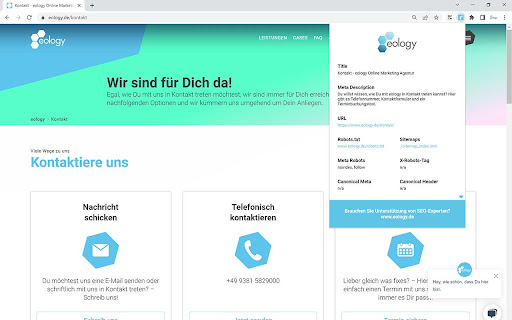
Bietet viele SEO-relevanten Informationen zur Seite. Dieses Plugin zeigt SEO-relevante Informationen auf einen Blick! Das Tool eology site metrics zeigt Ihnen: ★ Title ★ Meta Description ★ URL ★ URL der Robots.txt ★ URL der Sitemap ★ Meta Robots ★ X-Robots-Tag ★ Canonical aus den Meta Daten ★ Canonical aus dem Header ★ Content Encoding ★ Protokoll Mit dem Tool wollen wir allen Suchmaschinenoptimierern die Arbeit erleichtern. Deshalb zeigen wir nach nur einem Klick viele für die Analyse von Webseiten wichtige Informationen der URL an. So bekommt man direkt beim Surfen auf der Seite einen schnellen Überblick über mögliche Optimierungsmaßnahmen.

NoFollow
Outline nofollow links, detect nofollow and noindex meta tags on webpages. Features website filtering and custom CSS outline styles. :: Features ★ supports NOFOLLOW, UGC, and SPONSORED attribute values ★ supports search engine specific robot meta tags ★ disable or enable extension for defined websites v6.0.0 - switched to extension manifest V3 - added export and import - added keyboard shortcuts - removed "Remember minimised state" setting - now it always remembers minimised state across browser restarts - misc code improvements v5.3.3 - fixed visual issues in extension options for high pixel density screens v5.3.2 - trying a fix for errors on Mac OS v5.3.0 - ignore certain errors in logger - added CSP for better security v5.2.2 - fixed issue where extension would not mark links with image nested more than one level deep v5.2.0 - support for UGC and SPONSORED attribute values (there is no way to visually distinguish it from NOFOLLOW value at this time) - replaced facebook and twitter share links on options page v5.1.0 - improved the way injected script communicates with background script - fix: improved error logging v5.0.0 - new: added outline for links without nofollow attribute ("DoFollow" links) - new: added outline for external links - new: added "D" button next to each style input so you can easily restore default style value - new: inject content scripts to already opened browser tabs on extension start, this should improve user experience on extension install and update - change: updated minimum requirements to Chrome v39 - change: updated default outline styles (this will be noticed only by new users) - change: merged content scripts into one script, should use less resources now - change: made sure that extension doesn't try to load itself into pages from web store to avoid "no permission" errors - change: improved error logging - change: removed Google+ icon and updated Facebook and Twitter icons ===> Full changelog on the website

Redirect Path
The HTTP Header & Redirect Checker for SEO Redirect Path flags up 301, 302, 404 and 500 HTTP Status Codes as well as client side redirects like Meta and Javascript redirects, bringing potential issues that may not otherwise be seen to your attention immediately. As well as flagging up redirects and errors, the plugin also displays other HTTP Headers (such as server types and caching headers) and the server IP Address at the click of a button. All the magic happens on your computer, so it doesn’t “phone home” to anyone (except when auto-updating itself) and is instantaneous. The redirect path logo is from the "Iconic" icon set, which can be found here: http://somerandomdude.com/work/iconic/ Please note, by using this extension you agree to our End User Licence Agreement: https://www.ayima.com/browser-extensions-eula 4.0: Fixed runtime bugs and potential security flaws, plus added support for Ayima AI 3.0: Updated the extension to support Googles Manifest V3 roll out, no other major changes 2.0.0.6: Major rewrite - a lot of logic has been changed under the hood allowing us to display Meta and Javascript redirects for the first time.

Seerobots
SeeRobots conveniently displays the meta robots information of the website you are viewing - For more info visit www.seerobots.com SeeRobots will conveniently show you the information meta robots tag in the head section of the website your are viewing at that moment. Depending on this information colors in the browserbar will change. 1. If the SeeRobots field is all green it means that this page has "index, follow" as robots attributes. 2. If the SeeRobots field is all red it means that this page has "noindex, nofollow" as robots attributes. 3. If the SeeRobots field is green on the left and red on the right it means that this page has "index, nofollow" as robots attributes. 4. If the SeeRobots field is red on the left and green on the right it means that this page has "noindex, follow" as robots attributes.

GSC Helper by searchanalyzer.io
Streamlines your Google Search Console workflows. Data aggregation, quick-links and much more. GSC Helper: Your New Favorite Tool for Supercharging Google Search Console Workflows 🗂️ 𝐂𝐨𝐦𝐛𝐢𝐧𝐞 𝐈𝐧𝐝𝐞𝐱 𝐑𝐞𝐩𝐨𝐫𝐭𝐬 𝐓𝐨 𝐈𝐝𝐞𝐧𝐭𝐢𝐟𝐲 𝐈𝐧𝐝𝐞𝐱𝐚𝐭𝐢𝐨𝐧 𝐈𝐬𝐬𝐮𝐞𝐬 Combine selected indexation reports into one comprehensive report with a single click. 🕷️ 𝐔𝐧𝐥𝐨𝐜𝐤 𝐀𝐝𝐝𝐢𝐭𝐢𝐨𝐧𝐚𝐥 𝐂𝐫𝐚𝐰𝐥 𝐒𝐭𝐚𝐭𝐬 𝐈𝐧𝐬𝐢𝐠𝐡𝐭𝐬 Let GSC Helper combine separate crawl stats reports to give you comprehensive crawling insights. 📶 𝐕𝐢𝐬𝐮𝐚𝐥𝐢𝐳𝐞 𝐏𝐞𝐫𝐟𝐨𝐫𝐦𝐚𝐧𝐜𝐞 𝐃𝐚𝐭𝐚 𝐛𝐲 𝐖𝐞𝐞𝐤, 𝐌𝐨𝐧𝐭𝐡, 𝐨𝐫 𝐐𝐮𝐚𝐫𝐭𝐞𝐫 Go beyond daily views and get a broader perspective on your SEO traffic development. 📅 𝐐𝐮𝐢𝐜𝐤𝐥𝐲 𝐒𝐞𝐭 𝐚𝐧𝐝 𝐂𝐨𝐦𝐩𝐚𝐫𝐞 𝐃𝐚𝐭𝐞𝐬 Easily select date ranges such as 'last month', 'quarter to date' or compare 'last month vs. one year ago' via the context menu, or via the optional filter bar. 📂 𝐀𝐧𝐚𝐥𝐲𝐳𝐞 𝐓𝐫𝐚𝐟𝐟𝐢𝐜 𝐒𝐡𝐚𝐫𝐞 𝐛𝐲 𝐔𝐑𝐋 𝐨𝐫 𝐅𝐨𝐥𝐝𝐞𝐫 Identify your top-performing pages and folders with ease - now with a separate visualization tab! 🔎 𝐔𝐧𝐜𝐨𝐯𝐞𝐫 𝐀𝐝𝐝𝐢𝐭𝐢𝐨𝐧𝐚𝐥 𝐃𝐚𝐭𝐚 𝐏𝐨𝐢𝐧𝐭𝐬 𝐟𝐨𝐫 𝐘𝐨𝐮𝐫 𝐐𝐮𝐞𝐫𝐢𝐞𝐬 Explore more detailed insights for your search queries, e.g. keyword coverage percentages, n-grams, word counts & more. 🪄 𝐄𝐧𝐡𝐚𝐧𝐜𝐞 𝐭𝐡𝐞 𝐆𝐒𝐂 𝐈𝐧𝐭𝐞𝐫𝐟𝐚𝐜𝐞 Add handy tools like ‘Search on Google’, row numbers, copy-to-clipboard, and more — all within the Search Console interface! Check below for all features. 🔒 Your Privacy Matters GSC Helper doesn’t need access to your Google Search Console properties. It visualizes data from your current browser tab upon request, displaying it in a new tab within your browser. Your data is never shared. 🤔 How Does GSC Helper Work? When you're in Google Search Console, simply click the plugin logo to generate enhanced charts or tables. By your request, GSC Helper parses the source code of your current tab to extract and visualize the data you want. Everything happens locally in your browser. 💡 Discover searchanalyzer.io Unlock even deeper insights into your Google Search Console data with searchanalyzer.io. Instead of just creating new content, focus on enhancing your top-performing pages. Learn how searchanalyzer.io can help you optimize your existing content for better results. 📈 𝐓𝐫𝐚𝐜𝐤 𝐐𝐮𝐞𝐫𝐲 𝐏𝐞𝐫𝐟𝐨𝐫𝐦𝐚𝐧𝐜𝐞 𝐓𝐫𝐞𝐧𝐝𝐬 Monitor the growth and shifts in your queries, both in absolute numbers and % changes. 🔀 𝐒𝐩𝐨𝐭 𝐓𝐫𝐚𝐟𝐟𝐢𝐜 𝐂𝐡𝐚𝐧𝐠𝐞𝐬 𝐟𝐨𝐫 𝐏𝐚𝐠𝐞𝐬 View absolute numbers and % changes for your pages, and aggregate the data by folders for additional insights. 1️⃣ 𝐎𝐧𝐞-𝐂𝐥𝐢𝐜𝐤 𝐆𝐒𝐂 𝐀𝐜𝐜𝐞𝐬𝐬 Instantly open the current page in GSC using your preferred settings. 💨 𝐀𝐜𝐜𝐞𝐬𝐬 𝐆𝐒𝐂 𝐑𝐞𝐩𝐨𝐫𝐭𝐬 𝐯𝐢𝐚 𝐂𝐨𝐧𝐭𝐞𝐱𝐭 𝐌𝐞𝐧𝐮 Quickly open various GSC reports with a right-click. Check https://www.searchanalyzer.io/gsc-helper-browser-extension/faq for more information
