
hnljoiodjfgpnddiekagpbblnjedcnfp
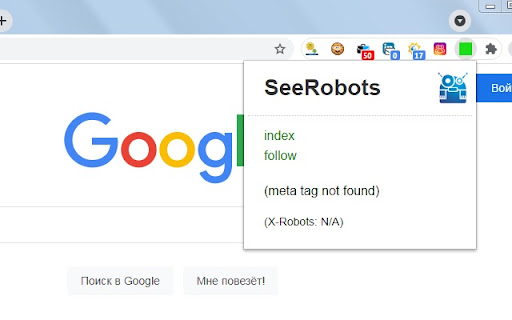
SeeRobots conveniently displays the meta robots information of the website you are viewing - For more info visit www.seerobots.com SeeRobots will conveniently show you the information meta robots tag in the head section of the website your are viewing at that moment. Depending on this information colors in the browserbar will change. 1. If the SeeRobots field is all green it means that this page has "index, follow" as robots attributes. 2. If the SeeRobots field is all red it means that this page has "noindex, nofollow" as robots attributes. 3. If the SeeRobots field is green on the left and red on the right it means that this page has "index, nofollow" as robots attributes. 4. If the SeeRobots field is red on the left and green on the right it means that this page has "noindex, follow" as robots attributes.

Robots Exclusion Checker
Checks robots.txt, meta robots, x-robots-tag with URL alerts. Canonical warnings, HTTP header info. An SEO extension, robots tester. Robots Exclusion Checker is designed to visually indicate whether any robots exclusions are preventing your page from being crawled or indexed by Search Engines. ## The extension reports on 6 elements: 1. Robots.txt 2. Meta Robots tag 3. A.I. Bots 4. X-robots-tag 5. Rel=Canonical 6. UGC, Sponsored and Nofollow attribute values If a URL you are visiting is being affected by an "Allow” or “Disallow” within robots.txt, the extension will show you the specific rule within the extension, making it easy to copy or visit the live robots.txt. You will also be shown the full robots.txt with the specific rule highlighted (if applicable). Cool eh! Any Robots Meta tags that direct robots to “index", “noindex", “follow" or “nofollow" will flag the appropriate Red, Amber or Green icons. Directives that won’t affect Search Engine indexation, such as “nosnippet” or “noodp” will be shown but won’t be factored into the alerts. The extension makes it easy to view all directives, along with showing you any HTML meta robots tags in full that appear in the source code. Checks whether a website's robots.txt file blocks A.I. companies from accessing its content. It monitors 14 bots across 6 companies - OpenAI, Anthropic, Google, Perplexity, Meta, and Apple, covering three types of access: training data collection, search indexing, and real-time browsing. If any bot exclusions are detected, an "AI" label will appear over the Robots Exclusion Checker icon in your browser. This feature can be deactivated within settings if preferred. Spotting any robots directives in the HTTP header has been a bit of a pain in the past but no longer with this extension. Any specific exclusions will be made very visible, as well as the full HTTP Header - with the specific exclusions highlighted too! Although the canonical tag doesn’t directly impact indexation, it can still impact how your URLs behave within SERPS (Search Engine Results Pages). If the page you are viewing is Allowed to bots but a Canonical mismatch has been detected (the current URL is different to the Canonical URL) then the extension will flag an Amber icon. Canonical information is collected on every page from within the HTML and HTTP header response. - UGC, Sponsored and Nofollow A new addition to the extension gives you the option to highlight any visible links that use a "nofollow", "ugc" or "sponsored" rel attribute value. You can control which links are highlighted and set your preferred colour for each. I’d you’d prefer this is disabled, you can switch off entirely. Within settings, you can choose one of the following user-agents to simulate what each Search Engine has access to: This tool will be useful for anyone working in Search Engine Optimisation (SEO) or digital marketing, as it gives a clear visual indication if the page is being blocked by robots.txt (many existing extensions don’t flag this). Crawl or indexation issues have a direct bearing on how well your website performs in organic results, so this extension should be part of your SEO developer toolkit for Google Chrome. An alternative to some of the common robots.txt testers available online. This extension is useful for: - Faceted navigation review and optimisation (useful to see the robot control behind complex / stacked facets) - Detecting crawl or indexation issues - General SEO review and auditing within your browser ## Avoid the need for multiple SEO Extensions Within the realm of robots and indexation, there is no better extension available. In fact, by installing Robots Exclusion Checker you will avoid having to run multiple extensions within Chrome that will slow down its functionality. 1.0.3: Various bug fixes, including better handling of URLs with encoded characters. Robots.txt expansion feature to allow the viewing of extra-long rules. Now JavaScript history.pushState() compatible. 1.0.4: Various upgrades. Canonical tag detection added (HTML and HTTP Header) with Amber icon alerts. Robots.txt is now shown in full, with the appropriate rule highlighted. X-robots-tag now highlighted within full HTTP header information. Various UX improvements, such as "Copy to Clipboard” and “View Source” links. Social share icons added. 1.0.5: Forces a background HTTP header call when the extension detects a URL change but no new HTTP header info - mainly for sites heavily dependant on JavaScript. 1.0.6: Fixed an issue with the hash part of the URL when doing a canonical check. 1.0.7: Forces a background body response call in addition to HTTP headers, to ensure a non-cached view of the URL for JavaScript heavy sites. 1.0.8: Fixed an error that occurred when multiple references to the same user-agent were detected within robots.txt file. 1.0.9: Fixed an issue with the canonical mismatch alert. 1.1.0: Various UI updates, including a JavaScript alert when the extension detects a URL change with no new HTTP request. 1.1.3: Added UGC, Sponsored and Nofollow link highlighting. 1.1.4: Switched off nofollow link highlighting by default on new installs and fixed a bug related to HTTP header canonical mismatches. 1.1.6: Extension now flags 404 errors in Red. 1.1.7: Not sending cookies when making a background request to fetch a page that was navigated to with pushstate. 1.1.8: Improvements to the handling of relative vs absolute canonical URLs and unencoded URL messaging. 1.2.0.11: Updating to Google's new manifest V3 and fixing small bugs. 1.2.0.12: Added a Spanish language version and made improvements to existing translations. Linking to new website https://www.checkrobots.com 1.2.0.13: Fixed pushState navigation data extraction, resolved inconsistent icon display, and added security protections to prevent logout issues with enterprise websites. 1.3.0: Introduced A.I. bot checking to monitor robots.txt exclusion rules for 14 bots across 6 companies including OpenAI, Anthropic, Google, Perplexity, Meta and Apple, with training, search indexing and real-time browsing bots tracked. New site exclusion feature lets you skip checking for specific domains. Fixes for SPA/back-forward navigation, x-robots-tag case sensitivity for Bingbot and Yahoo and improved allow/disallow rule precedence. Redesigned settings page with collapsible sections.

Core SERP Vitals
Show the Core Web Vitals data from the Chrome User Experience Report in the Google Search Results. Show real world Core Web Vital data from the Chrome User Experience Report in the Google Search Results. Displays LCP, FID, CLS (and the experimental INP and TTFB) metrics underneath the page links in the Google SERP where data is available in the CrUX report. * Note: Requires a free API key for the Chrome UX Report API. * https://developers.google.com/web/tools/chrome-user-experience-report/api/guides/getting-started Updates: Version 1.3.0 - Now displays the experimental INP and TTFB metrics.

SEO Minion
SEO Minion helps you in your daily SEO tasks such as On-Page SEO analysis, Broken Link Checking, SERP Preview and more The tool helps you with the following tasks - (1) Analyze On-Page SEO - analyze the HTML of any webpage and view useful information that will help you optimize the On-Page SEO as well as alert you to any issues. (2) Highlight All Links - quickly see all the links (internal & external) for any webpage (3) Check Broken Links - check every link on a webpage and get a report of any links with issues (5) SERP Preview - preview your website on a real Google search result and update this in real time (6) Google search location simulator - view non-personalized google search results for one keyword on two different location/language combination. (8) HTML v/s DOM - analyze the differences between the HTML source code and the rendered DOM to check if your JS library is causing any SEO related issue (9) Analyze Structured Data - analyze the structured data on the webpage We add features based on user feedback. If you'd like us to add any new features, please email us at akash@seominion.com. You can view the change-log for every version update at https://seominion.com/news

Inspect Canonical
Easily check the canonical tag of a page A lightweight and extremely easy Chrome extension that tells you the canonical source of any URL you are on. No more combing through the source code to understand if/when canonical tags point to a new destination. This extension does all the heavy lifting for you. This extension will display one of three values. GREEN (self canonical) AMBER (Canonicalized) or RED (error) Below are the conditions Inspect Canonical tests for, in the order it tests for them: RED: 1. Page contains noindex robots meta Message: "Page contains robots 'noindex' tag. Canonical tags are ignored. Click to view source" 2. No canonical in head but there is one elsewhere Message: "Canonical tag exists but not in . Click to view source" 3. No canonical tag at all Message: "Page has no canonical tag. Click to view source" 4. More than one canonical tag on page Message: "Multiple ([X]) canonical tags found. Click to view source" 5. Canonical exists but is missing the href attribute Message: "Canonical tag is missing 'href' attribute. Click to view source" - This is an unlikely case but still something I wanted to check for AMBER: 6. Canonical present but differs to current URL Message: "Canonical tag points to another URL. Click to visit URL: [URL]" GREEN: 7. Canonical is present and correct Message: "Canonical tag points to current URL. Click to view source" So that's 7 hurdles to jump through to get a green status.
