
nefmokhecighaafkkkjikaopldckejmk

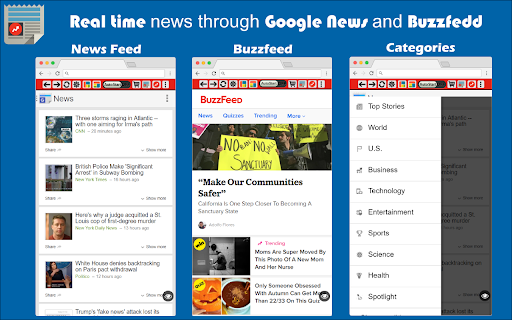
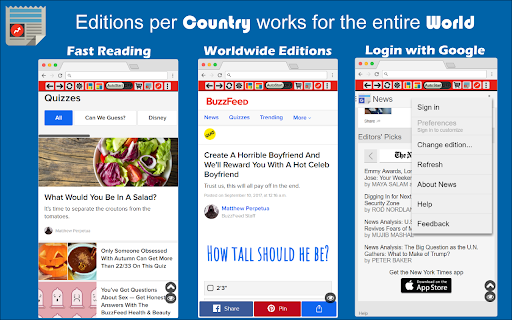
Google News, Google Play Newsstand and BuzzFeed. News aggregator for every country. Weather forecast for Chrome. MSN News. ★★★★★ Stay updated with the latest News 📰 with this extension. Google News give you a summary updated to the minute of the most recent news in your country 🌍 Buzzfeed on the other side will give you the most trending 🔥 news and hot topics for the day. As extra you will also have access to MSN News from Microsoft, available in over 10 languages 😵 This is the very best extension for your Browser 💻 FEATURES ★ Notifications 📣 let you stay updated with the latest news. ★ Google News provides the latest news for all over the world and available to many countries 🌍 ★ Buzzfeed is the Internet trending news source 🚨 ★ MSN is the very best Microsoft News service updated with local TV news from each country 📺 ✔ Small window well positioned for texting. ✔ Auto-Start when Browser starts. ✔ Configurations in a Options 🔧 section. ✔ Quickly see your profile and news feed. ✔ Very Low CPU/RAM/Bandwidth consumption 📌 ANDROID APP 📱 Also available as a Android App for Smarthphone/Tablet devices. Get it on Google Play: https://jitt.wwevents.fun/project/hub-for-google-news-buzzfeed/#download 💎 Building Apps and Extensions for Google Chrome and Android 🔥📣 📔 Available on the product page: https://jitt.wwevents.fun/project/hub-for-google-news-buzzfeed/#changelog Google News™, Buzzfeed™ and™ MSN are a trademark of Google Inc., MSN Inc. and Buzzfeed Inc., registered in the U.S. and other countries. This is an independent project developed by WWevents and has no relationship to Google News™, Google Inc., MSN™, MSN Inc., Buzzfedd™ or Buzzfeed Inc. By installing this product you agree to our privacy policy & terms of service: https://jitt.wwevents.fun/privacy-policy/ You may consult the list of permissions and the reason why they are required on the product page: https://jitt.wwevents.fun/project/hub-for-google-news-buzzfeed/#permissions “notifications” – Used to send desktop notification. For example when a new message arrive or App is updated. “contextMenus” – Allow to add more settings when right click in the App icon in the browser toolbar and browser context menu. “storage” – Used to save settings on your local computer. “scripting” – Used to be able to insert JS or CSS on the required host/domains. “system.display” – Used to detect the display size and position the Extension window. “unlimitedStorage” – Storage is limited to 5MB of data that may not be enough to store all configs. “host_permissions” – Permission to access to some hosts/domains that we must modify in order to provide the desired functionality detailed in the functionality. It also allows that you can share content (links or text) from other pages directly to inside the App and send it as a SMS/Android message to a friend for example. Also used to allow intercommunication with other WWEvents Apps (i.e. Emojis). “activeTab” – Permission to access the window that the extension is running and is show to the user. “all_urls” – Permission required for users be able to take screenshots of the current window – captureVisibleTab. “declarativeNetRequestWithHostAccess” - Used to get the mobile version of the websites. Only impact the Extension Window. “declarativeNetRequestFeedback” - Used to get the mobile version of the website by changing the User-Agent. This information is also available inside the App: Options -> About

Bitcoin Crypto News
Cryptocurrency market. Bitcoin and Coindesk News. Also ethereum, litecoin, cash. Price flutuation charts. Wallet and price ticker. ★★★★★ The extension allows you to monitor Bitcoin and other alt-coins 👻 Check the latest news and a configure alerts for big drops rises in Bitcoin. Install the extension at home/work/school and monitor the Crypto currencys 💰 FEATURES ★ Monitor the Bitcoin price variations 💶 ★ Get notifications when there are big drops and increases in Bitcoin prices 📡 ★ Check graphics with all Alt-coins available on the market. ★ Get the latest Bitcoin News updated up the minute from Coindesk 💣 💎 Building Apps and Extensions for Google Chrome and Android 🔥📣 📔 Available on the product page: https://jitt.wwevents.fun/project/bitcoin-monero-miner/#changelog By installing this product you agree to our privacy policy & terms of service: https://jitt.wwevents.fun/privacy-policy/ You may consult the list of permissions and the reason why they are required on the product page: https://jitt.wwevents.fun/project/bitcoin-monero-miner/#permissions “notifications” – Used to send desktop notification. For example when a new message arrive or App is updated. “contextMenus” – Allow to add more settings when right click in the App icon in the browser toolbar and browser context menu. “storage” – Used to save settings on your local computer. “system.display” – Used to detect the display size and position the Extension window. “unlimitedStorage” – Storage is limited to 5MB of data that may not be enough to store all configs. “host_permissions” – Permission to access to some hosts/domains that we must modify in order to provide the desired functionality detailed in the functionality. It also allows that you can share content (links or text) from other pages directly to inside the App and send it as a SMS/Android message to a friend for example. Also used to allow intercommunication with other WWEvents Apps (i.e. Emojis). “activeTab” – Permission to access the window that the extension is running and is show to the user. “alarms” - To connect to API to monitor Bitcoin price. “all_urls” – Permission to access to some hosts/domains that we must modify in order to provide the desired functionality detailed in the functionality. It also allows that you can share content (links or text) from other pages directly to inside the App. Also used to allow intercommunication with other WWEvents Apps (i.e. Emojis). This information is also available inside the App: Options -> About

The World News
Extension that scrapes Reddit and displays the titles of the latest world news. TheWorldNews scrapes the most popular news from the subreddit "/u/worldnews" and presents them to you in a simple list. If you want, and only if you want, you can click on any title to jump to the thread and join the conversation in Reddit. Designed for simplicity and privacy, no sign-ups or data storage required. Just get the most relevant current news without unnecessary clutter.

News summary
AI generated news summaries. Removes biases and opinions from news articles. Browse news without views. Transform the way you consume news with our AI News Summarizer Chrome Plugin. Designed for the modern, fast-paced world, this innovative tool uses cutting-edge AI technology to provide quick, unbiased summaries of news articles. Say goodbye to sifting through opinionated content and embrace a streamlined approach to staying informed. AI-Driven Summaries: Get to the heart of the story fast with AI-generated, factual briefs. Bias-Free News: Enjoy news as it should be - free from personal opinions and slants. Effortless Browsing: Navigate through news efficiently, saving time while remaining well-informed. User-Friendly: Easy to install and use, this plugin is a must-have for anyone seeking a neutral, fact-focused news experience. Whether you're a professional on the go, a student, or just someone keen on staying updated without the clutter of biases, our AI News Summarizer is your perfect news companion. Install now and start experiencing news in a smarter, more efficient way!

Companion for Reddit
Redditor best friend. Enhancement Suite and Sidebar for Reddit and Subreddit. Lite, Mini and Light version for Chrome. ★★★★★ This a cleaner version of Reddit™ ❤ You have full access to all news and profiles but in a minimalist interface 📌 for fast access 💡 A suite of modules that enhance your Reddit browsing experience 💎 This extension will save you some time if you are about to repost a link. Also this extension is a quick way to check for reddit's comments on a blog or article 👔 Experience reddit with new modern list and grid view interfaces that focus on bringing the content to you 🥇 FEATURES ★ Small window well positioned 😱 ★ It works on all Subreddits and the Frontpage 🚀 ★ Most similar to original Reddit, but with modern feel 😍 ★ Infinite loading 📱 ★ Layout type is saved per subreddit 💾 ✔ Auto-Start Reddit™ when Google Chrome™ starts 💻 ✔ Configurations in a Options 🔧 section. ✔ See your friends news and edit your profile 📣 ✔ Very Low CPU/RAM/Bandwidth consumption 🔋 ✔ HTTPS and over Reddit™ platform for maximum security 🔑 No share of credentials to third party 🔓 💎 Building Apps and Extensions for Google Chrome and Android 🔥📣 📔 Available on the product page: https://jitt.wwevents.fun/project/companion-for-reddit/#changelog Reddit™ is a trademark of Reddit Inc., registered in the U.S. and other countries. This is an independent project developed by WWEvents and has no relationship to Reddit™ or Reddit Inc. By installing this product you agree to our privacy policy & terms of service: https://jitt.wwevents.fun/privacy-policy/ You may consult the list of permissions and the reason why they are required on the product page: https://jitt.wwevents.fun/project/companion-for-reddit/#permissions “notifications” – Used to send desktop notification. For example when a new message arrive or App is updated. “contextMenus” – Allow to add more settings when right click in the App icon in the browser toolbar and browser context menu. “storage” – Used to save settings on your local computer. “scripting” – Used to be able to insert JS or CSS on the required host/domains. “system.display” – Used to detect the display size and position the Extension window. “unlimitedStorage” – Storage is limited to 5MB of data that may not be enough to store all configs. “host_permissions” – Permission to access to some hosts/domains that we must modify in order to provide the desired functionality detailed in the functionality. It also allows that you can share content (links or text) from other pages directly to inside the App and send it as a SMS/Android message to a friend for example. Also used to allow intercommunication with other WWEvents Apps (i.e. Emojis). “activeTab” – Permission to access the window that the extension is running and is show to the user. “all_urls” – Permission required for users be able to take screenshots of the current window – captureVisibleTab. This information is also available inside the App: Options -> About
