
bpekjbefojkhefgcfhfeohjfncbpioam
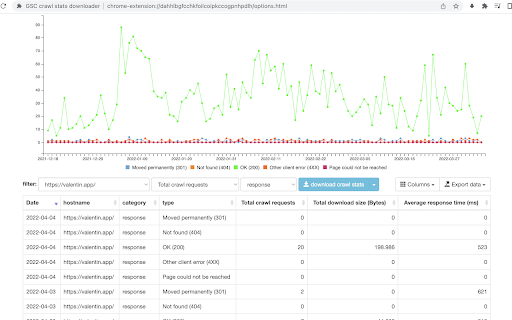
instead of downloading 42 separate CSV files (by response, file type, purpose, Googlebot type and summary) this allows you to download everything with one click (and you can decide wether you want to only use the extension or if you want to backup the original CSVs as well)

Schema Builder for Structured Data
Easily build validated json-ld structured data markup for any webpage. Based on schema.org specification Generating structured data markup for your webpages doesn't have to be hard! No more having to learn each Schema type, which elements are required vs. recommended or worrying about errors and issues. Schema.dev's Schema Builder makes it as simple as point and click to generate the perfect JSON-LD structured data for dozens of Google supported Schema types! and all for FREE! ============================================= Be sure to view the initial training video for fastest time to value. https://videos.seoclarity.net/video/kazj73n005plxgv61 ============================================= Simply enable the plugin, choose the schema markup you'd like to add and then populate the form using the point and click capabilities or manual input. Already have schema markup on your webpages? The built-in Schema testing tool helps validate your schema markup and shows errors and warnings. Key Features - Updated March 2nd, 2025 ================================== + NEW! Support for Vehicle Listing Markup + Support for 20+ Schema types - including ALL Google supported markups + Automatic detection of existing structured data + Point-and-click ease to populate schema fields + Intuitive UI that guides you through required, recommended and optional elements for each schema + Structured Data Testing capabilities built in for any schema markup generated + Intuitive UI to guide through required, recommended and optional elements NOTE: The plugin is in actively development - Join the forums at https://support.schema.dev for feedback, bugs and tips.

GSC Helper by searchanalyzer.io
Streamlines your Google Search Console workflows. Data aggregation, quick-links and much more. GSC Helper: Your New Favorite Tool for Supercharging Google Search Console Workflows 🗂️ 𝐂𝐨𝐦𝐛𝐢𝐧𝐞 𝐈𝐧𝐝𝐞𝐱 𝐑𝐞𝐩𝐨𝐫𝐭𝐬 𝐓𝐨 𝐈𝐝𝐞𝐧𝐭𝐢𝐟𝐲 𝐈𝐧𝐝𝐞𝐱𝐚𝐭𝐢𝐨𝐧 𝐈𝐬𝐬𝐮𝐞𝐬 Combine selected indexation reports into one comprehensive report with a single click. 🕷️ 𝐔𝐧𝐥𝐨𝐜𝐤 𝐀𝐝𝐝𝐢𝐭𝐢𝐨𝐧𝐚𝐥 𝐂𝐫𝐚𝐰𝐥 𝐒𝐭𝐚𝐭𝐬 𝐈𝐧𝐬𝐢𝐠𝐡𝐭𝐬 Let GSC Helper combine separate crawl stats reports to give you comprehensive crawling insights. 📶 𝐕𝐢𝐬𝐮𝐚𝐥𝐢𝐳𝐞 𝐏𝐞𝐫𝐟𝐨𝐫𝐦𝐚𝐧𝐜𝐞 𝐃𝐚𝐭𝐚 𝐛𝐲 𝐖𝐞𝐞𝐤, 𝐌𝐨𝐧𝐭𝐡, 𝐨𝐫 𝐐𝐮𝐚𝐫𝐭𝐞𝐫 Go beyond daily views and get a broader perspective on your SEO traffic development. 📅 𝐐𝐮𝐢𝐜𝐤𝐥𝐲 𝐒𝐞𝐭 𝐚𝐧𝐝 𝐂𝐨𝐦𝐩𝐚𝐫𝐞 𝐃𝐚𝐭𝐞𝐬 Easily select date ranges such as 'last month', 'quarter to date' or compare 'last month vs. one year ago' via the context menu, or via the optional filter bar. 📂 𝐀𝐧𝐚𝐥𝐲𝐳𝐞 𝐓𝐫𝐚𝐟𝐟𝐢𝐜 𝐒𝐡𝐚𝐫𝐞 𝐛𝐲 𝐔𝐑𝐋 𝐨𝐫 𝐅𝐨𝐥𝐝𝐞𝐫 Identify your top-performing pages and folders with ease - now with a separate visualization tab! 🔎 𝐔𝐧𝐜𝐨𝐯𝐞𝐫 𝐀𝐝𝐝𝐢𝐭𝐢𝐨𝐧𝐚𝐥 𝐃𝐚𝐭𝐚 𝐏𝐨𝐢𝐧𝐭𝐬 𝐟𝐨𝐫 𝐘𝐨𝐮𝐫 𝐐𝐮𝐞𝐫𝐢𝐞𝐬 Explore more detailed insights for your search queries, e.g. keyword coverage percentages, n-grams, word counts & more. 🪄 𝐄𝐧𝐡𝐚𝐧𝐜𝐞 𝐭𝐡𝐞 𝐆𝐒𝐂 𝐈𝐧𝐭𝐞𝐫𝐟𝐚𝐜𝐞 Add handy tools like ‘Search on Google’, row numbers, copy-to-clipboard, and more — all within the Search Console interface! Check below for all features. 🔒 Your Privacy Matters GSC Helper doesn’t need access to your Google Search Console properties. It visualizes data from your current browser tab upon request, displaying it in a new tab within your browser. Your data is never shared. 🤔 How Does GSC Helper Work? When you're in Google Search Console, simply click the plugin logo to generate enhanced charts or tables. By your request, GSC Helper parses the source code of your current tab to extract and visualize the data you want. Everything happens locally in your browser. 💡 Discover searchanalyzer.io Unlock even deeper insights into your Google Search Console data with searchanalyzer.io. Instead of just creating new content, focus on enhancing your top-performing pages. Learn how searchanalyzer.io can help you optimize your existing content for better results. 📈 𝐓𝐫𝐚𝐜𝐤 𝐐𝐮𝐞𝐫𝐲 𝐏𝐞𝐫𝐟𝐨𝐫𝐦𝐚𝐧𝐜𝐞 𝐓𝐫𝐞𝐧𝐝𝐬 Monitor the growth and shifts in your queries, both in absolute numbers and % changes. 🔀 𝐒𝐩𝐨𝐭 𝐓𝐫𝐚𝐟𝐟𝐢𝐜 𝐂𝐡𝐚𝐧𝐠𝐞𝐬 𝐟𝐨𝐫 𝐏𝐚𝐠𝐞𝐬 View absolute numbers and % changes for your pages, and aggregate the data by folders for additional insights. 1️⃣ 𝐎𝐧𝐞-𝐂𝐥𝐢𝐜𝐤 𝐆𝐒𝐂 𝐀𝐜𝐜𝐞𝐬𝐬 Instantly open the current page in GSC using your preferred settings. 💨 𝐀𝐜𝐜𝐞𝐬𝐬 𝐆𝐒𝐂 𝐑𝐞𝐩𝐨𝐫𝐭𝐬 𝐯𝐢𝐚 𝐂𝐨𝐧𝐭𝐞𝐱𝐭 𝐌𝐞𝐧𝐮 Quickly open various GSC reports with a right-click. Check https://www.searchanalyzer.io/gsc-helper-browser-extension/faq for more information

Redirect Path
The HTTP Header & Redirect Checker for SEO Redirect Path flags up 301, 302, 404 and 500 HTTP Status Codes as well as client side redirects like Meta and Javascript redirects, bringing potential issues that may not otherwise be seen to your attention immediately. As well as flagging up redirects and errors, the plugin also displays other HTTP Headers (such as server types and caching headers) and the server IP Address at the click of a button. All the magic happens on your computer, so it doesn’t “phone home” to anyone (except when auto-updating itself) and is instantaneous. The redirect path logo is from the "Iconic" icon set, which can be found here: http://somerandomdude.com/work/iconic/ Please note, by using this extension you agree to our End User Licence Agreement: https://www.ayima.com/browser-extensions-eula 4.0: Fixed runtime bugs and potential security flaws, plus added support for Ayima AI 3.0: Updated the extension to support Googles Manifest V3 roll out, no other major changes 2.0.0.6: Major rewrite - a lot of logic has been changed under the hood allowing us to display Meta and Javascript redirects for the first time.

View Rendered Source
View source is dead. See how the browser renders a page, not just what the server sends. A lightweight Chrome Extension that shows you how the browser has constructed (rendered) a page's original HTML into a functioning DOM, including modifications made by JavaScript. An essential tool for web developers using JavaScript frameworks like Angular, ReactJS and Vue.js, and for SEOs to understand how search engines see your pages, especially considering Google's dynamic serving workaround. Differences between raw and rendered versions are highlighted line-by-line showing how JavaScript has modified a page at render time. * Raw: The source code sent from the server to the browser before the DOM is rendered. The same as you'll see with traditional 'View Source' in the browser (after minor formatting tweaks) * Rendered: The rendered page after the source has been interpreted into a DOM, including any modifications made by Javascript * Difference: The difference between the rendered source and the raw source. Differences occur when JavaScript has modified the DOM. Adaptive website? If you serve different source code to mobile devices, emulate this easily with a mobile user-agent checkbox. Dynamic serving for Google? (More info: https://developers.google.com/search/docs/guides/dynamic-rendering) Using Google's dynamic rendering workaround designed for Javascript-heavy sites? Just request the raw source as Googlebot and ensure perfect technical SEO. Works with GatsbyJS and Prerender. DM the developer: https://twitter.com/ItsHogg
