
lofbbfcpljahnhgncgommcbkckdbjdof

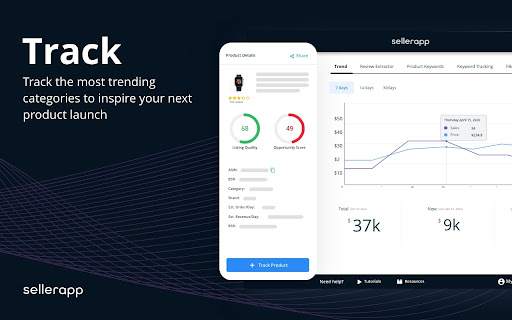
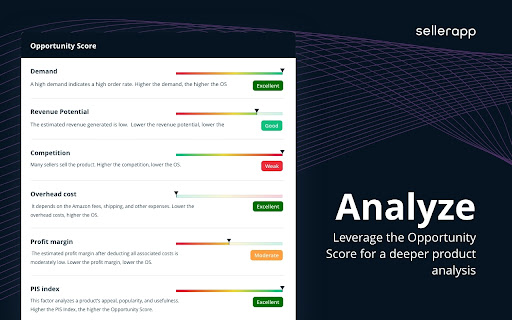
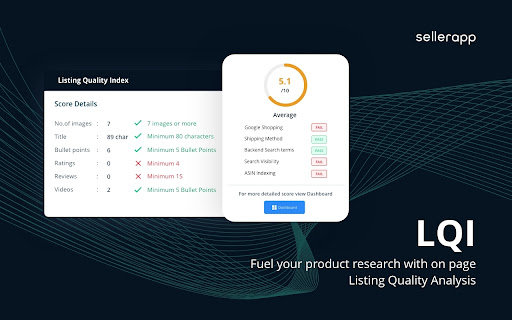
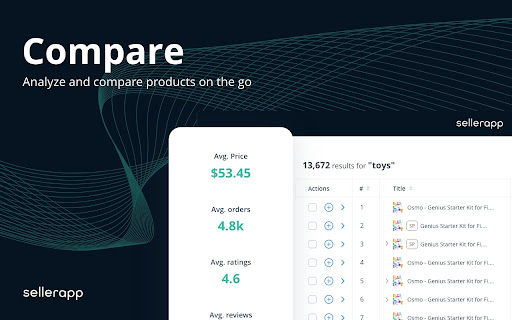
SellerApp’s Chrome extension to Research and compare products on the go for Amazon Sellers The SellerApp Chrome Extension is a valuable tool for Amazon sellers who want to research and compare products on the go. By analyzing products and keywords on Amazon pages, this extension provides detailed insights and allows sellers to make data-driven decisions about their products. With the free Amazon Seller Chrome Extension, you can track competitors' products, calculate profitability, improve your listing quality, conduct in-depth product analysis, perform keyword research, and much more. Here are the features offered by the SellerApp Chrome Extension: Take advantage of the best Chrome extension for Amazon sellers, streamline your product research, optimize your listings, and ultimately increase your sales and profitability on Amazon. Product Analyzer The Product Analyzer page shows you different metrics for products in the Amazon search results. Here’s how it works. Search for a product on the Amazon search bar. Open the SellerApp Chrome Extension, and click on “Product Analyzer.” You’ll immediately get all the essential insights into the products in the SERP, such as: ASIN Product Name Parent ASIN Brand Category BSR Price Listing Price Ratings No. of Rating Reviews Opportunity Score Listing Health Images Buybox Est. Daily Orders Est. Daily Revenue Est. Monthly Orders You also get Average Prices, Average Orders, Average Ratings, and the Market OS(Market Opportunity Score) for the products. Product Intelligence Product Intelligence gives you in-depth insights into multiple key parameters about individual products. On the left side, you get some basic product details, including Opportunity score, BSR, Product Category, Brand, Estimated orders/day, and Estimated revenue/day. On the right side, you get multiple options to measure the product’s performance: Trends Product Trends shows you the trend on multiple metrics such as Offers, Price, Rank, Revenue, and Orders and helps you understand year-round demand for the product. Product Keywords The Product Keywords section shows all the keywords associated with the product. You can also access the Relevance Score, Search Volume, and CPC for each keyword. Keyword Tracking The keyword tracking tab in the SellerApp Chrome Extension shows you all the keywords you track for a particular product. And, for each keyword, it shows the following metrics: Number of Indexed products: This shows how many products are indexed for the specific product Page rank: On which page on Amazon SERP the product ranks Current position: What’s the current position of the product Profit Calculator The Profit Calculator on SellerApp Chrome extension is a fast and easy way to determine whether a product is profitable. It’s available for both FBA and FBM. Just enter different costs, like Sales Price, Cost of goods sold, FBA cost, Shipping cost, and other costs, and the tool will give you the approximate Net Profit, Net Margin, and ROI of the product. Listing Quality Next, you get the Listing Quality feature. It analyzes the product listing you’re currently looking at and gives a weighted score based primarily on two factors: Discoverability: It shows how easily your product will be found on Amazon. Desirability: It is calculated based on different metrics that influence the product's conversion rate. The SellerApp free Amazon seller extension shows you a detailed score breakdown for each of these two categories to ensure your product listing will stand above the rest. Review Extractor Lastly, you get Review Extractor. This helps you scan through the reviews in the product listing to identify improvement opportunities. You can also download the reviews for further analysis. How to Install & Log In to SellerApp Chrome Extension? Installing and using the SellerApp Chrome Extension is a fairly easy process that hardly takes minutes. First, go to https://dashboard.sellerapp.com/register, and create an account. Once logged in, install the free SellerApp Chrome extension from Google Web Store. After that, pin the SellerApp Chrome Extension on the top right corner of your browser. Now, all you have to do is Open Amazon → search for a product → click on the extension, then sign in using your SellerApp credentials, and you are good to go. Using the SellerApp Chrome Extension, you can gain a significant advantage over your competitors by making informed decisions about your products. With features like Product Keywords, Keyword Tracking, Profit Calculator, and Listing Quality, you can streamline your product research, optimize your listings, and ultimately increase your sales and profitability on Amazon. So, if you're an Amazon seller looking to take your business to the next level, download the SellerApp Chrome Extension for free today!

Amazon Quick View by AMZScout
See Margin, BSR, ASIN, Size, etc. on an Amazon search page! All crucial data available right as you search for or browse products. With Quick View Extension by AMZScout, you can easily compare the products right on the Amazon pages. You now can choose the best item to sell with all the data right in front of you. There is no need to pull up extensions anymore. Simply type in a niche and enjoy viewing the full information. Quick View will show you: + BSR and its history + Price history + The best Keywords + Which sellers sell the product - FBA (and their number) - FBM (and their number) - Amazon itself sells it - Amazon Warehouse deals + The product’s FBA fees + The date it became available + Profit margin + Listing quality + ASIN + Size + Weight

Amazon KW Index and Rank Tracker
Free Amazon keyword ranking & indexation check tool by AMZDataStudio - The most accurate Amazon seller tool for keyword research. Instantly track your Amazon Keyword Ranking, Indexing Status, and Page Positions for FREE in just seconds! AMZDataStudio’s Chrome Extension is the ultimate Amazon keyword tool designed to help sellers optimize their listings, track keyword performance, and improve organic rankings. With this Amazon keyword checker, you can: - Instantly see the current ranking position of any keyword for any ASIN - Verify whether your product is indexed for specific keywords on Amazon - Get accurate monthly search volume for keywords across multiple marketplaces - Discover high-traffic keywords to improve your Amazon SEO strategy - Monitor competitor keyword rankings and uncover new keyword opportunities 1. Choose your product’s Amazon marketplace 2. Enter the ASIN and keyword phrases you want to check 3. Click to start tracking and get instant results Why use AMZDataStudio’s Keyword Tool? - Most powerful features are completely FREE to use - Optional paid upgrade available for advanced features - Fast and accurate keyword ranking checks - Helps sellers boost visibility, traffic, and sales - Perfect for Amazon FBA and FBM sellers who want better keyword insights Take control of your Amazon keyword strategy today. Find the best keywords, improve your product listings, and grow your sales — all with AMZDataStudio’s free Chrome Extension.

Amazon Keyword Tool for free : SellerApp
Generate tons of Amazon suggest keywords in ONE click for free! Amazon keyword tool trusted by Power Amazon sellers worldwide. Find tons of Amazon long-tail keywords for your products with ONE click for free! Whether you're in the product research phase or trying to improve your listing to boost visibility and rank higher, the Amazon keyword research tool helps you uncover the most profitable and relevant long-tail keywords that help you rank better and improves conversions. The Amazon Keyword tool pulls thousands of keywords from Amazon search auto-suggests from your chosen marketplace. Currently, you can select the following marketplaces: 1. USA 2. India 3. Chain 4. Japan 5. France 6. Germany 7. Italy 8. Netherlands 9. Spain 10. UK 11. Canada 12. Mexico 13. Australia 14. Brazil Plus, you can select the modifiers [a-z] or [1-9] to get more long-tail keywords from the seed keywords. With these keywords, you can optimize your product listings, add keywords to the backend, or run ads on them to generate sales. 1. Is SellerApp keyword research extension free? The SellerApp Amazon keyword research tool is absolutely free. Just install and start using it. 2. How to use SellerApp's free Amazon keyword research tool? Enter the seed keyword in the search box, select the marketplace and the modifiers, and wait for the tool to fetch all the keywords from Amazon. The best part is you can extract all the keywords and analyze them further. 3. What is seed and rank in the SellerApp Amazon keyword research tool? Seed: Once you enter the main keyword and select either [a-z] or [1-9] modifiers, the tool will combine your provided keyword with each letter of the alphabet or number from 1 to 9, respectively, and create a list of seed keyword variations for your main keyword. For example, if you provide the keyword "water bottle" and select [a-z] modifiers, the tool will show you results for "water bottle a, " "water bottle b," "water bottle c," and so on, up to "water bottle z." These are all seed keywords and can be a useful way to discover long-tail keywords for your product. Rank: Rank refers to the keyword position in the auto search suggestion when a shopper search with the seed on Amazon. These keywords appear in a drop-down menu as you start typing in the search bar. 4. Where does the Keyword Research tool extract these keywords from? All these keywords are fetched in real-time from the Amazon auto search suggestions. So rest assured, you get the most recent keyword data from our tool.

Amazon Index Checker
Free keyword ranking & index check tool by SellerApp - The most accurate seller tool for all amazon market places. Don’t have the time to track the right keywords for your listings? We don’t blame you. We understand that your time is valuable to you. Heck, that’s why we've got you the Keyword Rank Tracker. Amazon SEO takes time. Tracking keywords manually takes time. Marketing takes time. It’s not much freedom if you’re spending all of your time in front of a computer instead you could be spending doing what you love — spending your time your way. The combined Index Checker and Keyword Rank Tracker is built with focus on ease of use and effectivity. Save your time, benefit from the indexing information, page ranking, and the keyword position all on one screen. Helps you accurately identify the keyword ranks for you to know the position of your product listing for the most important keywords - Check your current Amazon keyword ranking, indexing information, Page Rank and positions - Helps you check ranking on all marketplaces - US, EU, UK, CN, JP, FR, DE, IT, NL, CA, MX, BR, AU - Helps monitor the effectiveness of your marketing efforts with changes in your PPC campaigns, keywords in your listings - Manually refresh your real time keyword ranking results - Export your daily keyword indexing, ranking and other ranking information to a Google spreadsheet for custom analysis and backup Keyword research, on-page and off-page optimization are just small parts of the SEO puzzle. It is more critical to control how your listing is performing in search. It's really important to understand what is going on your listing, and to track your most important product keywords to be alerted whenever something is going wrong -to know if you're losing rankings for a certain keyword or a pool of keywords. If you're not ranking for your most important keywords anymore, you could lose a lot of money in sales. The listing keyword search ranks keep constantly changing and you should stay vigilant against your keyword performance. Rank tracking also helps you find out how your competitors are ranking in search and find the best ways to outrank them. Make sure you keep an eye on the competition with the ranking tracker. Q1. How to check keyword ranking on amazon? Enter all the your most important keywords in the keyword tracker and click on ‘Analyze’. The Extension crawls through the Amazon listing pages to analyze your listing position in the search results. Q2. How to index keywords on Amazon? Keywords on Amazon are indexed based on the sales made by the listing for the keyword. Amazon considers the product making the most sales as the most relevant one and places it on the top of the search results for the keyword. Q3. How to enter keywords in listing? The keywords can be entered in different parts of the listing including the title, bullet points, the product description and the backend keywords. Amazon’s search engine picks up the keywords from your listing under all these portions to index it for your product listing.
