
pggamokfileohlopdonjmelbbghhnlah


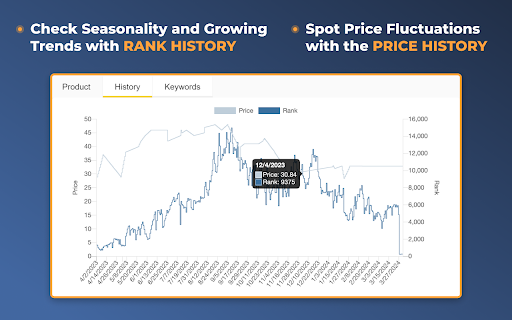

See Margin, BSR, ASIN, Size, etc. on an Amazon search page! All crucial data available right as you search for or browse products. With Quick View Extension by AMZScout, you can easily compare the products right on the Amazon pages. You now can choose the best item to sell with all the data right in front of you. There is no need to pull up extensions anymore. Simply type in a niche and enjoy viewing the full information. Quick View will show you: + BSR and its history + Price history + The best Keywords + Which sellers sell the product - FBA (and their number) - FBM (and their number) - Amazon itself sells it - Amazon Warehouse deals + The product’s FBA fees + The date it became available + Profit margin + Listing quality + ASIN + Size + Weight

sellerboard Amazon FBA Profit Calculator
sellerboard FBA Profit Calculator helps Amazon sellers research and source new products for selling on Amazon. The plugin displays estimates of Amazon fees (e.g., FBA fee, referral fee, storage fee) directly on the Amazon product detail page. Additionally, the sellerboard FBA Profit Calculator estimates daily and monthly sales of a product and calculates the potential profit per day and month. Just enter the buying price, and the tool will automatically do the rest. You can edit all calculation parameters manually (e.g., edit the selling price, product dimensions for FBA fee estimation, etc.). The sellerboard FBA Profit Calculator takes into account the following parameters: - The selling price of the product - All Amazon fees (incl. FBA fee, Referral fee, and Monthly Storage fee). - Cost of returns based on an editable return rate (e.g. 2%) - Estimated daily and monthly sales - Estimated profit and margin The sales are estimated based on the Best Seller Rank of the product (BSR). Be aware that actual sales and profit may be different. The sellerboard FBA Profit Calculator plugin is completely free! Supported marketplaces: Canada, UK, US, Germany, France, Italy and Spain If you have any questions, ideas, or feedback, please contact us: support@sellerboard.com. This extension is presented by sellerboard.com, the world's most accurate and most user-friendly profit analytics tool for Amazon sellers. Check out our demo and get a free trial: sellerboard.com

FBA calculator for Amazon Sellers : SellerApp
Is FBA the better choice for a product or FBM? Analyze profits with a single click . A trusted choice by 6-figure Amazon sellers. Researching and calculating the cost of goods sold, shipping fees, Amazon fees, and other expenses is crucial for your business. Understanding your true profit margins per unit ensures you make informed decisions, maximize profits, and scale your business successfully. A. Why use the SellerApp Amazon FBA Calculator? - The free Amazon FBA calculator provides multiple benefits for Amazon sellers, including: 1. Estimating all expenses upfront, including Amazon FBA fees, shipping charges, and seller fees. 2. Choosing products with lower fees to maximize profit margins. 3. Determining exactly how much you'll earn per sale, including total revenue and net profit. 4. Evaluating whether a product is worth selling by comparing expected revenue and costs. 5. Deciding between FBA and FBM based on estimated fees and profitability. Additionally, the FBA calculator extension gives you quick insights into: 1. Net profit 2. Net margin 3. Return on investment (ROI) B. How to use the SellerApp FBA Calculator? - If you're wondering how to use the FBA revenue calculator Amazon, follow these simple steps: 1. Install the SellerApp Amazon FBA Fee Calculator. 2. Visit Amazon.com and open the product listing you're interested in. 3. Launch the SellerApp FBA calculator for Amazon sellers. 4. Enter key cost factors, such as Cost of Goods Sold (COGS), shipping fees, fulfillment fees, and storage fees. The calculator will instantly generate your net profit, margin, and ROI, helping you make data-driven decisions. A. Is the FBA calculator free? - Yes! The SellerApp Amazon FBA calculator is 100% free to use. Just click the "Install" button to get started. B. Is the Amazon revenue calculator accurate? - The SellerApp FBA revenue calculator uses real-time data to provide highly accurate estimates. However, actual costs may vary due to Amazon’s dynamic pricing and fee structures. C. Is there any hidden cost for the Amazon seller fees calculator? - Absolutely not! The Amazon FBA fee calculator is completely free. D. How do I calculate the profit margin on Amazon FBA? - To calculate your profit margin, subtract all costs (COGS, fulfillment fees, and other expenses) from your total sales, then divide by the total sales price. Amazon determines FBA fees based on three key factors: product weight, size (dimensions), and category. You can learn more about the Amazon FBA price calculator and fee breakdown in our blog. Don't miss out on maximizing your profits! Use the SellerApp FBA Calculator today. For any questions, contact us at support@sellerapp.com.

AMZScout Stock Stats - Amazon Stock Level Spy
Spy on competitors' inventory, see real stock and sales for free! AMZScout Stock Stats is a FREE tool that allows you to view the inventory levels of a product from all Amazon sellers right on the product page.

Online Seller Addon
Free stock counter for Amazon sellers with unlimited daily product checks. This extension will show the inventory counts for the… Free stock counter for Amazon sellers with unlimited daily product checks. This extension will show the inventory counts for the different offers on an Amazon listing. You do not need to create an account or signup for anything. You can add the extension and start using it immediately. Works for all Amazon domains. Important Notice: Chrome will soon disable this extension. It uses an older version of Manifest that Chrome no longer supports; please consider migrating to Firefox to continue using it: https://addons.mozilla.org/en-US/firefox/addon/online-seller-addon/ How to use the Amazon stock checker: Add the extension to your browser (click the Add to Chrome button in the top right and confirm) Visit a product detail page on Amazon.com, and click the "Count Stock!" button or click the OS Addon icon in the top right of your browser. OS Addon does not collect or store data outside your local extension. Premium features may be added in the future, but the stock counter is completely free to use. Permissions: It can read and change data on all: - www.amazon.com, smile.amazon.com (and all the regional amazon tld domains) - allows the extension to appear and show quantity data on amazon websites - sellercentral.amazon.com (and all the regional amazon tld domains) - allows the extension to use amazon revenue calculator Disclaimer: The extension uses Google Analytics to collect extension usage statistics to help improve user experience. If you want to opt-out of Google Analytics tracking, please visit http://tools.google.com/dlpage/gaoptout
