
dehlblnjjkkbapjemjbeafjhjpjoifii
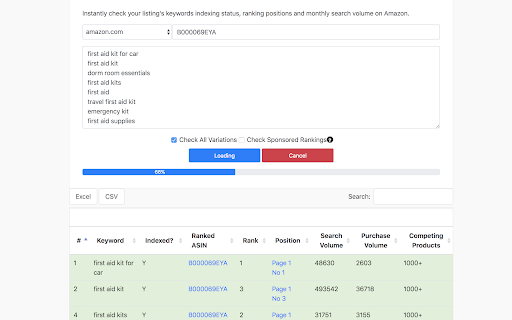
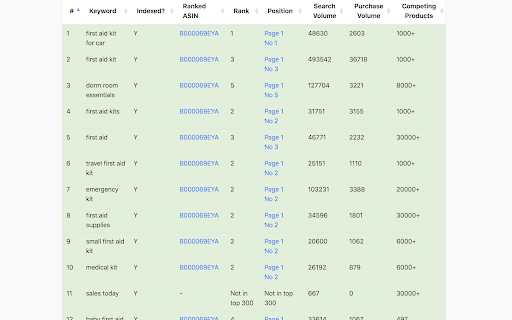
Free Amazon keyword ranking & indexation check tool by AMZDataStudio - The most accurate Amazon seller tool for keyword research. Instantly track your Amazon Keyword Ranking, Indexing Status, and Page Positions for FREE in just seconds! AMZDataStudio’s Chrome Extension is the ultimate Amazon keyword tool designed to help sellers optimize their listings, track keyword performance, and improve organic rankings. With this Amazon keyword checker, you can: - Instantly see the current ranking position of any keyword for any ASIN - Verify whether your product is indexed for specific keywords on Amazon - Get accurate monthly search volume for keywords across multiple marketplaces - Discover high-traffic keywords to improve your Amazon SEO strategy - Monitor competitor keyword rankings and uncover new keyword opportunities 1. Choose your product’s Amazon marketplace 2. Enter the ASIN and keyword phrases you want to check 3. Click to start tracking and get instant results Why use AMZDataStudio’s Keyword Tool? - Most powerful features are completely FREE to use - Optional paid upgrade available for advanced features - Fast and accurate keyword ranking checks - Helps sellers boost visibility, traffic, and sales - Perfect for Amazon FBA and FBM sellers who want better keyword insights Take control of your Amazon keyword strategy today. Find the best keywords, improve your product listings, and grow your sales — all with AMZDataStudio’s free Chrome Extension.

easyamz
致力于亚马逊数据可视化,智能化而奋力前行.本产品支持亚马逊产品可视化收藏并自动更新,收藏产品任意分组.内置Chatgpt产品评论,QA智能分析,listing优化建议. 产品数据一键下载等. 插件目前支持,亚马逊主流站点产品评论分析, 评论分析包括: 差评分析(痛点分析) 使用人群分析, 使用场景分析, 整体分析. 产品可视化收藏夹功能: 支持亚马逊主流站点产品的可视化收藏, 插件内部自动每日定时更新已收藏的asin 并记录历史数据. 数据下载功能: 榜单top100 数据下载, 关键词搜索结果下载, 细分类目页数据下载, 店铺产品数据下载. 支持,一键拷贝所选产品的所有变体ASIN , 一键拷贝所选产品的标题,以及五点描述. 4.3.2 1,新增了产品列表页 星级和产品评论显示。 2,新增了收藏数据的本地备份和还原。 4.3.4 新增了收藏的产品的自定义标记 新增了展示的产品的可视化统计视图。 4.3.5 修复4.3.4抓取卖家信息的错误,以及优化了部分代码。 4.3.6 增加潜在的品牌词检测 修复一些已值的错误 4.3.7 增加sk api支持 修复一些已值的错误 4.3.9 修复一些已值的错误

Sif — 亚马逊Listing和广告优化
Sif对亚马逊站内流量实现无死角全覆盖,精准查询每个产品的自然搜索、PPC广告、Deal(活动)、搜索推荐和关联流量,并锁定每个产品的主要流量词和精准长尾词,帮助卖家洞察不同竞品、不同变体的流量来源,据此优化自己的Listing和调整竞争策略 Sif(www.sif.com)是针对亚马逊平台的专业Listing和广告优化工具,对亚马逊站内流量实现无死角精细化覆盖,包括: 1. 自然流量 2. PPC广告流量(包含Sponsored Product广告、Sponsored Brand广告、Sponsored Video广告) 3. 搜索推荐流量(Amazon Choice、Editorial Recommendation、Top Rated等) 4. Deal流量(限时优惠、秒杀、优惠券等) 帮助卖家: 1. 了解自己产品及竞品的流量结构 2. 找出Listing下最畅销的变体 3. 反查对手的广告词、出单词、长尾词 4. 通过优质竞品扩充精准关键词库 5. 了解每一个关键词不同曝光位置的竞争程度 6. 以最快1小时1次的频率监控搜索坑位排名 插件版目前提供以下功能: 1. 详情页 1. 查询当前产品的主要流量词及流量分布 2. 对比该Listing下各个变体的流量分布 2. 搜索页 1. 展示每个搜索结果产品在目标关键词下的自然和SP广告排名趋势 2. 展示每个搜索结果产品在目标关键词的不同曝光位置的流量份额

Amazon Product Finder - AMZScout PRO Extension
Find a profitable product and start selling on Amazon quickly! Amazon product research made easy! See sales estimates and FBA fees. How to check sales data for any product: 1. Install the AMZScout PRO Chrome Extension. Begin your FREE trial by entering your details with a quick sign-up. 2. Access Amazon and search for any items you want to analyze. 3. Open the extension. 4. Review the product and niche information. You can review sales history for both the product and the niche, as well as estimated net margin, sales, and revenue. You can also use a built-in FBA calculator to help you identify profitable products, and much more! What can you use the AMZScout PRO Extension for? • Evaluate niche potential • Check niche and product trends • Calculate potential product profitability • Check product and niche sales, price, and rank history • Evaluate competition in the niche • Estimate FBA costs • Find reliable suppliers • Monitor your competitors' sales, pricing, and keywords ✅ More than 300,000 users already trust AMZScout’s product analysis tools, keyword search, and much more. AMZScout PRO is simple to use and navigate. Here are some hacks for anyone who’s interested in become a seller: [Quickly assess the potential of your niche and product] AMZScout Product Finder provides a niche score rating and a product score for both the private label and reselling business models. With this tool, you can immediately determine if the product is worth considering without having to look deeper into detailed product analytics. [Find the best supplier] Find things to sell on Amazon, or any other marketplaces, to scale your business. Save time by filtering suppliers according to country and price range. [Improve your ranking] Export niche and product keywords to improve product listings and use them in your PPC campaigns. Help your listing rank higher in organic searches and get more sales. This smart product research tool is often considered to be the most accurate tool by sellers. It helps you find unsaturated opportunities, get sourcing options, monitor your competitors, and even improve your keyword research. Base your product choice on concrete data to protect your investment. Find a product to launch with FBA that will bring you $5,000/month or more! The AMZScout Chrome Extension works in the United States in addition to these other Amazon marketplaces: the UK, Germany, France, Italy, Spain, Canada, Mexico, India, Japan, UAE, Saudi Arabia, Australia, and Brazil. You can research 15 niches for free with the trial version. No credit card information is required. Download the PRO Extension and give this fantastic software a try! Q: How are the estimated values calculated? A: These values are calculated using formula-based, top-level categories (for example, Home & Garden or Books) and rank in one of these categories. Q: What does the “LQS” column mean? A: “LQS” is Listing Quality Score. AMZScout analyzes a variety of product description criteria and computes a score for it. A higher score indicates a higher position in the search results. To see details, place your cursor on any LQS value. Q: What does the “RPR” column mean? A: “RPR” means Revenue Per Review. A higher RPR means a better selling opportunity. Q: Can I also get help with how to start selling on Amazon? A: Of course, the AMZScout team publishes useful articles and videos every month that you can find on our blog. You can also participate in an AMZScout Seller's Course and free webinars. Q: If I have any other questions or problems with AMZScout, where can I get support? A: The fastest way to get support is by emailing your question to support@amzscout.net.

Amazon Index Checker
Free keyword ranking & index check tool by SellerApp - The most accurate seller tool for all amazon market places. Don’t have the time to track the right keywords for your listings? We don’t blame you. We understand that your time is valuable to you. Heck, that’s why we've got you the Keyword Rank Tracker. Amazon SEO takes time. Tracking keywords manually takes time. Marketing takes time. It’s not much freedom if you’re spending all of your time in front of a computer instead you could be spending doing what you love — spending your time your way. The combined Index Checker and Keyword Rank Tracker is built with focus on ease of use and effectivity. Save your time, benefit from the indexing information, page ranking, and the keyword position all on one screen. Helps you accurately identify the keyword ranks for you to know the position of your product listing for the most important keywords - Check your current Amazon keyword ranking, indexing information, Page Rank and positions - Helps you check ranking on all marketplaces - US, EU, UK, CN, JP, FR, DE, IT, NL, CA, MX, BR, AU - Helps monitor the effectiveness of your marketing efforts with changes in your PPC campaigns, keywords in your listings - Manually refresh your real time keyword ranking results - Export your daily keyword indexing, ranking and other ranking information to a Google spreadsheet for custom analysis and backup Keyword research, on-page and off-page optimization are just small parts of the SEO puzzle. It is more critical to control how your listing is performing in search. It's really important to understand what is going on your listing, and to track your most important product keywords to be alerted whenever something is going wrong -to know if you're losing rankings for a certain keyword or a pool of keywords. If you're not ranking for your most important keywords anymore, you could lose a lot of money in sales. The listing keyword search ranks keep constantly changing and you should stay vigilant against your keyword performance. Rank tracking also helps you find out how your competitors are ranking in search and find the best ways to outrank them. Make sure you keep an eye on the competition with the ranking tracker. Q1. How to check keyword ranking on amazon? Enter all the your most important keywords in the keyword tracker and click on ‘Analyze’. The Extension crawls through the Amazon listing pages to analyze your listing position in the search results. Q2. How to index keywords on Amazon? Keywords on Amazon are indexed based on the sales made by the listing for the keyword. Amazon considers the product making the most sales as the most relevant one and places it on the top of the search results for the keyword. Q3. How to enter keywords in listing? The keywords can be entered in different parts of the listing including the title, bullet points, the product description and the backend keywords. Amazon’s search engine picks up the keywords from your listing under all these portions to index it for your product listing.
