
khapobkkeheiefaoefgfkamiddljmcga

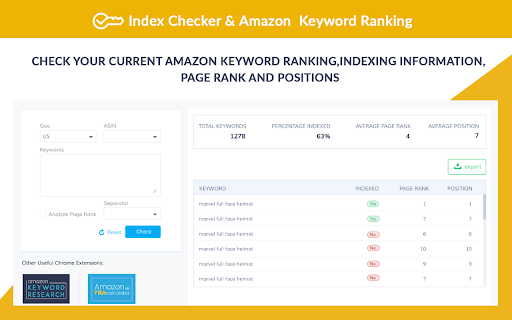
Free keyword ranking & index check tool by SellerApp - The most accurate seller tool for all amazon market places. Don’t have the time to track the right keywords for your listings? We don’t blame you. We understand that your time is valuable to you. Heck, that’s why we've got you the Keyword Rank Tracker. Amazon SEO takes time. Tracking keywords manually takes time. Marketing takes time. It’s not much freedom if you’re spending all of your time in front of a computer instead you could be spending doing what you love — spending your time your way. The combined Index Checker and Keyword Rank Tracker is built with focus on ease of use and effectivity. Save your time, benefit from the indexing information, page ranking, and the keyword position all on one screen. Helps you accurately identify the keyword ranks for you to know the position of your product listing for the most important keywords - Check your current Amazon keyword ranking, indexing information, Page Rank and positions - Helps you check ranking on all marketplaces - US, EU, UK, CN, JP, FR, DE, IT, NL, CA, MX, BR, AU - Helps monitor the effectiveness of your marketing efforts with changes in your PPC campaigns, keywords in your listings - Manually refresh your real time keyword ranking results - Export your daily keyword indexing, ranking and other ranking information to a Google spreadsheet for custom analysis and backup Keyword research, on-page and off-page optimization are just small parts of the SEO puzzle. It is more critical to control how your listing is performing in search. It's really important to understand what is going on your listing, and to track your most important product keywords to be alerted whenever something is going wrong -to know if you're losing rankings for a certain keyword or a pool of keywords. If you're not ranking for your most important keywords anymore, you could lose a lot of money in sales. The listing keyword search ranks keep constantly changing and you should stay vigilant against your keyword performance. Rank tracking also helps you find out how your competitors are ranking in search and find the best ways to outrank them. Make sure you keep an eye on the competition with the ranking tracker. Q1. How to check keyword ranking on amazon? Enter all the your most important keywords in the keyword tracker and click on ‘Analyze’. The Extension crawls through the Amazon listing pages to analyze your listing position in the search results. Q2. How to index keywords on Amazon? Keywords on Amazon are indexed based on the sales made by the listing for the keyword. Amazon considers the product making the most sales as the most relevant one and places it on the top of the search results for the keyword. Q3. How to enter keywords in listing? The keywords can be entered in different parts of the listing including the title, bullet points, the product description and the backend keywords. Amazon’s search engine picks up the keywords from your listing under all these portions to index it for your product listing.

SellerSprite - Amazon Research Tool
Join over a million sellers using SellerSprite to research, analyze, and optimize smarter — directly from your browser. Built on powerful data and AI, SellerSprite's Chrome Extension mirrors 80% of the full web app’s functionality. From product research to keyword analysis and competitor tracking, streamline your Amazon FBA business with real-time insights —all without leaving the Amazon page. In a single view, you can instantly spot high-potential products, analyze top competitors, uncover hidden keywords, and filter by sales, ratings, BSR, and more — without ever switching tabs. Key Features 📊 Deep Market Insights - Analyze subcategories with 16+ data points: demand, competition, supply/demand ratio to instantly spot high-potential niches and blue-ocean markets - Access granular BSR analytics with Top 400 rankings—track performance by parent and child ASINs, analyze variant-level sales distribution, and identify underexploited long-tail demand with precision - Customize your own product lists to batch-research trends, volume, and seasonality 🔑 Smart Keyword Tools - Discover high-converting long-tail keywords and build optimized listings - Track organic & sponsored keyword rankings in realtime - Reverse-search competitor ASINs to uncover hidden keyword strategies 🎯 Competitor Intelligence - Track BSR and sales across global sites - Detect brand infringement risks and benchmark strategies - Analyze reviews with AI and generate optimization suggestions ⚙️ Bulk Efficiency Tools - Download images, reviews, and selling points in one click - Collect ASINs and invite reviews in batches - Save hours with automation and smart scraping 💡 Why Sellers Choose SellerSprite - Feature-rich extension with 80% of full functionality — built into your browser - Real-time insights directly on Amazon pages - Trusted by over 1,400,000 Amazon sellers worldwide - Works with all major Amazon marketplaces ✅ Free to install — start exploring today! 1. Install the Extension • Download the SellerSprite Chrome Extension from the Chrome Web Store. 2. Create a Free Account • Sign up or log in. • New users get a 3 day-free trial of premium services. 3. Start Researching • Visit any Amazon product page to activate the extension. • Uncover competitor strategies, analyze product performance, and explore market trends. • Access in-depth historical data on pricing, sales, and keyword rankings to make informed decisions.

Amazon Keyword Tool for free : SellerApp
Generate tons of Amazon suggest keywords in ONE click for free! Amazon keyword tool trusted by Power Amazon sellers worldwide. Find tons of Amazon long-tail keywords for your products with ONE click for free! Whether you're in the product research phase or trying to improve your listing to boost visibility and rank higher, the Amazon keyword research tool helps you uncover the most profitable and relevant long-tail keywords that help you rank better and improves conversions. The Amazon Keyword tool pulls thousands of keywords from Amazon search auto-suggests from your chosen marketplace. Currently, you can select the following marketplaces: 1. USA 2. India 3. Chain 4. Japan 5. France 6. Germany 7. Italy 8. Netherlands 9. Spain 10. UK 11. Canada 12. Mexico 13. Australia 14. Brazil Plus, you can select the modifiers [a-z] or [1-9] to get more long-tail keywords from the seed keywords. With these keywords, you can optimize your product listings, add keywords to the backend, or run ads on them to generate sales. 1. Is SellerApp keyword research extension free? The SellerApp Amazon keyword research tool is absolutely free. Just install and start using it. 2. How to use SellerApp's free Amazon keyword research tool? Enter the seed keyword in the search box, select the marketplace and the modifiers, and wait for the tool to fetch all the keywords from Amazon. The best part is you can extract all the keywords and analyze them further. 3. What is seed and rank in the SellerApp Amazon keyword research tool? Seed: Once you enter the main keyword and select either [a-z] or [1-9] modifiers, the tool will combine your provided keyword with each letter of the alphabet or number from 1 to 9, respectively, and create a list of seed keyword variations for your main keyword. For example, if you provide the keyword "water bottle" and select [a-z] modifiers, the tool will show you results for "water bottle a, " "water bottle b," "water bottle c," and so on, up to "water bottle z." These are all seed keywords and can be a useful way to discover long-tail keywords for your product. Rank: Rank refers to the keyword position in the auto search suggestion when a shopper search with the seed on Amazon. These keywords appear in a drop-down menu as you start typing in the search bar. 4. Where does the Keyword Research tool extract these keywords from? All these keywords are fetched in real-time from the Amazon auto search suggestions. So rest assured, you get the most recent keyword data from our tool.

Amazon ASIN Keyword Rank & Index Checker
Amazon ASIN Keyword Rank & Index Checker enhances sellers and marketers tracking of product ranking and indexing. Amazon ASIN Keyword Rank & Index Checker enhances sellers and marketers'tracking of product ranking and indexing. Do you need help getting the product index in search results? Extfy Offers an ASIN-based keyword ranking and indexing checker tool. This free ASIN-based keyword ranking and indexing checker extension shows your product's current position when searching for relevant keywords and tracks its position changes over time. This extension also checks the sponsor product listing. If you select the sponsor list, it provides you with the relevant data. Use this extension to monitor the impact of your advertising campaigns and listing optimizations on your organic ranking and consistently improve it. This extension offers three convenient methods: Single ASIN, Multiple ASIN, and Batch File Upload: Single ASIN: Using a single ASIN feature, users can easily track a specific product's keyword ranking and indexing status by entering a single ASIN. Ideal for focused insights and optimizing individual listings. Multiple ASINs: Input multiple ASINs to monitor keyword rankings across several products simultaneously. Gain accurate insights to manage and optimize various listings efficiently. Batch File Upload: For bulk keyword tracking, upload a CSV file containing multiple ASINs. A sample CSV format is provided for convenience. These features allow you to check keyword rankings in bulk quickly. Export your ranking and indexing results to Excel or CSV for further analysis and reporting. If you're worried about whether your listed product is indexed and which keywords it ranks highest for, this extension is made for you. Select your marketplace location, input the product ASIN number, and enter your desired keywords for ranking insights. That's it! This extension will provide valuable data, including the percentage indexed, average page rank, average product rank, and average competing products. Higher search results will lead to increased sales through organic, unpaid traffic. As your products increase in the search rankings, you'll attract more and better potential customers, resulting in increased traffic and higher sales figures. Explore the features of our Chrome Extension: - Multi-Marketplace Support - Track Keyword Rankings - Check Multiple keywords - Index Checker - Real-Time Updates - Sponsored Product Listing Tracking - Effortless Listing Optimization - Export Results - User-Friendly Interface Don't wait! Experience the power of data-driven success today. Try it today and unlock the potential of data-driven success. Add this extension to Chrome to your PC now. Our support team is here to help if you have any questions. You can easily reach out to our developers for guidance or clarifications. Remember to explore our comprehensive help page section for additional resources and advice.

AMALYZE - for Amazon Sellers and Vendors
Searchvolume, related keywords, index checker and much more - for Amazon sellers and vendors Amazon Keyword Tool and Index Checker with analysis widgets for the SERP. The easy way to check your listing and the SERP and find new keywords. The AMALYZE Chrome Extension offers a range of tools for a variety of marketplaces, FBA Private Label Sellers and Vendors. Check whether the respective ASIN for the desired search terms and keywords can be found. Check with a single click for which parts of the title, description and bullet points the respective ASIN can be found. With the keyword AMALYZER you have the possibility to find new search terms in real time - actually used by the buyers. The widgets added with version 1.4 offer you data on a set of KPIs at the touch of a button! - How has the search volume changed in the course of the last days, months or last year? - What are the related search terms to my keyword? - What about the ratings and reviews of the products on the SERP? - What about the average price of the products? - And how many of them are available as Prime? Get all this data granularly displayed in comparison to organic ranked and spa products! In the search volume widget you will get the search volume in a graph to follow the changes historically. You can also adjust the time span of the graph by clicking on "30 days", "90 days", "1 year" or "Total" at the top. The related keywords widget shows you a set of keywords sorted by relevance. We get the keywords from the SERP via the organically ranking products, as well as keywords to which they rank. That way you will be shown a lot of potential keywords. You also have the possibility to click through the keywords to discover more ASINs, dates and keywords. The advantage of this is that you can also use the paper icon in the upper rightcorner to copy all the keywords to your clipboard. With the rating widget you can find out with how many stars the products on the SERP were rated. We get this data for the organic ranking products as well as for the sponsored products. In the review’s widget, you will see the number of reviews that the products on the SERP have received on average. As usual, a distinction is made here between organically ranking products and sponsored products. The price widget shows you in which price ranges the products on the SERP are being sold. Here again, we distinguish between organically ranking products and sponsored products. Finally, the Prime widget shows you the percentage of products available as Prime as well as “not” Prime on the SERP. Historical BSR trends and sales figures for most products Find out at a glance which is the top-selling variant and what share it has of total sales.
