
jbfijfdmeapilpakkljjmkfjlomhinnm

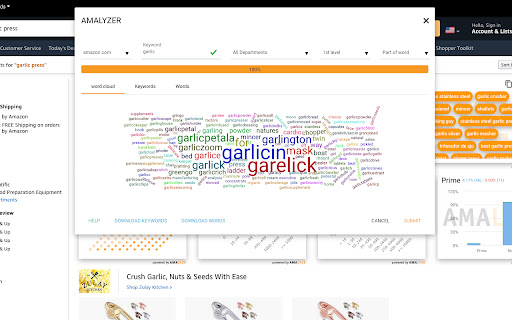

Searchvolume, related keywords, index checker and much more - for Amazon sellers and vendors Amazon Keyword Tool and Index Checker with analysis widgets for the SERP. The easy way to check your listing and the SERP and find new keywords. The AMALYZE Chrome Extension offers a range of tools for a variety of marketplaces, FBA Private Label Sellers and Vendors. Check whether the respective ASIN for the desired search terms and keywords can be found. Check with a single click for which parts of the title, description and bullet points the respective ASIN can be found. With the keyword AMALYZER you have the possibility to find new search terms in real time - actually used by the buyers. The widgets added with version 1.4 offer you data on a set of KPIs at the touch of a button! - How has the search volume changed in the course of the last days, months or last year? - What are the related search terms to my keyword? - What about the ratings and reviews of the products on the SERP? - What about the average price of the products? - And how many of them are available as Prime? Get all this data granularly displayed in comparison to organic ranked and spa products! In the search volume widget you will get the search volume in a graph to follow the changes historically. You can also adjust the time span of the graph by clicking on "30 days", "90 days", "1 year" or "Total" at the top. The related keywords widget shows you a set of keywords sorted by relevance. We get the keywords from the SERP via the organically ranking products, as well as keywords to which they rank. That way you will be shown a lot of potential keywords. You also have the possibility to click through the keywords to discover more ASINs, dates and keywords. The advantage of this is that you can also use the paper icon in the upper rightcorner to copy all the keywords to your clipboard. With the rating widget you can find out with how many stars the products on the SERP were rated. We get this data for the organic ranking products as well as for the sponsored products. In the review’s widget, you will see the number of reviews that the products on the SERP have received on average. As usual, a distinction is made here between organically ranking products and sponsored products. The price widget shows you in which price ranges the products on the SERP are being sold. Here again, we distinguish between organically ranking products and sponsored products. Finally, the Prime widget shows you the percentage of products available as Prime as well as “not” Prime on the SERP. Historical BSR trends and sales figures for most products Find out at a glance which is the top-selling variant and what share it has of total sales.

Titans Pro - Amazon KDP Keyword Research Tool
Titans Pro will make your Amazon keyword research and niche finding easy. With Titans pro, you get all Amazon search suggestions, estimated search volume for every keyword, the exact amount of search results (competitors), and we have created an algorithm to help you determine both demand and opportunity for every niche. Simply start typing in a keyword into the Amazon search bar and it will very quickly pull up huge amount of suggested keywords by Amazon. It is the ultimate amazon search suggestion expander and what makes it even better is that instead of writing them down one at a time, you can simply download them with a single click as an excel document and use it for your SEO research, or simply use them to create a keyword ad campaign with them and so many other great uses.

Book Report
Book Report is the best way for indie authors and publishers to track their sales data. Book Report automatically fetches your latest sales numbers and turns them into simple, insightful reports. We don't ask for your password, and your sales data is always fully encrypted, so you can have peace of mind that your data is safe.

Amazon Index Checker
Free keyword ranking & index check tool by SellerApp - The most accurate seller tool for all amazon market places. Don’t have the time to track the right keywords for your listings? We don’t blame you. We understand that your time is valuable to you. Heck, that’s why we've got you the Keyword Rank Tracker. Amazon SEO takes time. Tracking keywords manually takes time. Marketing takes time. It’s not much freedom if you’re spending all of your time in front of a computer instead you could be spending doing what you love — spending your time your way. The combined Index Checker and Keyword Rank Tracker is built with focus on ease of use and effectivity. Save your time, benefit from the indexing information, page ranking, and the keyword position all on one screen. Helps you accurately identify the keyword ranks for you to know the position of your product listing for the most important keywords - Check your current Amazon keyword ranking, indexing information, Page Rank and positions - Helps you check ranking on all marketplaces - US, EU, UK, CN, JP, FR, DE, IT, NL, CA, MX, BR, AU - Helps monitor the effectiveness of your marketing efforts with changes in your PPC campaigns, keywords in your listings - Manually refresh your real time keyword ranking results - Export your daily keyword indexing, ranking and other ranking information to a Google spreadsheet for custom analysis and backup Keyword research, on-page and off-page optimization are just small parts of the SEO puzzle. It is more critical to control how your listing is performing in search. It's really important to understand what is going on your listing, and to track your most important product keywords to be alerted whenever something is going wrong -to know if you're losing rankings for a certain keyword or a pool of keywords. If you're not ranking for your most important keywords anymore, you could lose a lot of money in sales. The listing keyword search ranks keep constantly changing and you should stay vigilant against your keyword performance. Rank tracking also helps you find out how your competitors are ranking in search and find the best ways to outrank them. Make sure you keep an eye on the competition with the ranking tracker. Q1. How to check keyword ranking on amazon? Enter all the your most important keywords in the keyword tracker and click on ‘Analyze’. The Extension crawls through the Amazon listing pages to analyze your listing position in the search results. Q2. How to index keywords on Amazon? Keywords on Amazon are indexed based on the sales made by the listing for the keyword. Amazon considers the product making the most sales as the most relevant one and places it on the top of the search results for the keyword. Q3. How to enter keywords in listing? The keywords can be entered in different parts of the listing including the title, bullet points, the product description and the backend keywords. Amazon’s search engine picks up the keywords from your listing under all these portions to index it for your product listing.

Productor for KDP
Productor for KDP (Kindle Direct Publishing) with Sales Overview, Trademark check, Sales Notifications and more... Productor for KDP (Kindle Direct Publishing) with Sales Overview, Trademark check, Sales Notifications and more...
