
njopapoodmifmcogpingplfphojnfeea


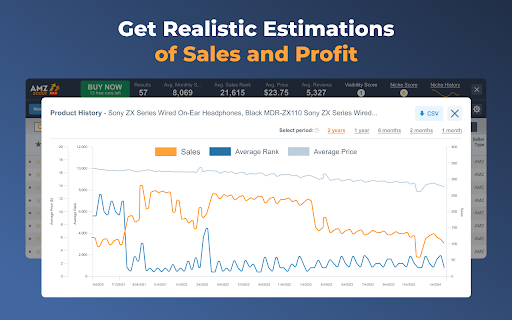

Find a profitable product and start selling on Amazon quickly! Amazon product research made easy! See sales estimates and FBA fees. How to check sales data for any product: 1. Install the AMZScout PRO Chrome Extension. Begin your FREE trial by entering your details with a quick sign-up. 2. Access Amazon and search for any items you want to analyze. 3. Open the extension. 4. Review the product and niche information. You can review sales history for both the product and the niche, as well as estimated net margin, sales, and revenue. You can also use a built-in FBA calculator to help you identify profitable products, and much more! What can you use the AMZScout PRO Extension for? • Evaluate niche potential • Check niche and product trends • Calculate potential product profitability • Check product and niche sales, price, and rank history • Evaluate competition in the niche • Estimate FBA costs • Find reliable suppliers • Monitor your competitors' sales, pricing, and keywords ✅ More than 300,000 users already trust AMZScout’s product analysis tools, keyword search, and much more. AMZScout PRO is simple to use and navigate. Here are some hacks for anyone who’s interested in become a seller: [Quickly assess the potential of your niche and product] AMZScout Product Finder provides a niche score rating and a product score for both the private label and reselling business models. With this tool, you can immediately determine if the product is worth considering without having to look deeper into detailed product analytics. [Find the best supplier] Find things to sell on Amazon, or any other marketplaces, to scale your business. Save time by filtering suppliers according to country and price range. [Improve your ranking] Export niche and product keywords to improve product listings and use them in your PPC campaigns. Help your listing rank higher in organic searches and get more sales. This smart product research tool is often considered to be the most accurate tool by sellers. It helps you find unsaturated opportunities, get sourcing options, monitor your competitors, and even improve your keyword research. Base your product choice on concrete data to protect your investment. Find a product to launch with FBA that will bring you $5,000/month or more! The AMZScout Chrome Extension works in the United States in addition to these other Amazon marketplaces: the UK, Germany, France, Italy, Spain, Canada, Mexico, India, Japan, UAE, Saudi Arabia, Australia, and Brazil. You can research 15 niches for free with the trial version. No credit card information is required. Download the PRO Extension and give this fantastic software a try! Q: How are the estimated values calculated? A: These values are calculated using formula-based, top-level categories (for example, Home & Garden or Books) and rank in one of these categories. Q: What does the “LQS” column mean? A: “LQS” is Listing Quality Score. AMZScout analyzes a variety of product description criteria and computes a score for it. A higher score indicates a higher position in the search results. To see details, place your cursor on any LQS value. Q: What does the “RPR” column mean? A: “RPR” means Revenue Per Review. A higher RPR means a better selling opportunity. Q: Can I also get help with how to start selling on Amazon? A: Of course, the AMZScout team publishes useful articles and videos every month that you can find on our blog. You can also participate in an AMZScout Seller's Course and free webinars. Q: If I have any other questions or problems with AMZScout, where can I get support? A: The fastest way to get support is by emailing your question to support@amzscout.net.

FBA calculator for Amazon Sellers : SellerApp
Is FBA the better choice for a product or FBM? Analyze profits with a single click . A trusted choice by 6-figure Amazon sellers. Researching and calculating the cost of goods sold, shipping fees, Amazon fees, and other expenses is crucial for your business. Understanding your true profit margins per unit ensures you make informed decisions, maximize profits, and scale your business successfully. A. Why use the SellerApp Amazon FBA Calculator? - The free Amazon FBA calculator provides multiple benefits for Amazon sellers, including: 1. Estimating all expenses upfront, including Amazon FBA fees, shipping charges, and seller fees. 2. Choosing products with lower fees to maximize profit margins. 3. Determining exactly how much you'll earn per sale, including total revenue and net profit. 4. Evaluating whether a product is worth selling by comparing expected revenue and costs. 5. Deciding between FBA and FBM based on estimated fees and profitability. Additionally, the FBA calculator extension gives you quick insights into: 1. Net profit 2. Net margin 3. Return on investment (ROI) B. How to use the SellerApp FBA Calculator? - If you're wondering how to use the FBA revenue calculator Amazon, follow these simple steps: 1. Install the SellerApp Amazon FBA Fee Calculator. 2. Visit Amazon.com and open the product listing you're interested in. 3. Launch the SellerApp FBA calculator for Amazon sellers. 4. Enter key cost factors, such as Cost of Goods Sold (COGS), shipping fees, fulfillment fees, and storage fees. The calculator will instantly generate your net profit, margin, and ROI, helping you make data-driven decisions. A. Is the FBA calculator free? - Yes! The SellerApp Amazon FBA calculator is 100% free to use. Just click the "Install" button to get started. B. Is the Amazon revenue calculator accurate? - The SellerApp FBA revenue calculator uses real-time data to provide highly accurate estimates. However, actual costs may vary due to Amazon’s dynamic pricing and fee structures. C. Is there any hidden cost for the Amazon seller fees calculator? - Absolutely not! The Amazon FBA fee calculator is completely free. D. How do I calculate the profit margin on Amazon FBA? - To calculate your profit margin, subtract all costs (COGS, fulfillment fees, and other expenses) from your total sales, then divide by the total sales price. Amazon determines FBA fees based on three key factors: product weight, size (dimensions), and category. You can learn more about the Amazon FBA price calculator and fee breakdown in our blog. Don't miss out on maximizing your profits! Use the SellerApp FBA Calculator today. For any questions, contact us at support@sellerapp.com.

Amazon Quick View by AMZScout
See Margin, BSR, ASIN, Size, etc. on an Amazon search page! All crucial data available right as you search for or browse products. With Quick View Extension by AMZScout, you can easily compare the products right on the Amazon pages. You now can choose the best item to sell with all the data right in front of you. There is no need to pull up extensions anymore. Simply type in a niche and enjoy viewing the full information. Quick View will show you: + BSR and its history + Price history + The best Keywords + Which sellers sell the product - FBA (and their number) - FBM (and their number) - Amazon itself sells it - Amazon Warehouse deals + The product’s FBA fees + The date it became available + Profit margin + Listing quality + ASIN + Size + Weight

sellerboard Amazon FBA Profit Calculator
sellerboard FBA Profit Calculator helps Amazon sellers research and source new products for selling on Amazon. The plugin displays estimates of Amazon fees (e.g., FBA fee, referral fee, storage fee) directly on the Amazon product detail page. Additionally, the sellerboard FBA Profit Calculator estimates daily and monthly sales of a product and calculates the potential profit per day and month. Just enter the buying price, and the tool will automatically do the rest. You can edit all calculation parameters manually (e.g., edit the selling price, product dimensions for FBA fee estimation, etc.). The sellerboard FBA Profit Calculator takes into account the following parameters: - The selling price of the product - All Amazon fees (incl. FBA fee, Referral fee, and Monthly Storage fee). - Cost of returns based on an editable return rate (e.g. 2%) - Estimated daily and monthly sales - Estimated profit and margin The sales are estimated based on the Best Seller Rank of the product (BSR). Be aware that actual sales and profit may be different. The sellerboard FBA Profit Calculator plugin is completely free! Supported marketplaces: Canada, UK, US, Germany, France, Italy and Spain If you have any questions, ideas, or feedback, please contact us: support@sellerboard.com. This extension is presented by sellerboard.com, the world's most accurate and most user-friendly profit analytics tool for Amazon sellers. Check out our demo and get a free trial: sellerboard.com

Amazon Keyword Tracker & Reverse Asin Lookup
Track keyword rankings to run cost-effective PPC with high-output keywords only. Move your product to the top of the Amazon search results! This extension shows you where your product stands when searching for a related keyword. It also shows how that position changes over time. With this tool, you can track the effects of your ad campaigns and listing optimization on your organic position, and continue raising it. Rising higher in the search results will bring sellers more sales with organic non-paid traffic. This means that eventually you can turn off the PPC and keep your sales volume the same, while saving tons of money on advertising! - Make sure an Amazon search engine picks up on all the keywords in your listing description, otherwise you will get less customers from organic traffic. Keyword Tracker also has an Index Checker feature that notifies you if an engine hasn’t indexed one of your keywords. - Locate the most popular competitor keywords using the Reverse ASIN Lookup feature. This feature shows you keyword rankings of an item by its ASIN. Become a stronger FBA seller and have your items listed on the first search page with the best Amazon Keyword Tool Chrome Extension! To try this tool free for 14 days, simply click the blue «Install» button in the top right corner. - Confirm that your listing is indexed for all your keywords - Monitor the keyword’s positions in the search results for you and your competitors’ listings - View keyword position changes over time in easy-to-understand graphs to instantly pick up on trends. Observe the data changes by hour, several hours or days - Stay ahead of the competition by analyzing PPC and listing influences on final rankings to improve your Amazon SEO This analytics extension is for fba and fbm sellers in major marketplaces! If you have any questions, let us know at support@amzscout.net.
