
lncinpfgcgmphkebnbfpogkgiaadphpi
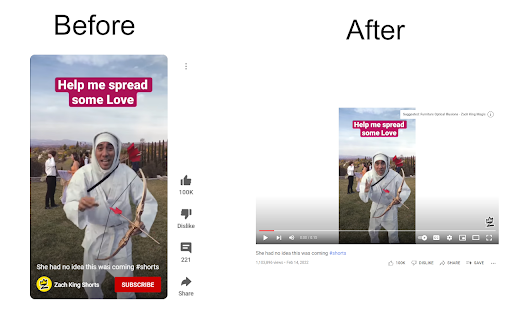
Redirects youtube shorts to the normal player This extension replaces the "/shorts/" from the url with "watch?v=" to play your shorts video on the normal player which is more user friendly on a computer.

No YouTube Shorts
Tired of the YouTube Shorts? No problem, this extension has your back and removes them from the YouTube page! New in version 0.6.6: - Adjustments for the new YouTube design

Clickbait Remover for Youtube
Replaces thumbnails and modifies titles of videos on youtube.com This extension replaces thumbnails with a frame from the video, effectively removing any clickbait while still showing a high quality thumbnail so you can still get a good idea of what the video is about. It can also modify titles to stop partial or all caps titles. It works everywhere on Youtube including the homepage, trending page, subscription page and channel pages. All functionality of the extension is customizable by clicking the extension icon on the top right, you can see the effect that different options have right away if you have a youtube tab open, no need to reload the page. And also on mobile. This extension might help people who have a Youtube addiction or anyone who just doesn't want to be distracted by flashy thumbnails and all caps titles while trying to find some quality content. Source code: https://github.com/pietervanheijningen/clickbait-remover-for-youtube Firefox version: https://addons.mozilla.org/firefox/addon/clickbait-remover-for-youtube

Shorts Deflector
Seamlessly play YouTube Shorts with the normal desktop interface Why does clicking on a YouTube Short on a desktop bring up the mobile-optimized interface? With no video scrubbing, harder to access comments, less accessible view count, and more, it makes no sense to use on a desktop. Shorts Deflector is an extension that allows you to seamlessly watch YouTube Shorts with the normal desktop interface. By using several techniques, this extension is super fast; you will barely notice the switch to the desktop viewer. Install now and try it out for yourself! Upon install, the "Read your browsing history" permission may seem alarming, but this permission is only used to detect page updates.

DeArrow - Better Titles and Thumbnails
Crowdsourcing titles and thumbnails to be descriptive and not sensational DeArrow is a browser extension for crowdsourcing better titles and thumbnails on YouTube. The goal of DeArrow is to make titles accurate and reduce sensationalism. DeArrow is a paid (if you want) browser extension. You can purchase an unlimited-use license key for 1$. However, if you cannot, or do not want to pay, you can use the extension by clicking the "I can't/don't want to pay" button. Titles can be any arbitrary text. Thumbnails are screenshots from specific timestamps in the video. These are user submitted and voted on. By default, if there are no submissions, it will format the original title to the user-specified format, and set a screenshot from a random timestamp as the thumbnail. This can be configured in the options to disable formatting, or show the original thumbnail by default. If the original thumbnail is actually good, you can still vote for it in the submission menu, and then it will act like a submission. No more dealing with clickbait, arrows, or annoying faces. Users can submit better titles and thumbnails for each video and vote on them. How does DeArrow differ from Clickbait Remover for YouTube - Unlike Clickbait Remover, DeArrow's main purpose is for crowdsourcing better titles and thumbnails - When a crowdsourced title is not available, DeArrow will auto-format it according to your setting, but does it in a more sophisticated way than Clickbait Remover. Instead of only setting all words to lower case, or capitalizing every word, DeArrow supports casing systems such as "Title Case" and "Sentence case". These will still allow acronyms and proper names to remain capitalized. - When a crowdsourced thumbnail is not available, DeArrow by default shows a screenshot at a random timestamp in the video. Clickbait Remover's thumbnails use YouTube auto-generated thumbnails, and while they are seemingly random, they are chosen by a machine learning algorithm to favor faces with expressions, and other overstimulating features. DeArrow uses truly random timestamps generated by its own server. DeArrow will also check the SponsorBlock database to ensure the randomized thumbnail is not inside of a sponsor segment. Access your data for youtube.com, www.youtube-nocookie.com: - Used to modify the YouTube webpage
