
hjfkenebldkfgibelglepinlabpjfbll
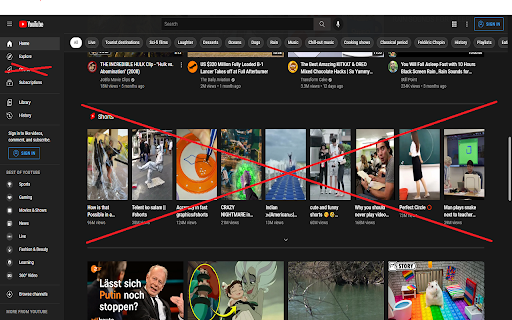
Tired of the YouTube Shorts? No problem, this extension has your back and removes them from the YouTube page! New in version 0.6.6: - Adjustments for the new YouTube design

Youtube shorts blocker
Hide YouTube Shorts is a powerful YouTube Shorts blocker that helps you block distracting short-form videos and stay focused while using YouTube. 🚀 If you want to remove Shorts, clean up your feed, and stop endless scrolling — this extension is built for you. • Remove Shorts from Home, Subscriptions, and Trending pages for a cleaner YouTube experience. 🧹 • Use a reliable blocker for YouTube Shorts to hide Shorts from Recommended videos, Search results, and Notifications. 🚫 • Disable the Shorts tab and block Shorts videos on Channel pages to avoid accidental clicks. 📺 • Convert Shorts into regular YouTube videos to eliminate the addictive vertical format. 🔄 This YouTube Shorts blocker is designed for productivity and attention control. By helping you block Shorts and reduce algorithm-driven distractions, it allows you to stay focused on long-form content and intentional viewing. ⚙️ Whether you want to fully remove Shorts or limit where they appear, this blocker for YouTube Shorts gives you flexible control over your YouTube interface and viewing habits. ✨ Perfect for users who want to: ■ stop YouTube Shorts ■ hide YouTube Shorts ■ block short videos ■ reduce distractions ■ improve focus and productivity

Remove YouTube Shorts
Removes YouTube Shorts and prevents you from wasting your precious time. # Remove Shorts - Removes Shorts from search results. - Eliminates Shorts from all viewing areas. - Now Available as Mobile app, "BlockScroll". - Works with Kiwi Browser for mobile browser use. - Helps reduce distractions, allowing for increased focus. This extension completely removes YouTube Shorts as if they never existed. You won't see any Shorts videos in your feed, search results, or recommendations. Browse YouTube without distractions from short-form videos. By removing Shorts, you can stay more focused and avoid frequent distractions that interrupt your concentration. This can help you maintain a better attention span and focus on longer tasks or content. Now available as a mobile app called BlockScroll. With Block Scroll, you can block Shorts, Reels, and more directly on your phone without affecting app functionality. Get BlockScroll here: 🔗 https://play.google.com/store/apps/details?id=com.arktechplugins.blockscroll If you have any feedback regarding extension 📩 #Contact: https://arktech-plugins.vercel.app/contact If you liked my work you can by me a coffee ☕ #Support: https://arktech-plugins.vercel.app/support

Clean YouTube: Block Shorts, Hide Comments & Feeds
YouTube Distraction-free. Remove Shorts, Recommended Videos, Thumbnails, Comments and other Distractions. Clean YouTube is a browser extension that removes distractions from YouTube, including recommended videos, shorts, video suggestions at the end, comments, the homepage, the popular tab, disabling autoplay or annotations, and much more. Toggle settings via a pop-up window to personalize YouTube! Focus on the YouTube content you love without distractions! Make your YouTube clean and minimalistic. Clean YouTube — the ultimate YouTube Enhancer for focus and productivity. With Clean YouTube, you can: 💪 Remove Distractions: Hide shorts, comments, and recommended videos that take away from your viewing pleasure. 🧩 Customize Your View: Use only one video player without any distracting elements on the page. Try a Clean Mode in which there is only a video player on the page. Remove YouTube distractions and customize the user interface with options. Features: ✅Clean Mode - Show only Video Player on Page ✅Black and White Mode ✅Hide Home Feed ✅Hide or Blur Thumbnails ✅Hide Related (Recommended) Videos ✅Hide Explore, Trending ✅Hide Shorts ✅Hide Comments ✅Hide Subscribe Button ✅Hide Likes ✅Hide Views ✅Hide Playables ✅Hide Live Chat ✅Hide Top Header Bar ✅Hide the Top Bar including Search Box ✅Hide Subscriptions ✅Disable Autoplay ✅Disable End Screen Cards Streamline your YouTube experience with Clean YouTube – the essential extension for a cleaner, more enjoyable video watching experience. Feel free to contact me if you want to see any features in the next releases. Extension doesn't track any information about you and does not send data anywhere.

ShortsBlocker - Remove Shorts from YouTube
SHORTSBLOCKER CHROME EXTENSION ===================================== This extension removes all Shorts videos from the YouTube homepage, tabs, search, explore, and subscriptions. Good news! The free version of ShortsBlocker continues to work exactly as before. All core Shorts blocking functionality remains completely free for personal use. Free Features: * Blocks Shorts across YouTube * Lightweight, fast, and easy to use * No account required Premium Features: * Advanced customization settings * Daily Shorts limit (control how many Shorts you can watch per day) * Scheduled blocking (block Shorts on selected days and times) * Channel whitelist (allow Shorts only from selected channels) * Blocked Shorts statistics (today, weekly, total) with time-saved tracking * More premium features coming soon Please Note: The free version works great for most users and will continue to be maintained and updated. Only purchase premium if you need advanced customization. * Unauthorized commercial or institutional use violates our Terms of Service. * Personal, non-commercial users are welcome to continue using ShortsBlocker for free. ===================================== UPDATE 3.6.1 ===================================== * YouTube is changing the way Shorts are displayed, which broke the extension. * Fixed various bugs and stability issues. 👉 Please report any bugs you encounter so I can address them quickly. Love the extension? Give us a rating! ===================================== FAQ ===================================== 1. What information do you collect? * We do not collect any personal data from free users. Premium users require basic account information for authentication purposes only. 2. Do I need the premium version? * Most users are completely satisfied with the free version. Only upgrade if you need the advanced customization options. * Businesses, schools, or universities: License required. ===================================== CHROME PERMISSION JUSTIFICATION ===================================== 1. Single purpose: The extension runs on YouTube.com and adds additional features. 2. Host Permission: Used to access information and run content scripts on the YouTube website. 3. Storage Justification: Used to access and store extension settings that users can toggle manually using the popup interface.
