
mgngbgbhliflggkamjnpdmegbkidiapm
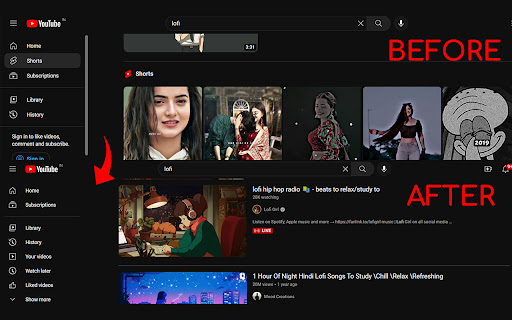

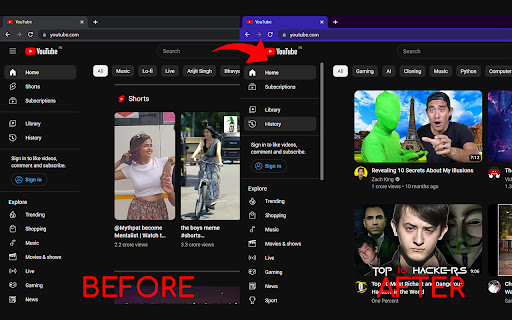
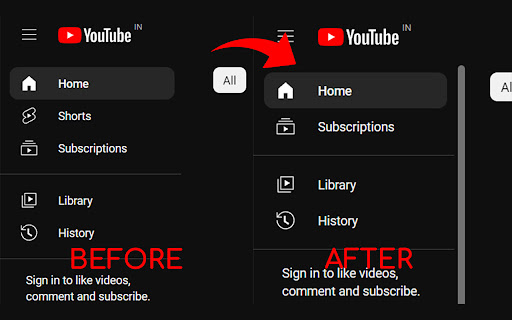

Removes YouTube Shorts and prevents you from wasting your precious time. # Remove Shorts - Removes Shorts from search results. - Eliminates Shorts from all viewing areas. - Now Available as Mobile app, "BlockScroll". - Works with Kiwi Browser for mobile browser use. - Helps reduce distractions, allowing for increased focus. This extension completely removes YouTube Shorts as if they never existed. You won't see any Shorts videos in your feed, search results, or recommendations. Browse YouTube without distractions from short-form videos. By removing Shorts, you can stay more focused and avoid frequent distractions that interrupt your concentration. This can help you maintain a better attention span and focus on longer tasks or content. Now available as a mobile app called BlockScroll. With Block Scroll, you can block Shorts, Reels, and more directly on your phone without affecting app functionality. Get BlockScroll here: 🔗 https://play.google.com/store/apps/details?id=com.arktechplugins.blockscroll If you have any feedback regarding extension 📩 #Contact: https://arktech-plugins.vercel.app/contact If you liked my work you can by me a coffee ☕ #Support: https://arktech-plugins.vercel.app/support

No YouTube Shorts
Tired of the YouTube Shorts? No problem, this extension has your back and removes them from the YouTube page! New in version 0.6.6: - Adjustments for the new YouTube design

Shorts Blocker
Removes Shorts from the home page, subscriptions page, and the search results in Youtube. Requirements: Chrome 105 and above Do you hate Youtube Shorts? Do you wish they wouldn't clutter up your subscriptions page? Do you wish there was an easy way of hiding them? Introducing, the Shorts Blocker; a very simple Google Chrome extension that hides Youtube Shorts from everywhere; the home page, subscriptions page, and even the search results. The entire project is open source, with no data collection, no ads, and no tracking.

Youtube-shorts block
Play the Youtube shorts video as if it were a normal video. A extension allows youtube shorts videos to play on a regular page. Features - Redirect shorts - Hide "shorts" tab - Hide shorts - Extended GUI for shorts player *** "Hide shorts video" is now enabled by default!!!! If you don't want to do that, please disable in option page! *** The UI of Youtube-shorts is not very well optimized for PCs and has poor functionality. This extension aims to improve the user experience by displaying short videos in the regular video player. ...utube.com/shorts/"video-id" ↓↓ ...utube.com/watch?v="video-id" Change the URL to something like. v1.5.5 features - Fix: Extension Breaks YouTube's New Replies UI #64 v1.5.2 features # Changed - Fix block the entire News(and other) page v1.5.1 features # Changed - Fix where opening in a new tab redirected to the wrong video v1.5.0 features # Changed - refactoring codebase - Fixed an issue where the hide shorts feature might not work depending on the environment (specifications). - Fixed the "open in new tab" feature on the shorts screen. - Updated to comply with YouTube's latest specifications (blocking ytd-rich-shelf-renderer). v1.4.2 features # Added - Russian translation from @jooblex # Changed - Support for Youtube specification changes v1.4.1 features # Added - German translation from @golgorath # Changed - Support new subscription page(Hide shorts video) v1.3.1 features # Changed - Fixed a bug that redirected links that were not short videos containing the string "shorts" v1.3.0 features # Added - Added "Open in regular player" button in the Shorts player - Block Shorts-related feeds (if Hide shorts video is enabled) - Add a Release notes # Changed - Fixed the problem that the load spinner does not disappear when "Hide Shorts video" is selected - Optimize "hide shorts video" v1.5.4 features - Additional selector for Shorts shelf elements by @HardyHeron2008 in #62 - Fix timing issue for richShelfFilter by @seporterfield in #63

remove shorts for youtube
Block all of the youtube shorts from homepage and play with Desktop UI as normal video One of your productivity extensions if you are a marketer, creator or youtuber. This extension is designed to hide shorts and enable them with the desktop view if they are required to play. Simply add the remove shorts for yt extension to your browser and no other settings are required. remove shorts for yt lets you play YouTube Shorts videos in normal mode like regular videos. It converts short videos with an aspect ratio of 9:16 to a normal aspect ratio of 16:9. How to Use -Click on the "Add to Chrome" option to add it. -Pin it to easily access the extension with a single click. -Open and play any YouTube video -Click on the extension icon and select whether or not to enable or disable short videos. >>Enables streamers to decide in which aspect ratio they want to watch shorts Videos >>One click YouTube shorts enable and disable option >>Simple to use >>Completely free
