
enamippconapkdmgfgjchkhakpfinmaj
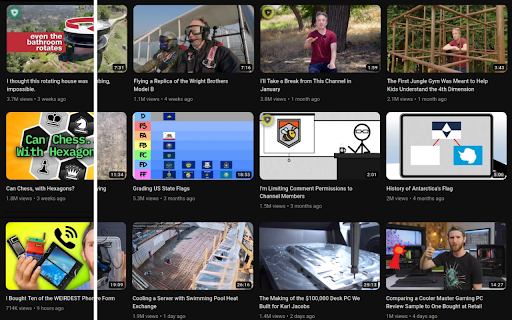

Crowdsourcing titles and thumbnails to be descriptive and not sensational DeArrow is a browser extension for crowdsourcing better titles and thumbnails on YouTube. The goal of DeArrow is to make titles accurate and reduce sensationalism. DeArrow is a paid (if you want) browser extension. You can purchase an unlimited-use license key for 1$. However, if you cannot, or do not want to pay, you can use the extension by clicking the "I can't/don't want to pay" button. Titles can be any arbitrary text. Thumbnails are screenshots from specific timestamps in the video. These are user submitted and voted on. By default, if there are no submissions, it will format the original title to the user-specified format, and set a screenshot from a random timestamp as the thumbnail. This can be configured in the options to disable formatting, or show the original thumbnail by default. If the original thumbnail is actually good, you can still vote for it in the submission menu, and then it will act like a submission. No more dealing with clickbait, arrows, or annoying faces. Users can submit better titles and thumbnails for each video and vote on them. How does DeArrow differ from Clickbait Remover for YouTube - Unlike Clickbait Remover, DeArrow's main purpose is for crowdsourcing better titles and thumbnails - When a crowdsourced title is not available, DeArrow will auto-format it according to your setting, but does it in a more sophisticated way than Clickbait Remover. Instead of only setting all words to lower case, or capitalizing every word, DeArrow supports casing systems such as "Title Case" and "Sentence case". These will still allow acronyms and proper names to remain capitalized. - When a crowdsourced thumbnail is not available, DeArrow by default shows a screenshot at a random timestamp in the video. Clickbait Remover's thumbnails use YouTube auto-generated thumbnails, and while they are seemingly random, they are chosen by a machine learning algorithm to favor faces with expressions, and other overstimulating features. DeArrow uses truly random timestamps generated by its own server. DeArrow will also check the SponsorBlock database to ensure the randomized thumbnail is not inside of a sponsor segment. Access your data for youtube.com, www.youtube-nocookie.com: - Used to modify the YouTube webpage

Clickbait Remover for Youtube
Replaces thumbnails and modifies titles of videos on youtube.com This extension replaces thumbnails with a frame from the video, effectively removing any clickbait while still showing a high quality thumbnail so you can still get a good idea of what the video is about. It can also modify titles to stop partial or all caps titles. It works everywhere on Youtube including the homepage, trending page, subscription page and channel pages. All functionality of the extension is customizable by clicking the extension icon on the top right, you can see the effect that different options have right away if you have a youtube tab open, no need to reload the page. And also on mobile. This extension might help people who have a Youtube addiction or anyone who just doesn't want to be distracted by flashy thumbnails and all caps titles while trying to find some quality content. Source code: https://github.com/pietervanheijningen/clickbait-remover-for-youtube Firefox version: https://addons.mozilla.org/firefox/addon/clickbait-remover-for-youtube

I still don't care about cookies
Community version of the extension `I don't care about cookies` (no Avast) This is a community updated version of a popular extension that got acquired by Avast with the source code on https://github.com/OhMyGuus/I-Dont-Care-About-Cookies ------- This extension removes cookie warnings/pop-ups from almost all websites! The EU regulations require that any website using tracking cookies must get user's permission before installing them. Imagine how irritating that becomes when you surf anonymously or if you delete cookies automatically every time you close the browser. In most cases, it just blocks or hides cookie related pop-ups. When it's needed for the website to work properly, it will automatically accept the cookie policy for you (sometimes it will accept all and sometimes only necessary cookie categories, depending on what's easier to do). It doesn't delete cookies.

SponsorBlock for YouTube - Skip Sponsorships
Skip sponsorships, subscription begging and more on YouTube videos. Report sponsors on videos you watch to save others' time. SponsorBlock lets you skip over sponsors, intros, outros, subscription reminders, and other annoying parts of YouTube videos. SponsorBlock is a crowdsourced browser extension that lets anyone submit the start and end times of sponsored segments and other segments of YouTube videos. Once one person submits this information, everyone else with this extension will skip right over the sponsored segment. You can also skip over non music sections of music videos. This is open source and the entire database is public. Access your data for youtube.com, www.youtube-nocookie.com: - Used to modify the YouTube webpage "Authentication Information": When you install the extension, it will generate a random "userID" that is used when submitting or voting. This allows you to appear on the leaderboard and helps determine reputation of submissions. With this extension, you will automatically skip YouTube sponsors.

Old Reddit Redirect
Ensure Reddit always loads the old design Dislike Reddit's redesign? Old Reddit Redirect will ensure that you always load the old (old.reddit.com) design instead. Forces all reddit.com links to old.reddit.com, including navigating to the site, opening links or using old bookmarks. Unlike the account setting for turning off the design, this works regardless of whether you are logged in or not or in incognito mode. - Remove the undismissable cookie banner - Prevent reddit from rendering raw image URLs as HTML - Rewrite links to galleries to the raw old reddit comments page Old Reddit Redirect is free and open source software. The code is available at https://github.com/tom-james-watson/old-reddit-redirect. Pull requests are more than welcome.
