
lmkfnhppofjfmjmiplljafpgapcpacdd


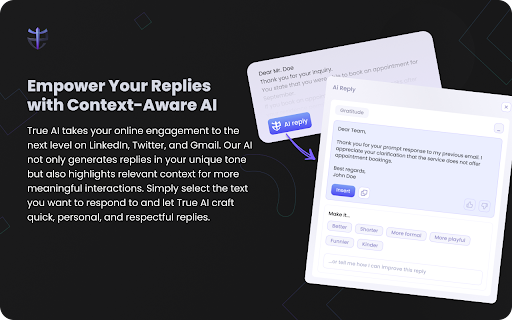


A browser extension that removes the BS from comments sections and makes replying a joy. Elevate Your Online Experience with True AI - Your Free AI-Powered Chrome Extension. Introducing True AI - the revolutionary tool designed to boost your digital productivity with autonomous content moderation, advanced text editing, and context-aware reply generation. Transform Your Comment Moderation Say goodbye to online toxicity with True AI's advanced filtering system. Our extension automatically hides abuse, spam, hate speech, scams, and more from your comment sections across all major social media platforms. Enjoy a cleaner, safer digital space with the choice to deactivate the feature anytime. Empower Your Replies with Context-Aware AI True AI takes your online engagement to the next level on LinkedIn, Twitter, and Gmail. Our AI not only generates replies in your unique tone but also highlights relevant context for more meaningful interactions. Simply select the text you want to respond to and let True AI craft quick, personal, and respectful replies. Select any text and let True AI assist you with quick and effective edits. Improve your content quality and save time with our AI-powered text editing feature. At True AI, we're committed to transforming the Internet into a platform for meaningful exchanges. By eliminating online negativity and providing innovative tools, we're redefining digital communication. We Value Your Feedback Your thoughts and suggestions matter to us! Share your feedback directly with our CEO at matthew@truenation.ai. Together, let's shape a better digital world.

All in one AI BOT
Introducing AIO Bot, your one-stop solution for accessing your favorite AI bots on any website, completely free of charge. With AIO Bot, you can easily access OpenAI ChatGPT, Google's Bard, and Bing Chat from a single extension, without opening new tabs or windows. With AIO Bot, you can enjoy several exciting features, including ChatGPT accessibility on any website, no need to open a new tab every time you need help from ChatGPT. Bard is also integrated into the extension, allowing you to use it from anywhere with just one login. Additionally, Bing GPT is also available on every browser, giving you more options to choose from. We've included a preview of the extension's functionality on our GitHub page, so you can see how seamless and easy it is to use. Get started today and experience the convenience and power of AIO Bot! If you find our extension helpful, please consider supporting us through our BuyMeACoffee page.

Free AI Side Bar
Free and open source chrome extension sidebar for all sort of AI stuff. Don't pay to us, pay for api key usage only!!

Syncia - Power of ChatGPT on any website
Syncia is a browser extension that allows you to use Open AI's GPT in any website. Syncia enables users to chat with ChatGPT by opening a sidebar on any website by using the shortcut ctrl+shift+x. In addition, it provides a floating menu underneath any selected text on any website that allows users to generate text summaries, check grammar issues, and customise text length so on ! 🦾 Features 🗨️ Chat with ChatGPT through a sidebar. 🔑 Use your own Open AI API key. 📜 Quick menu underneath any selected text which allows you to summarise, simplify language, translate, and more. 🗂️ Allows to store custom prompts and use them with quick menu. 💯 Fully customisable settings page. 🔐 Secure and fully Free and open source forever. (Please consider giving this project a star 🌟 and contributing 💖 to support the project.) For more info check out https://github.com/Royal-lobster/Syncia Note: If shortcut is not working, Enter "chrome://extensions/shortcuts", under Syncia set new keyboard shortcut for "Open the sidebar"

Multi AI Sidebar
Access to all AI apps like OpenAI ChatGPT, Bing AI, Microsoft Copilot, Google Gemini and more in a single Sidebar. Get the best AI. ★★★★★ Access to many Artificial Intelligence Apps and many more in a single Sidebar with OpenAI ChatGPT, Microsoft Bing AI - Copilot or Google Gemini - Bard, xAI Grok, Anthropic Claude 😱 See this link for a full list: https://jitt.wwevents.fun/project/multi-ai-sidebar/ 🚧 This Multi AI Sidebar allows to fast switch between all the AI Apps 🚨 You can enable/disable the AI Apps that you want to be active 🔥 Explore the amazing possibilities of AI, such as generating text, images, music, code and more in real time 🏆 Non-intrusive, by showing the number of active AI Apps in the Sidebar icon on the Browser Toolbar 🥊 FEATURES ★ ChatGPT: Allow to chat with the lastest GPT iteration from OpenAI. ★ Microsoft Copilot: Copilot and Bing AI have can read text and files and provide real-time web serach and information. ★ Google Gemini: Chat with the latest AI from Google that was upgraded from Google Bard to Gemini Nano, Gemini Pro, and Gemini Ultra. ★ xAI Grok: Check the latest AI for X, called Grok. Developed by xAI. It's one of the most advanced in the world. ★ Anthropic Claude: Now available the latest Claude LLM, give it a try! ★ For image and video manipulation the extension also provide easy access to Microsoft Designer, Microsoft Image Creator and Magic Studio. ★ Sidebar shows as a slide-out panel and runs the web versions of the available AI Apps meaning less CPU/RAM/Internet consumption 👑 ★ Your computer will run faster with more resources available without having to sacrifice functionality. ★ Choose your preferred AI App from a wide number of available options 😍 ★ Combine all the cutting-edge AI Apps into one simple panel! ★ Multi AI Sidebar is a wrapper for worldwide AI Apps. It allows you to have access to the official services quickly from a standalone sandboxed panel 🔥 ✔ Best extension for Artificial Intelligence 🔧 You can fast-switch between all AI Apps 🎓 ✔ Clean and simple interface 💻 ✔ Very Low CPU/RAM/Bandwidth consumption. ✔ HTTPS and on official platforms for maximum security 🔑 No share of credentials to third party 🔓 💎 Building Apps and Extensions for Google Chrome and Android 🔥📣 📔 Available on the product page: https://jitt.wwevents.fun/project/multi-ai-sidebar/#changelog Multi AI Sidebar is a trademark of WWEvents. All websites are a trademark of their own company's, registered in the U.S. and other countries. This is an independent project developed by WWEvents and has no relationship to them. By installing this product you agree to our privacy policy & terms of service: https://jitt.wwevents.fun/privacy-policy/ You may consult the list of permissions and the reason why they are required on the product page: https://jitt.wwevents.fun/project/multi-ai-sidebar/#permissions “notifications” – Used to send desktop notification. For example when a new message arrive or App is updated. “contextMenus” – Allow to add more settings when right click in the App icon in the browser toolbar and browser context menu. “storage” – Used to save settings on your local computer. “scripting” – Used to be able to insert JS or CSS on the required host/domains. “system.display” – Used to detect the display size and position the Extension window. “unlimitedStorage” – Storage is limited to 5MB of data that may not be enough to store all configs. “host_permissions” – Permission to access to some hosts/domains that we must modify in order to provide the desired functionality detailed in the functionality. It also allows that you can share content (links or text) from other pages directly to inside the App and send it as a message to a friend for example. Also used to allow intercommunication with other Apps (i.e. Emojis). “activeTab” – Permission to access the window that the extension is running and is show to the user. “all_urls” – Permission required for users be able to take screenshots of the current window – captureVisibleTab. “declarativeNetRequestWithHostAccess” - Used to get the iframe version of the websites. Only impact the Extension Window. “declarativeNetRequestFeedback” - Used to get the iframe version of the website by changing the iframe requests. “alarms” - Used to update App icon badge. This information is also available inside the App: Options -> About
