
kdaafcdfdmmkickmajigjaicaclnhbgi

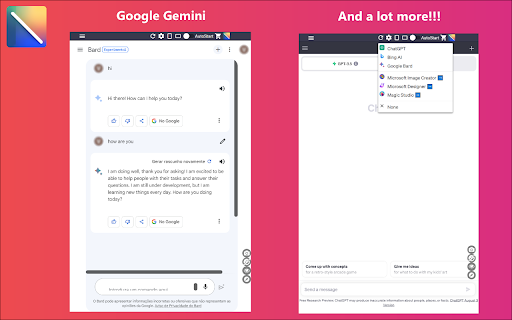
Access to all AI apps like OpenAI ChatGPT, Bing AI, Microsoft Copilot, Google Gemini and more in a single Sidebar. Get the best AI. ★★★★★ Access to many Artificial Intelligence Apps and many more in a single Sidebar with OpenAI ChatGPT, Microsoft Bing AI - Copilot or Google Gemini - Bard, xAI Grok, Anthropic Claude 😱 See this link for a full list: https://jitt.wwevents.fun/project/multi-ai-sidebar/ 🚧 This Multi AI Sidebar allows to fast switch between all the AI Apps 🚨 You can enable/disable the AI Apps that you want to be active 🔥 Explore the amazing possibilities of AI, such as generating text, images, music, code and more in real time 🏆 Non-intrusive, by showing the number of active AI Apps in the Sidebar icon on the Browser Toolbar 🥊 FEATURES ★ ChatGPT: Allow to chat with the lastest GPT iteration from OpenAI. ★ Microsoft Copilot: Copilot and Bing AI have can read text and files and provide real-time web serach and information. ★ Google Gemini: Chat with the latest AI from Google that was upgraded from Google Bard to Gemini Nano, Gemini Pro, and Gemini Ultra. ★ xAI Grok: Check the latest AI for X, called Grok. Developed by xAI. It's one of the most advanced in the world. ★ Anthropic Claude: Now available the latest Claude LLM, give it a try! ★ For image and video manipulation the extension also provide easy access to Microsoft Designer, Microsoft Image Creator and Magic Studio. ★ Sidebar shows as a slide-out panel and runs the web versions of the available AI Apps meaning less CPU/RAM/Internet consumption 👑 ★ Your computer will run faster with more resources available without having to sacrifice functionality. ★ Choose your preferred AI App from a wide number of available options 😍 ★ Combine all the cutting-edge AI Apps into one simple panel! ★ Multi AI Sidebar is a wrapper for worldwide AI Apps. It allows you to have access to the official services quickly from a standalone sandboxed panel 🔥 ✔ Best extension for Artificial Intelligence 🔧 You can fast-switch between all AI Apps 🎓 ✔ Clean and simple interface 💻 ✔ Very Low CPU/RAM/Bandwidth consumption. ✔ HTTPS and on official platforms for maximum security 🔑 No share of credentials to third party 🔓 💎 Building Apps and Extensions for Google Chrome and Android 🔥📣 📔 Available on the product page: https://jitt.wwevents.fun/project/multi-ai-sidebar/#changelog Multi AI Sidebar is a trademark of WWEvents. All websites are a trademark of their own company's, registered in the U.S. and other countries. This is an independent project developed by WWEvents and has no relationship to them. By installing this product you agree to our privacy policy & terms of service: https://jitt.wwevents.fun/privacy-policy/ You may consult the list of permissions and the reason why they are required on the product page: https://jitt.wwevents.fun/project/multi-ai-sidebar/#permissions “notifications” – Used to send desktop notification. For example when a new message arrive or App is updated. “contextMenus” – Allow to add more settings when right click in the App icon in the browser toolbar and browser context menu. “storage” – Used to save settings on your local computer. “scripting” – Used to be able to insert JS or CSS on the required host/domains. “system.display” – Used to detect the display size and position the Extension window. “unlimitedStorage” – Storage is limited to 5MB of data that may not be enough to store all configs. “host_permissions” – Permission to access to some hosts/domains that we must modify in order to provide the desired functionality detailed in the functionality. It also allows that you can share content (links or text) from other pages directly to inside the App and send it as a message to a friend for example. Also used to allow intercommunication with other Apps (i.e. Emojis). “activeTab” – Permission to access the window that the extension is running and is show to the user. “all_urls” – Permission required for users be able to take screenshots of the current window – captureVisibleTab. “declarativeNetRequestWithHostAccess” - Used to get the iframe version of the websites. Only impact the Extension Window. “declarativeNetRequestFeedback” - Used to get the iframe version of the website by changing the iframe requests. “alarms” - Used to update App icon badge. This information is also available inside the App: Options -> About

Docky.AI: ChatGPT Sidebar + GPT-5.5, DeepSeek & AI Tools
An all-in-one AI assistant ready to answer your questions, assist with your work, reading, and writing tasks 🔥 Docky is your all-in-one AI assistant, integrating ChatGPT, GPT-5.5, and DeepSeek to provide seamless assistance for your conversations, reading, and writing, boosting your work efficiency by leaps and bounds. Simply press Cmd/Alt + K, and the Docky sidebar will appear instantly, ready to tackle all sorts of challenges for you. 1️⃣ Conversing with AI: ✅ Multi-model support: Integrates multiple models like GPT-4o, DeepSeek, Claude, and Gemini, with continuous upgrades to bring you the cutting-edge AI experience! ✅ Real-time information: Connects in real-time to fetch the latest information, ensuring each answer is precise and reliable. ✅ AI group chat: Engage in multi-party conversations with numerous models or bots using the @ feature! ✅ Quick commands: Easily enter "/" commands to quickly bring up smart prompts. ✅ Files and images: Directly send files and images to AI for analysis and interpretation. ✅ Web reading: Summarize the content of current web pages with one click, improving your information intake efficiency. ✅ File reading: Supports reading various file formats such as PDF, Word, PPT, making knowledge accessible everywhere. ✅ Image reading: Accurately describes image content, recognizing text and objects, making image understanding a breeze. ✅ Composing: Whether it's articles, papers, emails, or tweets, Docky lends a hand, and you can even customize the language, tone, and style. ✅ Replying: Provides basic reply content, with Docky instantly generating appropriate response texts. ✅ Spelling and grammar check: Real-time checking for spelling and grammar mistakes, ensuring your copy is flawless. ✅ Text translation: Utilizes AI technology for precise translations, supporting barrier-free multilingual communication. ✅ Web translation: Easily convert web content, with original text comparison, making learning limitless. ✅ Search engine enhancement: Enhances the search results of major search engines (Google, Bing, etc.). ✅ Smart toolbar: Trigger the toolbar by selecting text, making it easy to explain, translate, continue writing, and more. ✅ Turn text into images, freely choose size and style, or artistically process existing pictures. Unleash your creativity! 🚀 How to Use 🚀 ➡️ Search for Docky in the extension store and install it ➡️ Log in or register an account ➡️ Press Cmd/Alt + K to bring up the sidebar ➡️ Start your journey with Docky! 💡 FAQs 💡 🤔 Is Docky free? - Docky offers a basic free quota. After the quota is exhausted, you can subscribe to enjoy more features and a larger usage quota. 🤔 I can't use ChatGPT in my region, is Docky available? - Of course! Docky is not subject to regional restrictions and can be used anywhere in the world. 🤔 What's the difference between it and ChatGPT? I already have ChatGPT, why should I use Docky? - Docky offers features such as AI group chat, multi-model support, context retention, web enhancement, artistic creation, and more that ChatGPT does not have, enriching your AI experience. 💌 Contact Us 💌 If you encounter any problems or have any suggestions, please feel free to email us at: service@docky.ai ⭐️ Choose Docky for smarter and more efficient work and creativity! ⭐️

Companion for Reddit
Redditor best friend. Enhancement Suite and Sidebar for Reddit and Subreddit. Lite, Mini and Light version for Chrome. ★★★★★ This a cleaner version of Reddit™ ❤ You have full access to all news and profiles but in a minimalist interface 📌 for fast access 💡 A suite of modules that enhance your Reddit browsing experience 💎 This extension will save you some time if you are about to repost a link. Also this extension is a quick way to check for reddit's comments on a blog or article 👔 Experience reddit with new modern list and grid view interfaces that focus on bringing the content to you 🥇 FEATURES ★ Small window well positioned 😱 ★ It works on all Subreddits and the Frontpage 🚀 ★ Most similar to original Reddit, but with modern feel 😍 ★ Infinite loading 📱 ★ Layout type is saved per subreddit 💾 ✔ Auto-Start Reddit™ when Google Chrome™ starts 💻 ✔ Configurations in a Options 🔧 section. ✔ See your friends news and edit your profile 📣 ✔ Very Low CPU/RAM/Bandwidth consumption 🔋 ✔ HTTPS and over Reddit™ platform for maximum security 🔑 No share of credentials to third party 🔓 💎 Building Apps and Extensions for Google Chrome and Android 🔥📣 📔 Available on the product page: https://jitt.wwevents.fun/project/companion-for-reddit/#changelog Reddit™ is a trademark of Reddit Inc., registered in the U.S. and other countries. This is an independent project developed by WWEvents and has no relationship to Reddit™ or Reddit Inc. By installing this product you agree to our privacy policy & terms of service: https://jitt.wwevents.fun/privacy-policy/ You may consult the list of permissions and the reason why they are required on the product page: https://jitt.wwevents.fun/project/companion-for-reddit/#permissions “notifications” – Used to send desktop notification. For example when a new message arrive or App is updated. “contextMenus” – Allow to add more settings when right click in the App icon in the browser toolbar and browser context menu. “storage” – Used to save settings on your local computer. “scripting” – Used to be able to insert JS or CSS on the required host/domains. “system.display” – Used to detect the display size and position the Extension window. “unlimitedStorage” – Storage is limited to 5MB of data that may not be enough to store all configs. “host_permissions” – Permission to access to some hosts/domains that we must modify in order to provide the desired functionality detailed in the functionality. It also allows that you can share content (links or text) from other pages directly to inside the App and send it as a SMS/Android message to a friend for example. Also used to allow intercommunication with other WWEvents Apps (i.e. Emojis). “activeTab” – Permission to access the window that the extension is running and is show to the user. “all_urls” – Permission required for users be able to take screenshots of the current window – captureVisibleTab. This information is also available inside the App: Options -> About

AI Side Panel
AI Side Panel Extension Enhance Your Productivity with Seamless AI Integration! The AI Side Panel Extension brings the power of popular AI tools directly to your browser. Easily access and interact with sites like ChatGPT, Gemini, Claude, Copilot, and DeepSeek through a convenient side panel, designed to integrate smoothly into your browsing experience. Just toggle the panel and start creating, translating, writing, or coding with ease. Boost your productivity today. * Instant AI Access: Side panel integration for immediate access to AI tools while browsing. * Split Screen Workflow: Customizable split view for simultaneous browsing and AI interaction. * Quick Toggle: One-click access via icon or ALT + Q shortcut. * Minimal Interface: Clean, distraction-free design for focused AI interactions. * Support for all popular AI services. * Custom Service Support: You can add any service via the settings menu. Simply copy the site URL. * Custom Service (Context Menu): Right-click selected text → pick Service + Action (with editable templates) to send it to your preferred AI instantly. * Smart content extraction that automatically cleans and formats text from news articles, code repositories, and social posts for AI analysis. * Prompt History: It enables quick navigation through previous messages in the chat window, supports all major AI services, and is completely optional. * Conversation Hub: Allows you to see and search all your AI conversations in one place. Perfect for anyone looking to boost productivity and integrate advanced AI resources into their daily tasks. Install the AI Side Panel Extension today and transform your browsing experience!

Open in Sidebar
Drop any link to the sidebar for dual-pane access The "Open in Sidebar" extension revolutionizes browsing by allowing you to load any webpage in a convenient sidebar view. Access web content while reading without switching tabs with a click or keyboard shortcut. Drag and drop links or use the built-in address bar for seamless navigation. Enhance productivity by opening online tools like text editors or dictionaries in the sidebar. Reset the view with a single click or load new pages by pasting URLs. Note that some pages with CSP headers may have limitations, but future updates aim to address these. Features: Loads any webpage in a convenient sidebar view Activate the sidebar with a click or assigned keyboard shortcut Drag and drop links or use the built-in address bar for seamless navigation Access web content while reading without switching tabs Enhance productivity by opening online tools like text editors or dictionaries in the sidebar Intuitive interface with an address bar for easy URL tracking Reset the view with a single click Load new pages by pasting URLs into the address bar Search for dropped text with your preferred search engine (e.g. Google, Bing, or DuckDuckGo) Supports split view (two panes)
