
lmijlfkdikhccdhliplohaeogblbamhh

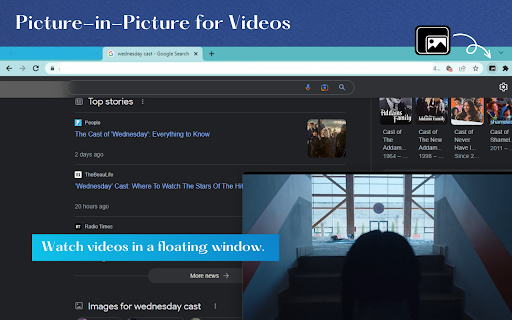
1. Install and add the extension to Chrome. 2. Play the video🎥, click on the extension icon. 3. The video will be playing in a floating screen on top of other windows. A mini-video player with which you can keep an eye on what you’re watching while interacting with other sites, or applications.

PiP - Picture in Picture Plus
Pop out video into a PIP Chrome Window. Works on all videos and websites. Watch video using Picture-in-Picture. Picture-in-Picture (PiP) allows you to watch videos in a floating window (always on top of other windows) 📌 so you can keep an eye on what you’re watching while interacting with other sites, or applications 📱 Supports video player on Youtube, Twitch, Mixer, Facebook and many other platforms and sites 🔧 Click on the extension icon to reduce the video player on YouTube and other sites 💎 This window will play videos on all pages of the browser. ★ Find a video and start it playing 🔔 ★ Click on the extension icon to reduce the video player on YouTube and other sites 📣 ★ Select the Floating Picture in Picture mode (PIP) and you're good to go 🎲 ★ Note: while you are free to browse other sites as the video plays in a pop-out, you must keep the original tab open. Picture-in-Picture Plus is a powerful tool to watch video on mini video player for all sites ✅ ✔ Now works for Disney Plus, HBO Max, Netflix, Amazon Prime, Apple TV+, ... ✔ Picture-in-Picture is a lite addon that gives you access to video on all site with just one click 🔥 ✔ Picture-in-Picture for all is extension that is developed and maintained independently 💡 ✔ Picture-in-Picture just makes it easy to access video in PIP for all video sites 💬 💎 Building Apps and Extensions for Google Chrome and Android 🔥📣 📔 Available on the product page: https://jitt.wwevents.fun/project/pip-picture-in-picture-plus/#changelog By installing this product you agree to our privacy policy & terms of service: https://jitt.wwevents.fun/privacy-policy/ You may consult the list of permissions and the reason why they are required on the product page: https://jitt.wwevents.fun/project/pip-picture-in-picture-plus/#permissions “notifications” – Used to send desktop notification. For example when a new message arrive or App is updated. “contextMenus” – Allow to add more settings when right click in the App icon in the browser toolbar and browser context menu. “storage” – Used to save settings on your local computer. “scripting” – Used to be able to insert JS or CSS on the required host/domains. “system.display” – Used to detect the display size and position the Extension window. “unlimitedStorage” – Storage is limited to 5MB of data that may not be enough to store all configs. “host_permissions” – Permission to access to some hosts/domains that we must modify in order to provide the desired functionality detailed in the functionality. It also allows that you can share content (links or text) from other pages directly to inside the App. Also used to allow intercommunication with other WWEvents Apps (i.e. Emojis). “activeTab” – Permission to access the window that the extension is running and is show to the user. “tabs” – Permission required to query all the active tabs in order to put the Picture in Picture on the requested tab. “all_urls” – We cannot predict ahead of time witch videos deployed on hosts/domains the user want to PiP. The extension is capable to PiP any Html5 video on any Webpage. This information is also available inside the App: Options -> About

Picture-in-Picture Shortcut
Switch videos to Picture-in-Picture mode with a keyboard shortcut or toolbar button. Picture-in-Picture Shortcut adds a keyboard shortcut and toolbar button for switching video players to the Picture-in-Picture mode in web browsers. The default keyboard shortcut is Ctrl+Period (Command+Period on Mac), but it can be changed from the browser settings. The Picture-in-Picture Shortcut extension button in the browser's toolbar can be used to toggle PiP mode. Google Chrome and other Chromium browsers have a built-in Picture-in-Picture button in the default media controls, but it isn't always available and requires multiple mouse clicks. Picture-in-Picture Shortcut also overrides sites that don't normally allow Picture-in-Picture mode, and attempts to add a play/pause button to the PiP popup. However, this may not always work for sites and players not originally built for PiP mode. This extension is open-source under the GPLv3 license, the code is available on GitHub: https://github.com/corbindavenport/pip-shortcut

Picture-in-Picture Anything - Place Any Element on Top of your screen
An extension that allows you to use Picture-in-Picture mode on any element of any website. This extension allows you to place any web page element into an Always-on-Top window, similar to video Picture-in-Picture mode, but now for any element. It utilizes a new Document Picture-in-Picture API (https://developer.chrome.com/docs/web-platform/document-picture-in-picture) and works natively in Chrome, Edge, and Opera browsers for desktop. Whether you want to have a video with proper controls and subtitles on top of your screen or an article that you are taking inspiration from before your eyes, this extension will help you. Press a keyboard shortcut (Ctrl-Shift-P) or Click on the extension icon in the toolbar or Right-click on the page and select "Picture-in-Picture Anything" to open the Element Selection Overlay Select an element by clicking the left mouse button on it. Holding a Shift button when selecting an element will open a Precise Selection Panel. There, you can navigate the element tree and select precisely an element you want. Pressing ESC before selecting an element will close the window. Sometimes, you may want to play around with the element you choose to achieve the desired effect (selecting either a parent or child element may help you if an element doesn't behave correctly). Please let me know if something needs to be fixed or if you have ideas for improvement.

TabFloater: Picture-in-Picture for any tab!
TabFloater allows you to multitask by moving browser tabs into floating windows, similar to “Picture-in-Picture” on TVs. At TabFloater, we're on a mission to empower users like you by simplifying multitasking and enhancing productivity through seamless tab management. TabFloater improves your productivity by providing "Picture-in-Picture" functionality to your tabs on any website, making it an indispensable tool in every digital workspace. - Coding in Visual Studio while referencing APIs on GitHub? - Designing in Figma with inspiration from Behance? - Juggling emails in Outlook alongside client briefs in Google Docs? - Trying to watch your favorite Netflix show while entering data in Excel? TabFloater allows you to keep important information, from any website, Always on Top and at your fingertips. To take advantage of all that TabFloater offers, you must install the companion software on your computer. Once you install TabFloater, we'll guide you through the process. (Don't worry, we're NOT selling your data. Check out our privacy policy at https://www.tabfloater.io/privacy if you don't believe us.) For more information, visit our website at https://www.tabfloater.io/ !
