
lbkmbojelekepakieejfcbjfadoacbnd

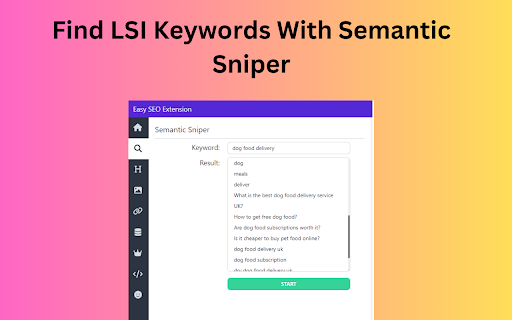
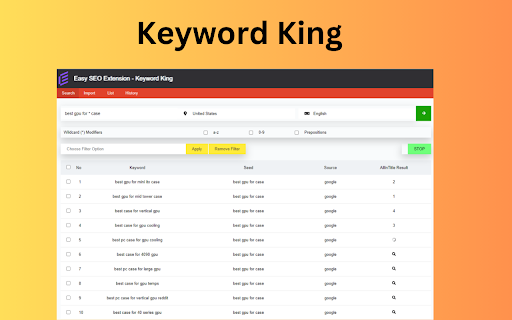

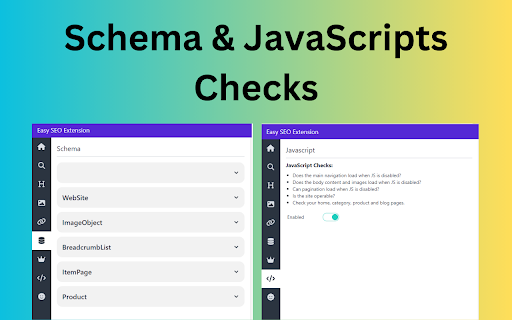
The most useful SEO extension ⚠️ We truly believe this is the most useful SEO extension out there. ⚠️ Easy SEO Extension was created by SEO professionals for SEO professionals. 🔸 Overview Tab (Meta titles/description checks, Canonicals, indexability & more) 🔸 Semantic Sniper (Find keyword related to your target keyword) 🔸 View Subheading (Highlight subheading, copy to clipboard) 🔸 Check Images (Without alt text, over 100kb, non Webp) 🔸 Check Links (internal, external, broken, unique, no-follow) 🔸 View Schema 🔸 KEYWORD KING (An epic keyword research tool) 🔸 JavaScrips Checks 🔸 SEO Tips 🔸 Lots more 1️⃣ The Overview Tab 🔹 Meta data check (you can edit the preview metadata) 🔹 See the indexability elements 🔹 Hidden Checks (missing H1, no images, non redirecting slash) 🔹 Find semantically related keywords to your target keyword 🔹 Data comes from Google so it’s highly relevant 🔹 Get keyword ideas 3️⃣ The Subheadings Tab 🔹 Get an overview of the page 🔹 Copy headings to clipboard 🔹 Highlights issues like missing H1 and multiple H1 tags 4️⃣ The Images Tab 🔹 Images with missing alt text and a link to the image’s URL 🔹 Large images (over 100kb) and a link to the image’s URL 🔹 Images without the recommended Google format (Webp) 5️⃣ The Links Tab 🔹 Automatically starts highlighting broken and working links 🔹 Export links (Internal, external, broken, all) 🔹 Highlight no-follow links 6️⃣ The Schema Tab 🔹 See what type of schema the page has 🔹 A detailed view of the schema’s code 🔹 Displayed in an easy to understand format 🔹 Get lots of untapped keywords 🔹 Check the AllinTitle: results (a great starting point for low competition keywords) 🔹 Import your own keywords 8️⃣ The JavaScript tab 🔹 Turn off JavaScript to see what your website looks like 🔹 This tab mentions JavaScript checks to go through 🔹 No developer required and it’s easy to do 9️⃣ The SEO Tips Tab 🔹 View actionable SEO tips 🔹 Frequently updated 🔹 Submit your own SEO tip to get mentioned and a link to your website The best way to think of this tool is as Your SEO Sidekick. You're Batman and Easy SEO Extension is Robin. 🦸♂️ Visit us for more info: https://easyseoextension.com/

Detailed SEO Extension
Get SEO insights at the click of a button to any website you're currently on. Built by full-time SEO's for daily analysis. Get SEO-related insights at the click of a button to any website you're currently on. Pull back their title tag, meta description, meta robots tag and much more. Save hours of time looking through the source code of this page with our SEO analysis extension.

FandangoSEO Extension
FandangoSEO SEO Extension to do a small Page audit Use the FandangoSEO extension to check the SEO performance of any page in a few seconds. With a single click, you can examine the metrics that search engines take into consideration to determine if your website is of quality (Title, meta descriptions, header tags, site speed, internal links, etc.). You can also conduct performance tests without leaving the page through the most powerful tools on the market today (WebPageTest, GTMetrix, Page Speed Insight, Lighthouse). Find redirects and redirect chains that harm your SEO performance. You can even activate or deactivate the Javascript on your page. This feature will allow you to check the main differences between having the Javascript enabled or disabled, and to detect rendering problems. Forget about having multiple extensions to get your SEO under control. With this single one, you’ll be able to do an exhaustive SEO analysis that generally requires three to four extensions. 🎁 BONUS! Run a technical SEO audit in just a single click against any website you've got open. You can crawl all your Website up to 1500 URLs for FREE Take a look at the available packages with which you can crawl up to 20 million pages. Download the extension now and check your SEO performance instantly! In the FandangoSEO extension, you’ll find the following tabs to perform detailed audits in record time: Page Info Redirect Chains Performance Tools Page Info: Here are those metrics that you should check when evaluating the quality of on-page SEO. Make sure that all these items are well optimized. meta title: Find out if you’ve got a meta title tag on your page. There should always be a meta title. Remember that it is vital to have a good one to capture the searcher’s attention on SERPs. With it, you also provide valuable information on what your page is about to both users and search engines. meta description Check if the page has a meta description. As with meta title, there should always be a meta description. An excellent one will tell users seductively what they can find on your page. It increases the CTR and lowers the bounce rate. Meta robots See if Meta Robots is affecting your indexation. Does it have an index or noindex tag? Make sure it has the right tag. Hreflang Does the page have an Hreflang tag? If your page provides content in several languages, you may consider using Hreflang. This tag helps search engines to differentiate a web page from its original version and allows them to display the language that corresponds to each user. Canonicals Does the page contain a canonical tag? Think if you are duplicating the content of this page by displaying it on another page of your website. If the answer is yes, consider adding a canonical tag. This way, you’ll avoid Google Penalization for duplicate content. AMP Is it an AMP page? Accelerated Mobile Pages, as the name indicates, help your pages load faster on mobile devices. Check if you are implementing the AMP on the page. Http Headers Easily visualize HTTP headers Every time your web browser opens a page, it sends a request that includes a series of HTTP headers. Instantly check which ones the current page is sending. Robots.txt Does your robots.txt exist? Validate that your website is using a robots.txt file and that it returns a 200 status code. This is a must for GoogleBot to crawl your website. Header Tags (H1-H6) Visualize all your header tags so you can review them right away. Check if you have any short header tags to see if you can add any relevant keywords. All your H1 to H6 headers will be marked on the page so you can locate them quickly. Page Links Get a list of links found on the page: Internal, External, Nofollow, Sponsored, and UGC. Select the desired link type to mark it in the HTML. This way, you’ll quickly find out which links you have on the page. Redirect Chains: Make sure you don’t have redirects or redirect chains. Get rid of redirect chains to avoid crawling issues and to prevent drops in Google Rankings. Performance: Check the web performance of your page through the most effective tools that we can find in the market today. You’ll be able to get the results in a single click without having to leave the current page. WebPageTest Run a speed test choosing from multiple locations around the world and selecting any browser. You can run a simple analysis or advanced tests that provide a rich diagnosis. GTMetrix Obtain detailed reports of your page speed performance using Google Page Speed and YSlow. GTMetrix rates your page and offers actionable recommendations for improvement. Page Speed Insight This tool was designed by Google to analyzes the content of your website and give you hints on how you can speed up your website. It offers advice with actionable guidelines. Lighthouse Lighthouse is an automated open-source tool developed by Google to audit the quality of your site. It provides you information on how you can improve the performance, quality, and correctness of your web apps. Tools: Use the following validation tools to quickly find any errors that can seriously harm the performance of your website. Javascript switcher: Enable or disable Javascript on your website and analyze what content is displayed. HTML Validator: Check the HTML web elements with the W3C validator for any syntax or format errors. SSL Validator: See the current status of your SSL certificates and make sure that they are not expired. They should be at least 2048 bits. DNS Validator: Obtain a DNS report. See what DNS servers are using the domain of your selected website. Ensure that they're the right ones and check their performance. Download the FandangoSEO extension now and check your SEO performance immediately!

Simple SEO Tool
A minimalistic tool for SEO on-page analysis. "Simple SEO Tool" is a minimalistic extension that simplifies SEO on-page analysis and optimization processes. In version 2 of the extension, many old features were removed, and it was aligned with up-to-date Google Chrome policies. With a user-friendly interface and minimalistic design, it helps SEO practitioners in their daily work. Key features and functionalities include: - Indexing status: Quickly determine whether a page is open or closed for indexing by search engines. - Metadata verification: Verify crucial metadata elements such as title, description, canonical URL, and H1 tags; - Microformats and page speed: Perform quick assessments of microformats implementation and page loading speed. - External links analysis: Check if a page has external links; - Headings structure: Analyze the structure and organization of page titles to ensure maximum effectiveness of H1-H6. - Hreflang: Check for hreflang attributes for multi-language and regional content optimization. - Pagination: Check for marking with prev/next. This tool lets you check and improve your pages quickly and drive organic traffic.

Conductor for Chrome - SEO Extension
Experience faster, better, smarter SEO insights in one click. The most advanced SEO extension is now free for all marketers. Conductor for Chrome is designed to make the day-to-day lives of marketing teams easier. 🔎 Discover insights around page performance and new topic opportunities 📈 Easily uncover website optimizations to improve visibility and performance 👍 Take action and collaborate more efficiently across teams Make impactful changes to your website by leveraging the best of Conductor right in your browser. Conductor for Chrome is available to anyone with a Conductor or Google account. Perform keyword research and better understand how your content is optimized for Search. Experience faster, better, and smarter SEO with the most advanced Organic Marketing browser extension ever created! == v4.10.11 == - Infinite loading and styles fixes. == v4.10.6 == - Minor bug fixes and performance improvements. == v4.10.4 == - Minor bug fixes and performance improvements. == v4.10.2 == - Minor bug fixes and performance improvements. == v4.10.0 == - Minor bug fixes and performance improvements. == v4.9.4 == - Minor bug fixes and performance improvements. == v4.9.2 == - Minor bug fixes and performance improvements. == v4.7.0 == - Minor bug fixes and performance improvements. == v4.6.0 == - Minor bug fixes and performance improvements. == v4.4.2 == - Minor bug fixes and performance improvements. == v4.4.0 == - Upgraded to Manifest V3 - Minor bug fixes and performance improvements. == v4.3.7 == - Fixed an issue where some users received an error when integrating Actions with Asana. - Minor bug fixes and performance improvements. == v4.3.5 == - Minor bug fixes and performance improvements. == v4.3.4 == - Minor bug fixes and performance improvements. == v4.3.3 == - Fixed issues related to correctly identifying and parsing sitemaps. - Fixed an issue where some users were unable to make edits using Conductor Live. - Fixed issue with reporting incorrect status code in Redirects widget. - Other minor fixes and performance improvements. == v4.3.2 == - Fixed and issue where related keywords would not load for certain pages. - The Live Editor Reset button didn't do anything before, now it does! == v4.3.0 == - NEW: Live Editor can now be used to make edits to page headings and image alt descriptions! A Conductor account is required. - Overview tab has been updated to bring live editor functionality to your fingertips. - Social Preview widget has been moved to the Social Tab. - Other bug fixes and improvements. ==V4.2.3 == Thank you for your continued use of Conductor for Chrome. In order to make sure the Chrome Extension is as secure as possible, unnecessary permissions were removed. ==v4.2.2== Minor Live Editor bug fixes and improvements. ==v4.2.1== - Minor bug fixes and performance improvements. == v4.2.0 == - NEW: Actions in Conductor for Chrome! Conductor customers can take action and seamlessly manage their SEO workflows by creating Content Briefs, To-do's, and Keyword Lists directly from the extension. Share them to your productivity tool of choice such as Jira, Asana and more or download them for easy team collaboration without leaving the page. - Fixed an issue when logged in using a Google account, it was then not always possible to login using a Conductor account. - Other bug fixes and performance improvements. == v4.1.1 == - Fixed an issue with Conductor Live that prevented publishing changes for some users. - Other bug fixes and performance improvements. == v4.1.0 == - Fixed an issue where the chrome extension would open sporadically on it own. Now it will only open when you want it to! - Other bug fixes and performance improvements. == v4.0.0 == - Now users who do not have a Conductor account can use the extension with their Google account. - Perform keyword research and navigate the extension with a new redesigned layout.
