
chanllebmhpihdidogiopcgfnhcmlhek
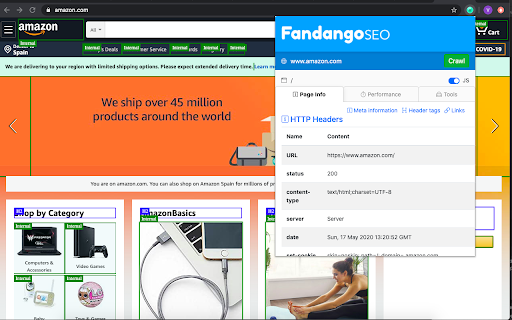
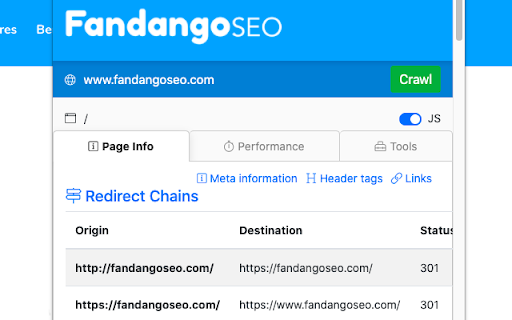
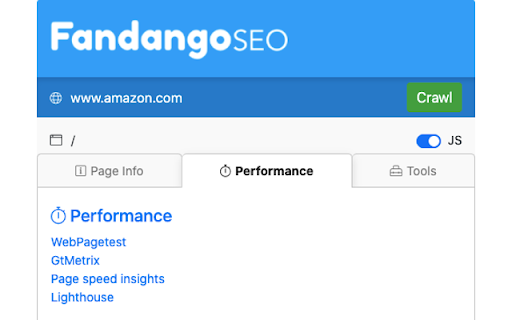
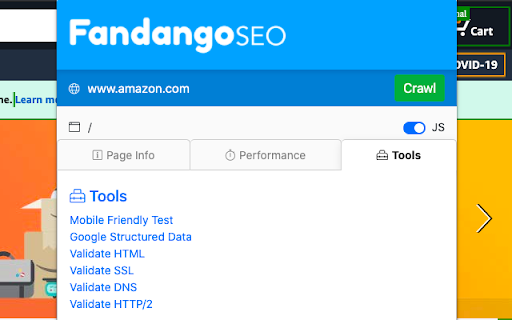
FandangoSEO SEO Extension to do a small Page audit Use the FandangoSEO extension to check the SEO performance of any page in a few seconds. With a single click, you can examine the metrics that search engines take into consideration to determine if your website is of quality (Title, meta descriptions, header tags, site speed, internal links, etc.). You can also conduct performance tests without leaving the page through the most powerful tools on the market today (WebPageTest, GTMetrix, Page Speed Insight, Lighthouse). Find redirects and redirect chains that harm your SEO performance. You can even activate or deactivate the Javascript on your page. This feature will allow you to check the main differences between having the Javascript enabled or disabled, and to detect rendering problems. Forget about having multiple extensions to get your SEO under control. With this single one, you’ll be able to do an exhaustive SEO analysis that generally requires three to four extensions. 🎁 BONUS! Run a technical SEO audit in just a single click against any website you've got open. You can crawl all your Website up to 1500 URLs for FREE Take a look at the available packages with which you can crawl up to 20 million pages. Download the extension now and check your SEO performance instantly! In the FandangoSEO extension, you’ll find the following tabs to perform detailed audits in record time: Page Info Redirect Chains Performance Tools Page Info: Here are those metrics that you should check when evaluating the quality of on-page SEO. Make sure that all these items are well optimized. meta title: Find out if you’ve got a meta title tag on your page. There should always be a meta title. Remember that it is vital to have a good one to capture the searcher’s attention on SERPs. With it, you also provide valuable information on what your page is about to both users and search engines. meta description Check if the page has a meta description. As with meta title, there should always be a meta description. An excellent one will tell users seductively what they can find on your page. It increases the CTR and lowers the bounce rate. Meta robots See if Meta Robots is affecting your indexation. Does it have an index or noindex tag? Make sure it has the right tag. Hreflang Does the page have an Hreflang tag? If your page provides content in several languages, you may consider using Hreflang. This tag helps search engines to differentiate a web page from its original version and allows them to display the language that corresponds to each user. Canonicals Does the page contain a canonical tag? Think if you are duplicating the content of this page by displaying it on another page of your website. If the answer is yes, consider adding a canonical tag. This way, you’ll avoid Google Penalization for duplicate content. AMP Is it an AMP page? Accelerated Mobile Pages, as the name indicates, help your pages load faster on mobile devices. Check if you are implementing the AMP on the page. Http Headers Easily visualize HTTP headers Every time your web browser opens a page, it sends a request that includes a series of HTTP headers. Instantly check which ones the current page is sending. Robots.txt Does your robots.txt exist? Validate that your website is using a robots.txt file and that it returns a 200 status code. This is a must for GoogleBot to crawl your website. Header Tags (H1-H6) Visualize all your header tags so you can review them right away. Check if you have any short header tags to see if you can add any relevant keywords. All your H1 to H6 headers will be marked on the page so you can locate them quickly. Page Links Get a list of links found on the page: Internal, External, Nofollow, Sponsored, and UGC. Select the desired link type to mark it in the HTML. This way, you’ll quickly find out which links you have on the page. Redirect Chains: Make sure you don’t have redirects or redirect chains. Get rid of redirect chains to avoid crawling issues and to prevent drops in Google Rankings. Performance: Check the web performance of your page through the most effective tools that we can find in the market today. You’ll be able to get the results in a single click without having to leave the current page. WebPageTest Run a speed test choosing from multiple locations around the world and selecting any browser. You can run a simple analysis or advanced tests that provide a rich diagnosis. GTMetrix Obtain detailed reports of your page speed performance using Google Page Speed and YSlow. GTMetrix rates your page and offers actionable recommendations for improvement. Page Speed Insight This tool was designed by Google to analyzes the content of your website and give you hints on how you can speed up your website. It offers advice with actionable guidelines. Lighthouse Lighthouse is an automated open-source tool developed by Google to audit the quality of your site. It provides you information on how you can improve the performance, quality, and correctness of your web apps. Tools: Use the following validation tools to quickly find any errors that can seriously harm the performance of your website. Javascript switcher: Enable or disable Javascript on your website and analyze what content is displayed. HTML Validator: Check the HTML web elements with the W3C validator for any syntax or format errors. SSL Validator: See the current status of your SSL certificates and make sure that they are not expired. They should be at least 2048 bits. DNS Validator: Obtain a DNS report. See what DNS servers are using the domain of your selected website. Ensure that they're the right ones and check their performance. Download the FandangoSEO extension now and check your SEO performance immediately!

View Rendered Source
View source is dead. See how the browser renders a page, not just what the server sends. A lightweight Chrome Extension that shows you how the browser has constructed (rendered) a page's original HTML into a functioning DOM, including modifications made by JavaScript. An essential tool for web developers using JavaScript frameworks like Angular, ReactJS and Vue.js, and for SEOs to understand how search engines see your pages, especially considering Google's dynamic serving workaround. Differences between raw and rendered versions are highlighted line-by-line showing how JavaScript has modified a page at render time. * Raw: The source code sent from the server to the browser before the DOM is rendered. The same as you'll see with traditional 'View Source' in the browser (after minor formatting tweaks) * Rendered: The rendered page after the source has been interpreted into a DOM, including any modifications made by Javascript * Difference: The difference between the rendered source and the raw source. Differences occur when JavaScript has modified the DOM. Adaptive website? If you serve different source code to mobile devices, emulate this easily with a mobile user-agent checkbox. Dynamic serving for Google? (More info: https://developers.google.com/search/docs/guides/dynamic-rendering) Using Google's dynamic rendering workaround designed for Javascript-heavy sites? Just request the raw source as Googlebot and ensure perfect technical SEO. Works with GatsbyJS and Prerender. DM the developer: https://twitter.com/ItsHogg

Serpstat Website SEO Checker
Instantly check your website's SEO, analyze competitors and get advantage of powerful search analytics in one place. Serpstat Website SEO Checker allows you to find the key metrics of any site or page in just a few clicks. It provides you with an extensive list of SEO metrics, analysis, and tips. To examine a domain/page, you don't need to open a new tab. Click on the icon and you'll get an SEO audit of domain or page: visibility, traffic, number of keywords, top competitors in the region, etc. Three sections are now available: * On-page SEO parameters - Free Lifetime * Page analysis - Freemium * Domain analysis - Freemium Some features work without API requests to Serpstat servers so they are available without signing up, right after installation of the extension. Some reports require to sign up and get a token for API access. Serpstat Website SEO Checker makes analyzing competitors data easier than ever. The extension helps you to provide quickly a keyword research and trust me, it's much better than Keyword Planner tool. The major features: #1 On-page search engine optimization: Page Source Google Cache PageSpeed Insights Site start date Meta tags HTML tags Words Count / Symbols Count Favicon checker and many others. #2 Page analysis: Top 10 keywords in Google ranking URL that ranks for this request Ranking position for this keyword Position change and search volume Keyword CPC URL Competitors Keywords the site ranks in Missing keywords #3 Domain analysis Domain visibility Domain traffic Number of keywords Improved and declined keywords New and lost keywords PPC keywords Number of results in Google, Bing Yandex Quality Index Number of images in Google Image Search Alexa Rank. Visibility change graph In fact, we've brought together the most useful SEO features, so you no longer need a bunch of tools like Ahrefs, Semrush, Majestic and others. Keep an eye on this - it's just the beginning, you'll see many exciting updates soon. Important: To get full access to all functionality, you'll need to sign up on Serpstat.com For information regarding data collection please visit: https://serpstat.com/users/privacy-policy/

Robots Exclusion Checker
Checks robots.txt, meta robots, x-robots-tag with URL alerts. Canonical warnings, HTTP header info. An SEO extension, robots tester. Robots Exclusion Checker is designed to visually indicate whether any robots exclusions are preventing your page from being crawled or indexed by Search Engines. ## The extension reports on 6 elements: 1. Robots.txt 2. Meta Robots tag 3. A.I. Bots 4. X-robots-tag 5. Rel=Canonical 6. UGC, Sponsored and Nofollow attribute values If a URL you are visiting is being affected by an "Allow” or “Disallow” within robots.txt, the extension will show you the specific rule within the extension, making it easy to copy or visit the live robots.txt. You will also be shown the full robots.txt with the specific rule highlighted (if applicable). Cool eh! Any Robots Meta tags that direct robots to “index", “noindex", “follow" or “nofollow" will flag the appropriate Red, Amber or Green icons. Directives that won’t affect Search Engine indexation, such as “nosnippet” or “noodp” will be shown but won’t be factored into the alerts. The extension makes it easy to view all directives, along with showing you any HTML meta robots tags in full that appear in the source code. Checks whether a website's robots.txt file blocks A.I. companies from accessing its content. It monitors 14 bots across 6 companies - OpenAI, Anthropic, Google, Perplexity, Meta, and Apple, covering three types of access: training data collection, search indexing, and real-time browsing. If any bot exclusions are detected, an "AI" label will appear over the Robots Exclusion Checker icon in your browser. This feature can be deactivated within settings if preferred. Spotting any robots directives in the HTTP header has been a bit of a pain in the past but no longer with this extension. Any specific exclusions will be made very visible, as well as the full HTTP Header - with the specific exclusions highlighted too! Although the canonical tag doesn’t directly impact indexation, it can still impact how your URLs behave within SERPS (Search Engine Results Pages). If the page you are viewing is Allowed to bots but a Canonical mismatch has been detected (the current URL is different to the Canonical URL) then the extension will flag an Amber icon. Canonical information is collected on every page from within the HTML and HTTP header response. - UGC, Sponsored and Nofollow A new addition to the extension gives you the option to highlight any visible links that use a "nofollow", "ugc" or "sponsored" rel attribute value. You can control which links are highlighted and set your preferred colour for each. I’d you’d prefer this is disabled, you can switch off entirely. Within settings, you can choose one of the following user-agents to simulate what each Search Engine has access to: This tool will be useful for anyone working in Search Engine Optimisation (SEO) or digital marketing, as it gives a clear visual indication if the page is being blocked by robots.txt (many existing extensions don’t flag this). Crawl or indexation issues have a direct bearing on how well your website performs in organic results, so this extension should be part of your SEO developer toolkit for Google Chrome. An alternative to some of the common robots.txt testers available online. This extension is useful for: - Faceted navigation review and optimisation (useful to see the robot control behind complex / stacked facets) - Detecting crawl or indexation issues - General SEO review and auditing within your browser ## Avoid the need for multiple SEO Extensions Within the realm of robots and indexation, there is no better extension available. In fact, by installing Robots Exclusion Checker you will avoid having to run multiple extensions within Chrome that will slow down its functionality. 1.0.3: Various bug fixes, including better handling of URLs with encoded characters. Robots.txt expansion feature to allow the viewing of extra-long rules. Now JavaScript history.pushState() compatible. 1.0.4: Various upgrades. Canonical tag detection added (HTML and HTTP Header) with Amber icon alerts. Robots.txt is now shown in full, with the appropriate rule highlighted. X-robots-tag now highlighted within full HTTP header information. Various UX improvements, such as "Copy to Clipboard” and “View Source” links. Social share icons added. 1.0.5: Forces a background HTTP header call when the extension detects a URL change but no new HTTP header info - mainly for sites heavily dependant on JavaScript. 1.0.6: Fixed an issue with the hash part of the URL when doing a canonical check. 1.0.7: Forces a background body response call in addition to HTTP headers, to ensure a non-cached view of the URL for JavaScript heavy sites. 1.0.8: Fixed an error that occurred when multiple references to the same user-agent were detected within robots.txt file. 1.0.9: Fixed an issue with the canonical mismatch alert. 1.1.0: Various UI updates, including a JavaScript alert when the extension detects a URL change with no new HTTP request. 1.1.3: Added UGC, Sponsored and Nofollow link highlighting. 1.1.4: Switched off nofollow link highlighting by default on new installs and fixed a bug related to HTTP header canonical mismatches. 1.1.6: Extension now flags 404 errors in Red. 1.1.7: Not sending cookies when making a background request to fetch a page that was navigated to with pushstate. 1.1.8: Improvements to the handling of relative vs absolute canonical URLs and unencoded URL messaging. 1.2.0.11: Updating to Google's new manifest V3 and fixing small bugs. 1.2.0.12: Added a Spanish language version and made improvements to existing translations. Linking to new website https://www.checkrobots.com 1.2.0.13: Fixed pushState navigation data extraction, resolved inconsistent icon display, and added security protections to prevent logout issues with enterprise websites. 1.3.0: Introduced A.I. bot checking to monitor robots.txt exclusion rules for 14 bots across 6 companies including OpenAI, Anthropic, Google, Perplexity, Meta and Apple, with training, search indexing and real-time browsing bots tracked. New site exclusion feature lets you skip checking for specific domains. Fixes for SPA/back-forward navigation, x-robots-tag case sensitivity for Bingbot and Yahoo and improved allow/disallow rule precedence. Redesigned settings page with collapsible sections.

Checkbot: SEO, Web Speed & Security Tester 🚀
Checkbot is a powerful website testing tool that tells you how to improve the SEO, page speed and security of your website. Checkbot crawls 100s of pages at the same time checking for 50+ common website problems based on web best practices recommended by Google and Mozilla. These checks include: 📊 SEO TESTS: Broken link checker, missing or long page titles/descriptions/headings, duplicate page content, HTML/CSS/JavaScript validator, canonical URLs, image ALT tags, robots.txt, URL naming, mobile friendly pages, deprecated web features, 404 pages, meta tags, temporary/meta redirects, thin pages & sitemap setup. 🚀 PAGE SPEED TESTS: Minification, network compression, resource caching, render blocking or duplicate CSS/JavaScript, excessive inlining of CSS/JavaScript, redirecting URLs & redirect chains. 🔒 WEB SECURITY TESTS: Security headers, HTTPS and mixed content checker, HSTS with preloading, content sniffing, iframe restrictions & password forms security. See https://www.checkbot.io/guide/ for the 50+ web best practices Checkbot will test for you to help make your site faster, more secure and rank higher in search results. 🏆 HubSpot, Best Chrome Extensions 2021 - "Checkbot combines technical SEO with modern security to help you analyze both how safe and how optimized a website is for search engines" https://blog.hubspot.com/marketing/best-chrome-extensions 🏆 Einstein Marketer, "11 Must-Have Google Chrome Extensions (for Marketers, Entrepreneurs and Businesses)...If you own a website, this Chrome extension is going to help you supercharge your load speed, rank higher in Google and improve the security" https://www.einsteinmarketer.com/chrome-extensions-marketers/ 🏆 Product Hunt, #3 Product of the Day award https://www.producthunt.com/posts/checkbot-for-chrome The free version lets you check unlimited small websites as often as you want but you need to upgrade to run website audits with these features: - Advanced crawl settings to exclude pages by URL pattern, type, folder and subdomain See https://www.checkbot.io/#pricing for more. Follow Checkbot for updates: Visit https://www.checkbot.io/faq/ for support, answers to frequently asked questions and to give feedback. Checkbot will ask for the "Read and change all your data..." permission for the sole purpose of crawling and testing the websites you ask Checkbot to check. This is currently the most restrictive permission we can ask for that allows this and Google has also reviewed this extension to check it follows best practices on requesting permissions. Your regular browsing will be unaffected: Checkbot does not observe or modify anything outside of the Checkbot tab. If you still have concerns, you can opt to create a new Chrome user profile to install Checkbot inside of to isolate it from your regular browsing.
