
lbiaiddfgadedcboolliiefgajaholag
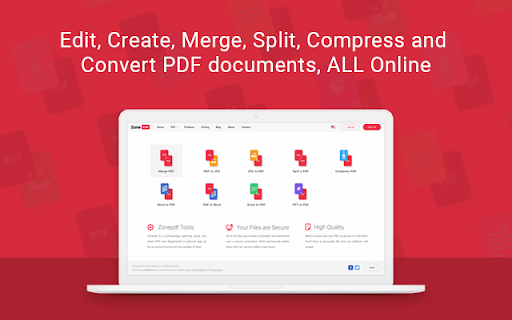


Edit, Convert, Merge, Compress and Split PDF Files in Seconds! Edit, Create, Sign, Merge, Split, Compress, and Convert PDF documents. Zone PDF: the easy, fast, and convenient way to manage PDF files and more. Zone PDF features powerful integrations like Google Drive, Dropbox, and DocuSign. Whether you prefer to upload your documents through online storage, our drag-and-drop feature, or directly from your files, we’ve got you covered. ➔ Edit & Create Content Manage text and pages, insert images and drawings, erase existing content, and much more! ➔ Merge Files Merge an unlimited number of files, easy and secure! You can also reorder your files with our drag & drop feature. ➔ Split PDFs Split a single PDF into multiple documents; split all pages in a single document, or select a range of pages and save them as a single new document. ➔ Compress Files Compress a PDF into a small pdf file; it’s fast, easy, and it stays high-quality! ➔ Convert To and From Images Convert unlimited images to PDF, or PDF to images; rest assured, all of your pictures and documents will retain their original quality. ➔ Convert To and From Office PDF to Word, Excel or PPT - no matter the type of document you’re working with, it’s no problem. The conversion process is easy, fast and secure. ➔ Integrations Load files from Google Drive and Dropbox, or sync all files with a Google drive as your storage. Link your DocuSign account for a smooth and easy signing process. ➔ Team Management Create, Edit and Manage your teams through simple and intuitive interface. Invite users from your organization to collaborate on your next big project. Trusted by millions of users online, we keep all of your information safe and secure. All of your documents are deleted from our servers just hours after being uploaded. Find out how Zone PDF can make your work life simple and easy by giving you the tools you need to succeed in an online world.

Xodo | PDF Editor, Converter & Merger
Free PDF tool to edit, convert, compress, merge, combine, crop, and redact PDF files. Enjoy the better PDF experience by adding Xodo to your Chrome browser! Access PDF converter, PDF combiner, PDF filler, PDF editor, PDF merger and more to supercharge your productivity online. Powerful PDF Converters and PDF tools to boost your productivity: - Convert PDF to Word, PPT, Excel, PDF/A, HTML, JPG, JPEG and PNG - Convert JPG, JPEG, PNG to PDF - Convert Word, Excel, Powerpoint to PDF - PDF Reader - Edit PDF - Merge PDF - Compress PDF - Crop and redact PDF - Fill PDF - Split PDF - Rotate PDF pages - Delete PDF pages - Reduce PDF size - Combine PDF files - Sign a PDF How to Use: - Install Xodo extension - Select an action from the top 5 tools - Upload your file and use our online tools to edit, convert, compress, merge, combine, crop, and redact. - Download your new file With Xodo you can process various file types: - PDF, PDF/A - Office: Word, Excel, powerpoint (doc, docx, xlsx, xlsm, ppt) - Images: JPG, JPEG, PNG, GIF, TIFF - HTML - DICOM NOTES: To access the full list of document processing tools, visit https://xodo.com By installing the Chrome extension, you agree to Xodo Terms of Use and Privacy Policy (https://xodo.com/legal)

Free PDF Editor
Fill up your PDF Forms quickly online for free. You can select files from your PC or Google Drive. This service is absolutely free of charge. Files of up to 100 Mb are supported , it is a full version and there are no upgrades/demo versions. We hope you enjoy using our online PDF Editor tool. Fill up your PDF Forms quickly online for free. With our website, you can begin to edit your PDF files for free. Our PDF Form Filler allows you to do the following functions. - Add text to PDF files - Fill out PDF forms - Bold/Italicize/Underline text in your PDF files - Highlight Terms in your PDF file - Password Protect PDF Files - Create PDF Forms - Print your PDF files out once you finish filling them in It is possible to load online PDF files directly in your browser, without having to save them onto your PC first. You can begin using our features by either uploading a PDF file from your computer, or creating a new PDF from scratch. All your PDF files are deleted from our servers within 1 hour and none of your personal data is stored. We take privacy concerns seriously and ensure this PDF experience works for our users.

DocHub - Sign PDF from Gmail
Sign and edit PDF documents Sign, edit, and share PDFs right from your Chrome™ browser or Gmail™ inbox. Sign email attachments and draft replies with signed documents attached without leaving your Gmail™ inbox. Use the DocHub extension for Chrome™ to open PDFs from a web URL in DocHub and then edit, sign, or share them with others. With DocHub's powerful editor, you can add text, images, comments, and highlights. You can also white out information, and underline or strike out text anywhere on a document without losing the document's original quality. Sign PDFs sent as email attachments using DocHub. Add your signature by drawing, typing, or uploading its picture. Once signed, you can reply to an email with the signed document attached — all without leaving your Gmail™ inbox. Manage your PDFs online. With DocHub, you can rearrange, add, and delete pages, or merge entire PDFs to create a new file with just a few clicks. Create forms with fillable fields for checkboxes, signatures, initials, and more, or build reusable templates to share unique copies with multiple recipients. Easily share a PDF via email, fax, and by public or personal URL, to securely collaborate on documents online. DocHub works seamlessly with various file formats. Improve teamwork by collaborating on documents within academic or business organizations that you can create in DocHub. Maintain security and compliance. DocHub ensures document security with password protection, access control, two-factor authentication, encrypted storage, and a detailed audit trail while helping you comply with HIPAA, FERPA, SOC 2 Type II, PCI DSS, CCPA, and GDPR regulations. Sign up and get started for free! DocHub’s generous free plan includes access to a variety of annotation, page management, and eSignature tools. When you’re ready to explore our full suite of features, upgrade to DocHub Pro and try it free for 30 days. You'll unlock the ability to handle the heaviest workloads and gain access to all of our premium tools. With DocHub Pro, you get everything in our free plan plus: Access to Premium Tools Unlimited eSignatures Unlimited Sign Requests Unlimited Saved Signatures Unlimited Document Storage … and much more!

PDF Editor for Chrome:Edit, Fill, Sign, Print
Edit, e-sign, print or fax PDFs directly from search engine results and webpages with the pdfFiller extension. Create, edit, and manage PDFs for free with a 30-day trial at pdffiller.com or add the pdfFiller extension to Chrome! Find the PDF form or document you need in Google Chrome and instantly edit, annotate, sign, and share it online with the pdfFiller extension, the feature-rich Chrome PDF editor. Forget about downloading and uploading documents or having to install expensive software. pdfFiller Chrome extension allows you to edit PDFs in Chrome, create fillable PDF forms & share them with others online, on any desktop or mobile device. Transform your static PDF into an interactive experience for both sender and receiver. Save time, money & increase your team’s efficiency with pdfFiller’s comprehensive document management solution. Get the PDF editor for Chrome: start your 30-day free trial now! ✳ Let’s see what you can do with the pdfFiller online PDF editor and creator. Type on a PDF online using the pdfFiller editor 1. Once you’ve installed the pdfFiller Chrome extension, you can edit a PDF in your browser. You’ll see an orange Fill button near the PDF document or form. 2. Click Fill to open the PDF in your pdfFiller account. Note: you have to create an account if you don’t have one. But don’t worry, it only takes a couple of minutes. 3. That’s it, your PDF is now editable and fillable. Use pdfFiller’s powerful editing tools to add text anywhere on a PDF document. Click Text in the top panel and start typing. 4. Choose other editing tools to modify new or existing text: highlight words and sentences, black out sensitive details, or erase text. 5. Save your fillable PDF from Chrome to your account, cloud or device storage. Write on a PDF on your Mac or Windows computer pdfFiller provides users with a powerful online writing tool. Just follow the steps above to instantly open your PDF document or form in Chrome using the pdfFiller editor. Click Draw in the top panel and start writing text where you need, or draw images, graphics, etc. How to save a fillable PDF on Chrome Once you are done editing your PDF, click DONE to save the document to your account. Alternatively, click the dropdown near the DONE button to convert your PDF, share with teammates or clients, send for signing, print, notarize, or send by fax, email, and text message. Sign a PDF using the pdfFiller web or mobile app With pdfFiller, you can sign your PDF document digitally in your office or while on the go. To edit a PDF online in Chrome and insert your legally-binding signature, click Fill to open a PDF in the pdfFiller editor. Choose Sign on the top panel and open the Signature Wizard. You can type, draw, capture your legally-binding signature or upload its image. Once your signature is ready, click anywhere in the document to add it. Convert a PDF online With the pdfFiller Chrome extension, you can convert any PDF file to Word, Excel, PowerPoint, or a JPEG image. 1. Open your PDF in Chrome using the pdfFiller editor. The pdfFiller editor automatically makes any PDF editable. 2. Edit, sign, annotate or add fillable fields to your PDF. 3. Once your document is ready, click the dropdown near the DONE button and choose Save As. 4. Choose the new format for your PDF. 5. Choose where you’d like to download your new document. ✳You must register a pdfFiller account to start a free pdfFiller trial and save your edited PDF document. A paid subscription plan is required to use pdfFiller’s advanced features. For support, visit https://www.pdffiller.com/en/support.htm Subscribe to our blog https://blog.pdffiller.com/ Follow us on Twitter: @pdf_filler Like us on Facebook: facebook.com/pdffiller
