
gphandlahdpffmccakmbngmbjnjiiahp
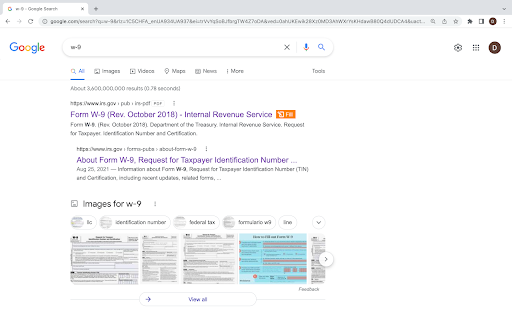


Edit, e-sign, print or fax PDFs directly from search engine results and webpages with the pdfFiller extension. Create, edit, and manage PDFs for free with a 30-day trial at pdffiller.com or add the pdfFiller extension to Chrome! Find the PDF form or document you need in Google Chrome and instantly edit, annotate, sign, and share it online with the pdfFiller extension, the feature-rich Chrome PDF editor. Forget about downloading and uploading documents or having to install expensive software. pdfFiller Chrome extension allows you to edit PDFs in Chrome, create fillable PDF forms & share them with others online, on any desktop or mobile device. Transform your static PDF into an interactive experience for both sender and receiver. Save time, money & increase your team’s efficiency with pdfFiller’s comprehensive document management solution. Get the PDF editor for Chrome: start your 30-day free trial now! ✳ Let’s see what you can do with the pdfFiller online PDF editor and creator. Type on a PDF online using the pdfFiller editor 1. Once you’ve installed the pdfFiller Chrome extension, you can edit a PDF in your browser. You’ll see an orange Fill button near the PDF document or form. 2. Click Fill to open the PDF in your pdfFiller account. Note: you have to create an account if you don’t have one. But don’t worry, it only takes a couple of minutes. 3. That’s it, your PDF is now editable and fillable. Use pdfFiller’s powerful editing tools to add text anywhere on a PDF document. Click Text in the top panel and start typing. 4. Choose other editing tools to modify new or existing text: highlight words and sentences, black out sensitive details, or erase text. 5. Save your fillable PDF from Chrome to your account, cloud or device storage. Write on a PDF on your Mac or Windows computer pdfFiller provides users with a powerful online writing tool. Just follow the steps above to instantly open your PDF document or form in Chrome using the pdfFiller editor. Click Draw in the top panel and start writing text where you need, or draw images, graphics, etc. How to save a fillable PDF on Chrome Once you are done editing your PDF, click DONE to save the document to your account. Alternatively, click the dropdown near the DONE button to convert your PDF, share with teammates or clients, send for signing, print, notarize, or send by fax, email, and text message. Sign a PDF using the pdfFiller web or mobile app With pdfFiller, you can sign your PDF document digitally in your office or while on the go. To edit a PDF online in Chrome and insert your legally-binding signature, click Fill to open a PDF in the pdfFiller editor. Choose Sign on the top panel and open the Signature Wizard. You can type, draw, capture your legally-binding signature or upload its image. Once your signature is ready, click anywhere in the document to add it. Convert a PDF online With the pdfFiller Chrome extension, you can convert any PDF file to Word, Excel, PowerPoint, or a JPEG image. 1. Open your PDF in Chrome using the pdfFiller editor. The pdfFiller editor automatically makes any PDF editable. 2. Edit, sign, annotate or add fillable fields to your PDF. 3. Once your document is ready, click the dropdown near the DONE button and choose Save As. 4. Choose the new format for your PDF. 5. Choose where you’d like to download your new document. ✳You must register a pdfFiller account to start a free pdfFiller trial and save your edited PDF document. A paid subscription plan is required to use pdfFiller’s advanced features. For support, visit https://www.pdffiller.com/en/support.htm Subscribe to our blog https://blog.pdffiller.com/ Follow us on Twitter: @pdf_filler Like us on Facebook: facebook.com/pdffiller

PrintFriendly: Print Clean Pages, Save as PDF & Screenshot, AI Tools
Join millions of users who rely on PrintFriendly to print web pages, convert any webpage to PDF, or take full-page screenshots, all without ads, sidebars, or clutter. It works like a reader mode, but gives you more control: adjust text size, remove images, edit text, highlight key content, and customize your layout before printing or saving. PrintFriendly is perfect for teachers, students, researchers, and anyone who needs clean, printable, shareable content. Print articles, save recipes as PDFs, archive research, and even capture conversations with tools like Claude and Gemini. 🪄 Convert Web Pages to PDF Turn any webpage into a clean, professional PDF without ads, headers, or navigation. Preserve text, images, and links with full support for non-Latin characters and right-to-left languages. Adjust margins, choose between A4 and Letter page sizes, and download with one click. Log into the extension to sync your account with printfriendly.com, where you can also convert, compress, edit, merge, and sign PDFs. Upload PDF, DOCX, XLSX, JPG, and other file types for conversion. Your settings and preferences sync between the extension and website. 🖨️ Print Web Pages Without Clutter Remove ads, pop-ups, navigation bars, and footers to create clean printouts of any webpage. Use Delete mode to remove entire sections or click and drag to remove multiple blocks at once. Use Highlight to emphasize important content, or switch to Edit mode to modify text directly on the page. 📸 Full-Page Screenshots Capture a full-page screenshot or current-view screenshot of any webpage with one click. Works on sites with iframes, dynamic content, and complex layouts. Export screenshots as PNG, JPG, or PDF. Ideal for archiving web pages, saving visual records, or sharing content exactly as it appears on screen. ✏️ Edit, Delete & Highlight Before You Save Make changes directly on the page before printing or saving as PDF. Modify text, adjust font size, remove images, delete unwanted sections, and highlight important information. All editing tools work in full-screen mode with undo support. 🤖 AI Page Summaries Generate AI-powered summaries of any web page directly inside PrintFriendly. Quickly understand long articles, research papers, or complex content without reading every word. Upgrade your printing, PDF conversion, and screenshot experience today with PrintFriendly. By using this extension, you agree to our Terms of Service and Privacy Policy:

PDF Viewer Pro - View, Edit, Fill, Convert, Sign, and More
PDF Viewer Pro: Your all-in-one PDF solution. View, edit, fill, comment, and sign PDFs seamlessly in your browser. PDF Viewer Pro is an advanced and user-friendly browser extension that allows you to view and edit PDF files directly within your browser, all for free. As a leading solution in PDF reading, PDF Viewer Pro integrates seamlessly with Google Chrome, offering an exceptional PDF viewing experience and enhanced productivity. - **Comprehensive PDF Application:** PDF Viewer Pro is a fully functional PDF web application designed for your busy lifestyle. It provides a complete suite of tools accessible from any device, making it ideal for on-the-go use. - **Conversion Capabilities:** - Convert PDFs to and from Word, Excel, PowerPoint, JPG, JPEG, PNG, and HTML. - Convert images (JPG, JPEG, PNG) to PDF and vice versa. - **PDF Management:** - Merge, Split, and Extract PDF Pages - Edit, Rotate, and Delete PDF Pages - Compress PDF Files - Sign and Send PDFs for Signature - Protect and Unlock PDF Documents 1. Install the PDF Acrobat extension for Chrome. 2. Pin the extension for easy access. 3. Open any PDF file directly in your browser. 4. Choose from the available PDF Acrobat tools to edit or convert your PDF. - **Productivity Boost:** Enhance your workflow with features such as PDF compression, merging, splitting, and more. - Supports Microsoft Office formats including Word, Excel, and PowerPoint. - Provides integration with Adobe Acrobat for additional PDF editing and conversion tools. Experience a better PDF interaction by adding PDF Viewer Pro to your Chrome browser. Enjoy tools for editing, converting, compressing, merging, and managing PDFs all from one place. We hope PDF Viewer Pro enhances your PDF handling experience. We welcome your feedback and suggestions for further improvements.

Free PDF Editor & Reader — Compress, Merge, Convert PDFs · PDFly
PDFly extension gives you everything you need to work with PDF files — right inside Google Chrome and easy-to-use. • PDF reader with smooth scrolling and zoom controls • Handle large PDF files with optimized rendering • Navigate via Thumbnails, Bookmarks, or Headlines • Annotate PDF - add comments, highlights, text, and free hand drawings • View PDF comments, reply and add new comments • Fill PDF forms with automatic form detection • PDF to Word (DOCX) converter including OCR • Word to PDF - create PDF from Word documents instantly • PDF to JPG and JPG to PDF conversion • PDF to PNG and PNG to PDF transformation • PDF to Excel for data extraction and editing • Batch mode to convert multiple files at once • Merge PDF files - combine multiple PDFs into one document • Split PDF - separate large PDFs into smaller files • Extract PDF pages - save specific pages as new documents • Rotate PDF pages and delete unwanted pages • Reorder PDF pages with drag-and-drop simplicity • Delete PDF pages - delete any PDF page from your PDF document • Reduce file size while keeping quality • See preview which files require optimization • Choose from two advanced compression levels • Option to preserve Metadata, Bookmarks, Annotations and advanced PDF compatibility • Batch mode to compress multiple files at once • Password protect PDF files with encryption • Custom allow printing, text copying, form filling even for password-protected PDF • Unlock PDF - remove password protection from secured files • Secure PDF sharing with built-in protection • 256-bit encryption as standard • Batch mode to password-protect multiple files at once • Translate PDF - translate entire documents to 50+ languages with auto-detection of document language • Copy the translated output • Translations are processed securely using cloud connectivity • Summarize PDF - get instant AI summaries of long documents • Choose summary length, focus of summary (general, technical points, key points) and output langauge • Summaries are processed securely using cloud connectivity PDF editor, PDF reader, PDF converter in one app Replace multiple PDF tools with this single solution Compatible with Adobe PDF standards and all PDF formats Handle large PDF files with optimized rendering Batch process multiple PDF documents simultaneously Modern, intuitive interface designed for Windows Free: Unlimited free PDF reader and all basic PDF editing tools Pro: Advanced options, batch mode, no ads, AI tools (summaries, translate, OCR), unlimited files

Fill Out PDF
Easily fill out, edit, and sign PDF forms. Add text, highlight, and comment — all right in your browser. Boost your productivity with this powerful Chrome extension designed to help you fill out PDF forms instantly. Whether you want to fill out files, this tool simplifies the entire process for work, school, or everyday tasks. If you have ever wondered how to fill out a pdf form without installing software, this extension provides the fastest solution. It opens directly in your browser, making it easy to edit pdf, and handle documents in seconds. Enjoy a smooth workflow while filling out a pdf, adding text, making comments, or updating form fields. With our pdffiller, you get everything you need to edit documents right from your Chrome toolbar. This extension is ideal for anyone searching for how to fill out pdf files in the simplest way possible. It handles interactive fields, typed content, digital signatures, and more. Our online pdf editor is designed to help you fill out your documents quickly. Whether you are dealing with applications, agreement, surveys, or reports, the process is simple and intuitive. ✅ No software installs —just use a PDF editor right in your browser. ✅ Add text, highlights, and comments with intuitive tools. ✅ Create digital signatures. Perfect for approvals and agreements. ✅ Turn any static file into a fillable document and edit it like a form. ✅ Your files never leave your computer. All editing happens locally for maximum privacy. ✅ Runs directly from the Chrome toolbar and loads documents in seconds. Perfect for users who work on the go, the extension loads any file fast and lets you fill out your documents online securely. Our integrated pdffiller engine allows you to add or adjust content and finalize forms professionally. 1️⃣ Contracts and professional documents. Perfect for reviewing agreements, proposals, and service contracts. 2️⃣ Student assignments and academic paperwork. Ideal for filling out school forms, research submissions, or annotating documents. 3️⃣ HR internal company forms. Streamline paperwork such as onboarding packets, attendance sheets or performance evaluations. 4️⃣ Client-facing applications. Excellent for industries like finance, insurance, consulting or healthcare. 5️⃣ Approvals and remote collaboration. Useful for anyone who needs to authorize documents, confirm agreements, or approve internal workflows. 6️⃣ Government forms and applications. Complete tax forms, visa applications, and other documents. 7️⃣ Everyday personal tasks. Convenient for filling out rental agreements, medical forms or travel documents. When searching for how to edit a pdf or how to fill out forms online, this extension provides a complete solution. It gives you powerful edit pdf tools combined with the simplicity of a browser experience. 🔥 Additional features you will appreciate: 🔺 Fill out pdf online with typed text 🔺 Add checkmarks, shapes and highlights 🔺 Edit pdf documents without external apps 🔺 Save filled forms instantly ❓ How do I fill out a PDF form in my browser? 💡You can edit pdf instantly by opening the file with the extension. It launches an online PDF editor where you can type text, add comments, and sign. ❓ How to edit form if it isn’t fillable? 💡If your document doesn't include interactive fields, the extension lets you type anywhere on the page. ❓How can I edit PDF form securely? 💡All editing, signing, and form filling happens on your device. The extension processes files locally, without uploading them to external servers. ❓How do I sign a form? 💡Open your file, select Sign PDF, and draw your signature. Apply it anywhere inside the document, then save the form instantly. ❓Can I edit documents online from my phone? 💡No. The tool allows to fill out your documents online in Chrome browser on your desktop. For anyone who frequently deals with forms, this is the easiest way to fill pdf files online. You no longer need to print, or scan anything. Whether you need a reliable pdf filler for everyday use, this extension delivers a fast and hassle free experience. It is your all in one assistant for how to fill out pdf files online. Start using the extension now to simplify any workflow, boost your efficiency, and enjoy stress free filling out your forms. Install it today and transform the way you manage documents.
