
lpkaodjnpmklkcjlchephbdfoaeliohm


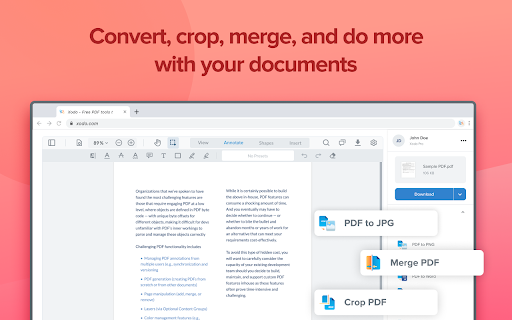
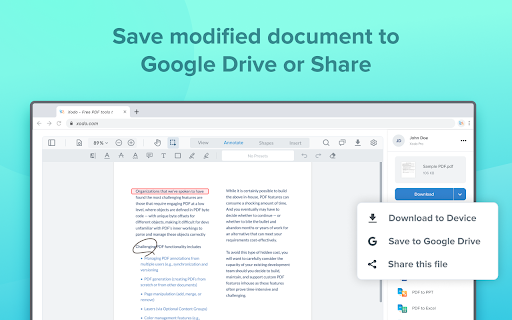
Free PDF tool to edit, convert, compress, merge, combine, crop, and redact PDF files. Enjoy the better PDF experience by adding Xodo to your Chrome browser! Access PDF converter, PDF combiner, PDF filler, PDF editor, PDF merger and more to supercharge your productivity online. Powerful PDF Converters and PDF tools to boost your productivity: - Convert PDF to Word, PPT, Excel, PDF/A, HTML, JPG, JPEG and PNG - Convert JPG, JPEG, PNG to PDF - Convert Word, Excel, Powerpoint to PDF - PDF Reader - Edit PDF - Merge PDF - Compress PDF - Crop and redact PDF - Fill PDF - Split PDF - Rotate PDF pages - Delete PDF pages - Reduce PDF size - Combine PDF files - Sign a PDF How to Use: - Install Xodo extension - Select an action from the top 5 tools - Upload your file and use our online tools to edit, convert, compress, merge, combine, crop, and redact. - Download your new file With Xodo you can process various file types: - PDF, PDF/A - Office: Word, Excel, powerpoint (doc, docx, xlsx, xlsm, ppt) - Images: JPG, JPEG, PNG, GIF, TIFF - HTML - DICOM NOTES: To access the full list of document processing tools, visit https://xodo.com By installing the Chrome extension, you agree to Xodo Terms of Use and Privacy Policy (https://xodo.com/legal)

Online PDF tools | ilovepdf.com
iLovePDF is an online service to work with PDF files completely free and easy to use. iLovePDF helps millions of people manage documents every day. From individuals to businesses and global companies, we simplify document management. With the iLovePDF Chrome Extension, you get all your essential PDF tools in one place: merge, split, compress, convert, edit, protect, and sign PDFs directly from your browser. Trusted worldwide, iLovePDF is consistently rated highly for its ease of use, performance, and reliability, and has been recognized in industry awards for document productivity. ORGANIZE PDF FILES • Merge PDF: Combine multiple PDFs into one organized file. Arrange pages easily for reports, contracts, or multi-part documents. • Split PDF: Extract pages or split PDFs into smaller files. Share only what’s needed or break large documents into manageable parts. • Organize PDF: Reorder, rotate, or delete pages with ease. Clean up and structure your PDF before sharing or submitting. •Create PDF: Convert files into clean, shareable PDFs. Keep formatting consistent for professional results. OPTIMIZE & OCR PDFs • Compress PDF: Reduce file size without losing quality. Ideal for faster uploads, sharing, and saving storage space. • OCR PDF (Optical Character Recognition): Turn scanned PDFs into searchable, editable text. Work with content instead of static images. CONVERT TO PDF • JPG to PDF / Image to PDF: Convert images into PDF files. Perfect for receipts, screenshots, and scanned documents. • Word to PDF: Convert DOC and DOCX to PDF while preserving layout. Share documents without formatting issues. • Excel to PDF: Turn spreadsheets into PDFs. Share data clearly without exposing formulas or editable cells. • PowerPoint to PDF: Convert presentations into PDF format. Share slides in a consistent, print-ready layout. CONVERT PDF TO OTHER FORMATS • PDF to Word: Convert PDFs into editable Word files. Update content without retyping from scratch. •PDF to Excel: Extract tables into Excel for editing and analysis. Work easily with structured data. •PDF to JPG: Convert PDF pages into images. Ideal for sharing visuals or embedding in other content. •PDF to PowerPoint: Turn PDFs into editable slides. Repurpose content for presentations quickly. EDIT PDF •Edit PDF: Add text, comments, or edits directly in your PDF. Update content without switching tools. •Rotate PDF: Fix page orientation in seconds. Ensure your document is properly aligned and readable. •Add Watermark: Add text or logos to your PDF. Mark documents as drafts, branded, or confidential. PDF SECURITY AND E-SIGN •Unlock PDF: Remove passwords from PDFs you’re authorized to access. Edit and use your files freely. •Protect PDF: Add password protection to secure your PDFs. Keep sensitive documents safe. •Sign PDF: Add electronic signatures quickly. Sign agreements, contracts, and approvals online. Why Choose iLovePDF? •All-in-one PDF toolkit in your browser •Fast, intuitive, and easy to use •Secure file processing you can trust •Clean, distraction-free interface •Trusted by millions worldwide

CocoDoc - PDF Editor, Filler & Converter
Easily edit, convert, split, and compress a PDF online. Get easy access to any PDF related tool you need: ★ Add text, note, date, type on a PDF ★ Convert PDF to Word, Excel, PPT, JPG, PNG, etc. ★ Convert Word, Excel, PPT, JPG, PNG, etc., to PDF ★ Compress a PDF ★ Sign PDFs and send for signature ★ Merge, Split and Extract PDF Pages ★ Download, send and share PDF files ★ Protect and Unlock PDF ★ Create PDF forms ★ Rotate PDFs ★ Delete PDF Pages ★ Sign PDFs ★ Erase, Redact, & Highlight PDFs Just add CocoDoc to your Chrome and start using the tools for any PDF in your browser! You can download the edited PDF or print it out, effortlessly and quickly.🚀🚀 Simplify PDFs handling and improve work efficiency by 90% with CocoDoc Business, you can: ● Unlimited storage, edit as many PDF files as you wish ● Protect your PDF documents with password and military-grade encryption ● Add unlimited electronic signatures to your PDF documents ● Manage PDFs with your co-workers and enhance collaboration Get 999+ Fillable & Downloadable forms, agreements, and templates from CocoDoc: ● IRS Tax Forms ● Consent Forms ● Contract Templates ● Business Proposal Templates ● Finance Forms ● … Uncover full potential with the best online PDF editor: https://cocodoc.com/

PDF4me - Edit, Merge, Compress & Convert PDF
Convert and Manage your documents quickly from your browser PDF4me Chrome Extension - Your PDF Toolkit Transform PDFs directly in your browser with PDF4me's powerful Chrome extension. Access professional PDF tools for conversion, compression, editing, and more. Key Features: • Convert PDFs to/from Word, Excel, PPT, Images • Compress and optimize PDFs • Merge, split, and edit PDFs • Add watermarks and barcodes • Advanced OCR text extraction Quick Start: 1. Install the extension 2. Enable 'Allow access to file URLs' 3. Open any PDF in Chrome 4. Click the PDF4me icon to begin Your documents are processed securely with no permanent storage. Visit pdf4me.com/pricing for subscription options. By installing, you agree to our Privacy Policy and Terms of Service (pdf4me.com/help/privacy-and-security).

WPS PDF - Read, Edit, Fill, Convert, and AI Chat PDF with Ease
Easy-to-use PDF tools to view, edit, convert, fill, e-sign PDF files, and more in your browser. WPS PDF, part of the WPS Office suite with over 600 million monthly active users worldwide, offers an efficient approach to managing PDFs. Now integrated into Google Chrome, it enables effortless handling of PDF files across both desktop and web platforms, ensuring a consistent and powerful user experience. By adding the extension in Chrome, you can gain instant access to a wide range of tools, including various editing tools, parallel translate, fill & sign, chat PDF, drawing highlights, adding comments, making notes, and more. More features are waiting for your exploration here. How to Use the WPS PDF Chrome Extension: • Install and pin WPS PDF Chrome Extension • Open your PDFs in browser • Browse and process your PDFs View, Download, Print, and Store PDFs • Get the best PDF viewing experience online with WPS PDF extension. • Download or print your PDFs with a quick click. • Sign in to store your PDF files for fast access to them from anywhere. • Find your PDFs instantly. Edit PDFs • Add notes, text comments, and highlights to improve your work efficiency. • Use drawing tools to freely mark your ideas on your PDFs. • Unlock full PDF edit tools in WPS Office desktop, such as managing pages, extracting PDFs, protecting PDFs, combining PDF files, compressing PDFs, and more. Fill and Sign PDFs • Open a PDF file in WPS PDF extension and then fill or sign it in your WPS Office desktop. • Easily complete a form within WPS Office Fill & Sign feature. • E-sign your documents with your signatures or initials. Explore More Popular Premium Tools to Elevate Your Performance in Chrome PDF Parallel Translate • Supported by reliable LLMs with various languages. • Provide precise and layout-preserved translation. • Side-by-side comparison for intuitive reading and checking. Chat PDF • Extract essential information and provide concise summaries through insight. • Gain deeper insights and suggestions by asking the intelligent AI. • Provides credible and accurate AI responses backed by supporting citations. PDF Converter Offers over a dozen PDF solutions on the WPS online platform. Enjoy quick and high-quality PDF conversions to streamline your workflow. • Convert PDF to Word • Convert PDF to Excel • Convert PDF to PPT • Convert Word to PDF • Convert Excel to PDF • Convert PPT to PDF • Convert JPG to PDF Besides the PDF converter here, you can also find PDF tools such as compressor, splitter, merger, and more.
