
ahlpdiblbmmedijjcnpcdlleodikdapi

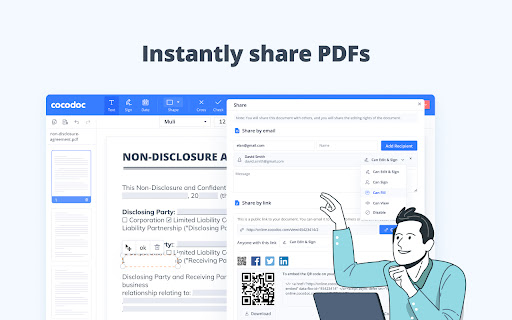
Easily edit, convert, split, and compress a PDF online. Get easy access to any PDF related tool you need: ★ Add text, note, date, type on a PDF ★ Convert PDF to Word, Excel, PPT, JPG, PNG, etc. ★ Convert Word, Excel, PPT, JPG, PNG, etc., to PDF ★ Compress a PDF ★ Sign PDFs and send for signature ★ Merge, Split and Extract PDF Pages ★ Download, send and share PDF files ★ Protect and Unlock PDF ★ Create PDF forms ★ Rotate PDFs ★ Delete PDF Pages ★ Sign PDFs ★ Erase, Redact, & Highlight PDFs Just add CocoDoc to your Chrome and start using the tools for any PDF in your browser! You can download the edited PDF or print it out, effortlessly and quickly.🚀🚀 Simplify PDFs handling and improve work efficiency by 90% with CocoDoc Business, you can: ● Unlimited storage, edit as many PDF files as you wish ● Protect your PDF documents with password and military-grade encryption ● Add unlimited electronic signatures to your PDF documents ● Manage PDFs with your co-workers and enhance collaboration Get 999+ Fillable & Downloadable forms, agreements, and templates from CocoDoc: ● IRS Tax Forms ● Consent Forms ● Contract Templates ● Business Proposal Templates ● Finance Forms ● … Uncover full potential with the best online PDF editor: https://cocodoc.com/

PDF4me - Edit, Merge, Compress & Convert PDF
Convert and Manage your documents quickly from your browser PDF4me Chrome Extension - Your PDF Toolkit Transform PDFs directly in your browser with PDF4me's powerful Chrome extension. Access professional PDF tools for conversion, compression, editing, and more. Key Features: • Convert PDFs to/from Word, Excel, PPT, Images • Compress and optimize PDFs • Merge, split, and edit PDFs • Add watermarks and barcodes • Advanced OCR text extraction Quick Start: 1. Install the extension 2. Enable 'Allow access to file URLs' 3. Open any PDF in Chrome 4. Click the PDF4me icon to begin Your documents are processed securely with no permanent storage. Visit pdf4me.com/pricing for subscription options. By installing, you agree to our Privacy Policy and Terms of Service (pdf4me.com/help/privacy-and-security).

Editar PDF
Employ Editar PDF to effortlessly edit documents with this Chrome Extension — ideal for quick customization and edit PDF online. 📄 Simplify Your Experience Editar PDF is the ultimate solution for seamless redacting. Whether you need to modify text, adjust layouts, or add annotations, this Chrome Extension offers the tools to edit PDF files effortlessly. Say goodbye to complicated software—welcome a user-friendly experience right in your browser. ✨ Editar PDF empowers you with comprehensive tools to: - Edit text in PDF with precision. - Convert files into editable PDF formats. - Modify layouts and edit format. - Explore how this online redactor simplifies the way you manage and customize documents. 🌐 Easy-to-Use Online document editor Forget downloading bulky programs. With Editar PDF, you can redact documents directly from your browser. It’s perfect for anyone who needs to redactable file without hassle. Experience quick loading times, intuitive tools, and seamless file handling. 🚀 What Makes Exceptional? Tool stands out for its exceptional features. It offers a fast and reliable way to edit documents, allowing you to make changes in seconds.Your data remains secure and private throughout the process, giving you peace of mind. Plus, the cloud-based convenience of this tool means you can access it anytime, anywhere. 📈 Redact docs with comfort 📌 Need to make changes to a document? With our tool, you can easily: 📌 Redact text or add new information. 📌 Modify layouts to fit your needs. 📌 Use the online modify PDF feature to tweak files instantly. ✏️ Add Text and More You can add text to PDF, insert images, and even change formatting. It’s perfect for creating polished documents or making quick adjustments. From contracts to study materials, it’s never been easier to manage your files. 💻 A Seamless Online Experience The original tool ensures a smooth editing process. It’s designed for speed and reliability, making it the go-to choice for work with docs. You can easily redact document online or even edit an online PDF without worrying about software compatibility. 💡 Comprehensive Features ✅ With this product, you get a range of features, including: ✅ PDF edit online for quick modifications. ✅ Tools to redact formats and layouts. ✅ A robust PDF editor web platform for all your needs. 🤝 Collaborate and Share Effortlessly Need to share updated files? You can easily collaborate with others service. Whether you need to make adjustments, add signatures, or refine details, this PDF online editor ensures your team stays on the same page. 📱 Redact Documents Anywhere Whether you’re on a laptop, tablet, or smartphone, extension offers a consistent editing experience. It’s perfect for users who need to edit PDF document on the go. The extension works seamlessly across devices, making it incredibly versatile. 🌍 Modify in Any Language Designed with global users in mind, Editar PDF supports multilingual documents. Whether you’re editing in English, Spanish, French, or any other language, you can edit PDF online with confidence. The editor for documents feature is ideal for international teams. 👍 Great for Personal and Professional Use 💼 From editing resumes to preparing contracts, Editar PDF is tailored for various use cases: 💼 Students can quickly edit PDF for assignments. 💼 Professionals can fine-tune reports and presentations. 💼 Businesses can use the tool to generate editable PDF for clients. 🗂 Perfect for All File Types Whether it’s contracts, eBooks, or presentations, Editar PDF handles a wide range of formats effortlessly. You can customize files, add annotations, or even extract specific pages, making it a versatile tool for all your document management needs. 🔧 Power users will love the advanced options in instrument, such as: 1. Batch editing for multiple documents. 2. High-quality exports in various formats. 3. Integration with other tools for a streamlined workflow. ⚡ Editar PDF is designed to save you time and effort. With its intuitive tools, you can quickly make adjustments, whether you need to edit text, rearrange pages, or format a document. This extension ensures that your workflow remains smooth and uninterrupted. 🌟 Hidden Gems You’ll Appreciate 🔄 Add custom annotations to highlight important details. 🔄 Rearrange file layouts effortlessly for better organization. 🌍 Unlock Global Accessibility Editing tools designed with international users in mind ensure compatibility with various languages and formats. This makes it easier to collaborate across borders, share updated versions, and maintain consistency in multi-language projects. 🎉 Start apply today! Ready to transform the way you manage documents? Install extension now and unlock the full potential of online PDF editing. Whether you need to edit a PDF, add text to file, or make layout changes, this extension has you covered.

zPDF—Free Simple PDF Editor
A Simple PDF Editor: Split pages, Merge, Rearrange, add Signature, Image and Multi-language Text. — Offline and Private. Easy, Simple, Quick zPDF was designed for editing PDFs with ease and speed. It currently supports merging documents, rearranging/removing pages, adding images, text, watermarks, and signing documents, etc. Your Privacy Matters Supports editing PDF offline, with privacy. All editing is done by client's browser. No need to upload private/sensitive PDF over the Internet to random sites, or processed by AI servers online just for a simple edit. Unicode Multi-language PDF Support most languages and with Unicode fonts embeded inside PDF, includes syllabaries languages like Japanese, Korean, Chinese and Arabic, Minimize chances of un-rendered characters ("boxes"). Cross-Platform Designed to be cross-platform for both mobile (Android/iOS) and desktop (Windows/MacOS/Linux). It now works inside browser as PWA or as Chrome/Edge Plugin. Ongoing Improvement Will updates the software to enhance functionality. You may contact through email. If you like the program, consider donation for support. Tutorial for zPDF: ( https://zpdf.zenqlo.com/docs/Edit-PDF/openPDF ) End-User License Agreement (EULA) with PRIVACY POLICY: ( https://zpdf.zenqlo.com/privacy/ )

PDF Editor Extension - PDFzorro
Open PDF files with Google Chrome™ and edit them with this PDFzorro Extension With this extension you can edit PDF files, that are opened in Google Chrome™. You also can open the free Online-PDF-Editor to edit PDF in the browser. You can rotate, split, sort pages. Secure or unsecure PDF files. Add text, annotation, draws or marks into the PDF. You also can add images to the PDF. Convert PDF to Word, Excel or PowerPoint. Enjoy PDFzorro, for free!
