
icbddibgmpdonpogkcnambimgncliipl
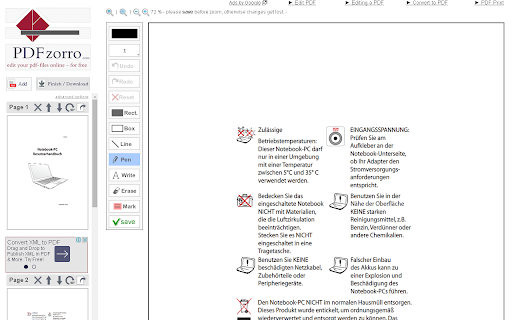


Open PDF files with Google Chrome™ and edit them with this PDFzorro Extension With this extension you can edit PDF files, that are opened in Google Chrome™. You also can open the free Online-PDF-Editor to edit PDF in the browser. You can rotate, split, sort pages. Secure or unsecure PDF files. Add text, annotation, draws or marks into the PDF. You also can add images to the PDF. Convert PDF to Word, Excel or PowerPoint. Enjoy PDFzorro, for free!

CocoDoc - PDF Editor, Filler & Converter
Easily edit, convert, split, and compress a PDF online. Get easy access to any PDF related tool you need: ★ Add text, note, date, type on a PDF ★ Convert PDF to Word, Excel, PPT, JPG, PNG, etc. ★ Convert Word, Excel, PPT, JPG, PNG, etc., to PDF ★ Compress a PDF ★ Sign PDFs and send for signature ★ Merge, Split and Extract PDF Pages ★ Download, send and share PDF files ★ Protect and Unlock PDF ★ Create PDF forms ★ Rotate PDFs ★ Delete PDF Pages ★ Sign PDFs ★ Erase, Redact, & Highlight PDFs Just add CocoDoc to your Chrome and start using the tools for any PDF in your browser! You can download the edited PDF or print it out, effortlessly and quickly.🚀🚀 Simplify PDFs handling and improve work efficiency by 90% with CocoDoc Business, you can: ● Unlimited storage, edit as many PDF files as you wish ● Protect your PDF documents with password and military-grade encryption ● Add unlimited electronic signatures to your PDF documents ● Manage PDFs with your co-workers and enhance collaboration Get 999+ Fillable & Downloadable forms, agreements, and templates from CocoDoc: ● IRS Tax Forms ● Consent Forms ● Contract Templates ● Business Proposal Templates ● Finance Forms ● … Uncover full potential with the best online PDF editor: https://cocodoc.com/

Split PDF
Fast and easy way to Split PDF files online Select or drag your files, then click the Split button to download your document into one pdf file. All split files maintain the best quality which can be accepted on any web platform (when uploading to a website or attaching as email). Your files are fully secure as they are been transferred over a secure connection. We’ll permanently delete all files from our servers within a few hours after conversion.

PDF Mage
Click to save page as PDF PDF Mage lets you save the page you are currently viewing as a high quality PDF file. Features: - Saves a page with a single click of a button - Works with any page you are currently viewing, even if it requires a login - No watermarks applied - Automatically downloads the saved PDF file - Capable of saving parts of a web page as PDF Note: this extension requires an Internet connection to operate. It uses an external API to convert a web page into a PDF file and lets you download the file once the conversion is completed.

Xodo | PDF Editor, Converter & Merger
Free PDF tool to edit, convert, compress, merge, combine, crop, and redact PDF files. Enjoy the better PDF experience by adding Xodo to your Chrome browser! Access PDF converter, PDF combiner, PDF filler, PDF editor, PDF merger and more to supercharge your productivity online. Powerful PDF Converters and PDF tools to boost your productivity: - Convert PDF to Word, PPT, Excel, PDF/A, HTML, JPG, JPEG and PNG - Convert JPG, JPEG, PNG to PDF - Convert Word, Excel, Powerpoint to PDF - PDF Reader - Edit PDF - Merge PDF - Compress PDF - Crop and redact PDF - Fill PDF - Split PDF - Rotate PDF pages - Delete PDF pages - Reduce PDF size - Combine PDF files - Sign a PDF How to Use: - Install Xodo extension - Select an action from the top 5 tools - Upload your file and use our online tools to edit, convert, compress, merge, combine, crop, and redact. - Download your new file With Xodo you can process various file types: - PDF, PDF/A - Office: Word, Excel, powerpoint (doc, docx, xlsx, xlsm, ppt) - Images: JPG, JPEG, PNG, GIF, TIFF - HTML - DICOM NOTES: To access the full list of document processing tools, visit https://xodo.com By installing the Chrome extension, you agree to Xodo Terms of Use and Privacy Policy (https://xodo.com/legal)
