
gknphemhpcknkhegndlihchfonpdcben
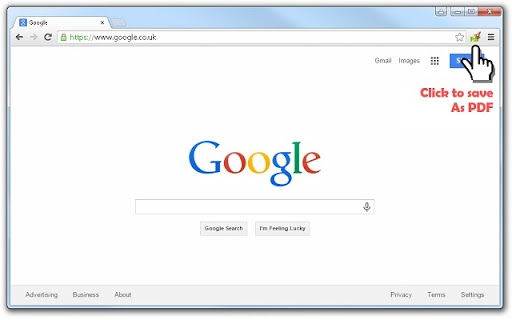
Click to save page as PDF PDF Mage lets you save the page you are currently viewing as a high quality PDF file. Features: - Saves a page with a single click of a button - Works with any page you are currently viewing, even if it requires a login - No watermarks applied - Automatically downloads the saved PDF file - Capable of saving parts of a web page as PDF Note: this extension requires an Internet connection to operate. It uses an external API to convert a web page into a PDF file and lets you download the file once the conversion is completed.

Veeva Web2PDF
Create a PDF of your website that captures user interactions and links. We understand that dynamic and interactive elements can make up a large portion of your website. Dynamic elements are any aspects of a webpage that may not be displayed immediately as the page loads, such as an image slider, dropdown menu, or questionnaire. These elements are usually JavaScript-based and may require some user interaction. You can browse your site and drop hints along the way with Hintify mode. Right click on anything you want to add a hint to and the Veeva Web2PDF Chrome extension automatically translates your clicks into hint actions that you can easily preview by generating a PDF directly from the Chrome extension. These hints are saved locally to your computer and you can share them with others by downloading a .json file from the Hint Tab. You can also download your hints as a .js file to make them permanent on your website via touchless hints. To learn more, please visit https://www.veevaweb2pdf.com.

Gaaiho PDF
Convert a web page to PDF IMPORTANT NOTICE: This is an outdated addon and exists only to serve users of older versions. In accordance with our rebranding policy effective from May, 2022, "Right PDF" has replaced Gaaiho as the brand name. Designed for Google Chrome, Gaaiho PDF is a plug-in from Gaaiho PDF Driver 4 which enables you to convert webpages to PDF right inside the browser. Further, you may also right-click a link and select to convert link target to PDF. This way, you can convert the webpage to PDF without having to personally open it. Main features: Convert current webpage to PDF Convert current webpage and add to existing PDF Convert current webpage and send as email attachment Convert current webpage and send to supported DMS Right-click a link and select to convert link target to PDF Right-click a link and select to convert link target to existing PDF Rich layout settings provide page size and orientation options

Print Selection to PDF
Select a text and print it to PDF via mouse right-click. Print Selection to PDF is an extension that helps you print a selection of words or sentences to a PDF document. To work with this addon, simply select a word or sentence with your mouse, right-click on the selection, and then click on - Print Selection to PDF item. The selection (only the text content) will be downloaded as a PDF document to your machine in the default download folder. If you want to change the download folder, please head to the settings page in your browser and change the download folder from there. There are also several settings to adjust for this addon which you can find on the options page. For example, you can adjust the page layout, unit, type, font family, size style, etc. Note: This add-on uses the jsPDF library to print a document to PDF. jsPDF is a free and open-source client-side JavaScript PDF library; to get more information about this library please visit this (https://github.com/parallax/jsPDF) GitHub page. To report bugs, please fill out the bug report form on the addon's homepage (https://mybrowseraddon.com/print-selection-to-pdf.html).

Tungsten Power PDF
Create PDF from web page This extension requires Tungsten Power PDF 3 or higher (Windows, paid product). With it, you can save any web page as a clean, searchable PDF in one click. Use it to read pages offline, archive sites, or build expense reports from receipts. HOW TO USE 1. Install the extension. 2. Pin it to your Chrome toolbar. 3. Open the web page you want to save. 4. Click the extension and choose Create PDF or Append to PDF. WHAT IT DOES - Saves web pages as searchable PDFs. - Keeps formatting, links, and images. - Creates a new PDF or adds pages to an existing one. POPULAR USES - Read pages offline. - Bundle research into one document. - Build expense reports from online receipts. - Archive draft pages for review. - Save full websites for the record. EDIT IN BROWSER Open your saved PDF in Tungsten Power PDF cloud to edit in the browser. Requires the Business license. Installing this extension means you accept the End-User License Agreement (EULA).
