
kpecfgjcmboghimfnkpcfijmoknhipdi
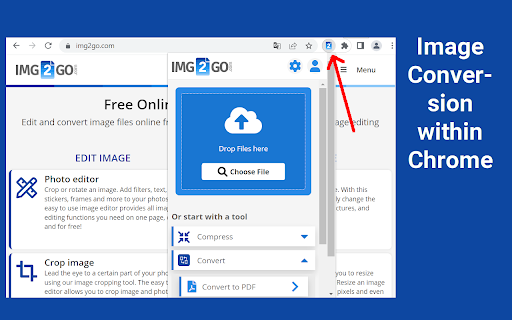


Edit and convert images. Compress images or convert them to another format. The official extension from img2go.com. An extension for lossless image compression and image conversion. Supports Gmail. Speed up your productivity by adding img2go.com to Chrome! ★ The tool adds an icon in your extension toolbar and lets you compress and convert files there without the need to visit our webpage. ★ The image converter extension contains the following tools: - Compress image - Convert to JPG - Convert to PNG - Resize image - Edit photo - Crop image - Rotate image ★ The integration with Gmail is called when you compose a message and click on the small blue icon within the compose window. ★ Much more can be done with this extension: - Turn a PDF or other documents into images - Add drawings, boxes, arrows or texts to an image - Change the file size of a photo to upload it to social media - Rotate images that are upside-down or sideways - Extract text from an image (OCR) - Create a PowerPoint presentation from your photos - Convert RAW camera images - Turn a video into an animated GIF If you have any questions, requests or need to get in touch with us, send us an e-mail to time2help@img2go.com By installing the extension, you agree to our terms at https://www.img2go.com/terms

Photo Editor in Google Chrome™
Edit Photos and Images files in Chrome. Begin editing your photos and make them look better when you download and install this software. 1) Add rounded corners to your photos 2) Change the brightness of your photos 3) Change the contrast 4) Add Filters to the photo 5) Blur the photo if you want a more historical feel/look 6) Add a black vignette if you want to draw attention to the center of the photo Disclaimer: Please note this extension is NOT made by Google and is made by an independent development team. All copyrights belong to their respective owners. Google doesn’t endorse or sponsor this Chrome extension. Photo Editor in Google Chrome™ is not owned by, is not licensed by and is not a subsidiary of Google Inc.

Online Video Editor (video2edit.com)
Solve all your video editing and conversion needs with this free All-in-One online video tool. Convert your video files or edit them. The official app from video2edit.com. High quality video converter to convert your video files from one format to another. Integrated with Gmail. Speed up your productivity by adding video2edit.com to Chrome! ★ The tool adds an icon in your extension toolbar and lets you convert files there without the need to visit our webpage. ★ The video converter contains the following tools: - Convert to MP4 - Convert to MOV - Compress video - Rotate video - Cut video ★ The integration with Gmail is called when you compose a message and click on the small icon within the compose window. ★ The tool can not only work with video files. If the source file is a document, our tool will even create a video showing all pages of the document. If it's an image, we create a video with that image and you can later add an audio track. If you right click on a link and it's pointing to a website, we create a video of a screenshot. By installing the extension, you agree to our Privacy and Terms (www.video2edit.com/terms)

Image Editor
You can modify image text, image text, image watermark, rotation, filter, crop, flip, color. And get the DataURL of the picture. Right-click the picture to edit online! Edit pictures online, you can modify text, image text, image watermark, rotation, filter, crop, flip, color. And get the DataURL of the picture. Features Load image to canvas Undo/Redo (With shortcut) Crop Flip Rotation Free drawing Line drawing Shape Icon Text Mask Filter Image Filter

Image Editor for Google Chrome™
Install for edit your images quickly. Need a quick and simple method to edit your images online? Our software Image Editor for Google Chrome™ supports the most popular image formats such as JPG/ JPEG / PNG / GIF Our image editor provides plenty of features such as Adding rounded corners to your photos Change the brightness of your photos Change the contrast Add Filters to the photo Blur the photo if you want a more historical feel To begin using our software Image Editor for Google Chrome™, simply install and open the image you wish to edit. Its that simple! Disclaimer: Please note this extension is NOT made by Google and is made by an independent development team. All copyrights belong to their respective owners. Google doesn’t endorse or sponsor this Chrome extension. Image Editor for Google Chrome™ is not owned by, is not licensed by and is not a subsidiary of Google Inc.
