
djanbckaomofhalpklkcbimkmlaocddd
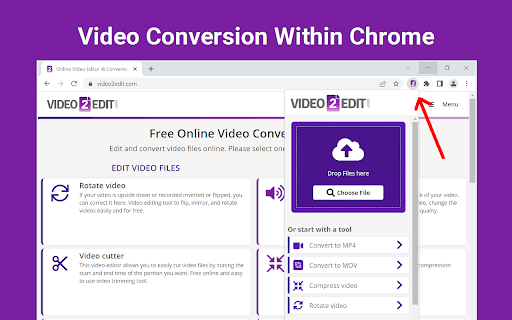

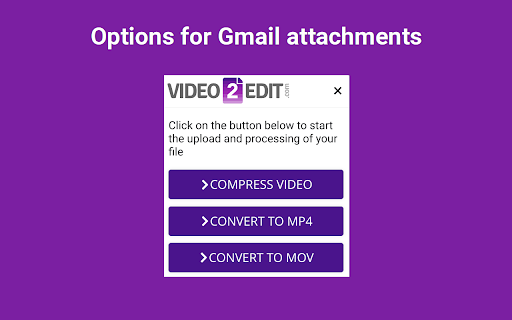
Solve all your video editing and conversion needs with this free All-in-One online video tool. Convert your video files or edit them. The official app from video2edit.com. High quality video converter to convert your video files from one format to another. Integrated with Gmail. Speed up your productivity by adding video2edit.com to Chrome! ★ The tool adds an icon in your extension toolbar and lets you convert files there without the need to visit our webpage. ★ The video converter contains the following tools: - Convert to MP4 - Convert to MOV - Compress video - Rotate video - Cut video ★ The integration with Gmail is called when you compose a message and click on the small icon within the compose window. ★ The tool can not only work with video files. If the source file is a document, our tool will even create a video showing all pages of the document. If it's an image, we create a video with that image and you can later add an audio track. If you right click on a link and it's pointing to a website, we create a video of a screenshot. By installing the extension, you agree to our Privacy and Terms (www.video2edit.com/terms)

Cut Video Online
Cut and Trim video online without downloading software on your computer Cut Video Online is a web app which helps you to effortlessly cut and trim your video files online, in order, for example to take out the pause and shutters from your video . With this simple online tool you can cut, trim your video files without downloading complex software on your computer. Cut Video Online is easy to use and works perfectly on your Windows and Mac. - Smart Cut helps you to take out unwanted low volume part

Video editor OpenShot online
Create and edit videos with OpenShot online The OpenShot video editor is a Chrome extension that allows to create and edit videos online. It is an integration with an OpenShot instance, which is a free and open-source video editor . It supports commonly used video codecs that are supported by FFmpeg like WebM (VP9), AVCHD (libx264), HEVC (libx265) and audio codecs like mp3 (libmp3lame) and aac (libfaac). The program can render MPEG4, ogv, Blu-ray and DVD video, and Full HD videos for uploading to the internet video websites. It is a video editor integrated with our file manager to manage only video file types with this desktop app. OpenShot main features are - Support for many video, audio, and image formats (based on FFmpeg). - Unlimited tracks / layers. - Clip resizing, scaling, trimming, snapping, rotation, and cutting. - Video transitions with real-time previews. - Compositing, image overlays, watermarks. - Title templates, title creation, sub-titles. - Scrolling motion picture credits. - Solid color clips (including alpha compositing). - Support for Rotoscoping / Image sequences. - Advanced Timeline (including Drag & drop, scrolling, panning, zooming, and snapping). - Video encoding (based on FFmpeg). - Digital zooming of video clips. - Time-mapping and Speed changes on clips (slow/fast, forward/backward, etc...) - Custom transition lumas and masks. - Audio mixing and editing. - Digital video effects, including brightness, gamma, hue, greyscale, chroma key. (bluescreen / greenscreen) , and many more. In order to handle the video compositions this extension includes the following functionality over the files used by this extension: - Personal files and directories in the Cloud. - Operations with files and folders: copy, move, upload, create folder/file, etc - Search for files. This is not a video player, it is a video editor, so do not expect great quality when playing video or audio. Download locally the video composed by OpenShot to play it with the right quality. This OpenShot Video Editor extension uses the platform http://www.offidocs.com. It is available for free online users but it also allows the integration with premium users and on-premises OffiDocs deployments where the OffiDocs OpenShot video editor is installed. IMPORTANT: This extension scans the URLs browsed in order to detect video files. The video files detected appear in a file list located in the extension popup that are retrieved from our servers. The scanning is performed from our servers so your URL are reported to our system. No personal data is collected. This scan can be disabled with a checkbox that appears in the extension popup. If you disable this scanning, this functionality is not available so then the extension functionality is very limited.

Video converter online VideoConvertPlus
Video converter online for multiple video formats This extension is a video converter to convert video formats between each other. It allows users to upload their videos to be automatically converted to the video format chosen by the users. It is based on the tool ffmpeg and HandBrake. HandBrake is used to convert any MOV related video file. The rest of the video formats are converted using FFMPEG online. In addition to the video conversion functionality, the videos converted remained in a cloud space area from where the users can download them or delete them. Moreover, if the video format chosen for conversion is MP4, VideoConvertPlus adds an option to import such MP4 videos to the online movie maker MovieStudio. This app, a movie maker online, allows to edit the video, add texts, images and audios in different video layers. Refer to the RedcoolMedia MovieStudio documentation for further details.

Video Converter
Convert any video file to selected formats (i.e. mp4) inside your browser! Video Converter extension helps you easily convert any video format to another (for example, WEBM to MP4). It uses the FFmpeg library which is compiled from C/C++ language to JavaScript with Emscripten compiler. Emscripten is a source-to-source compiler that can compile native C/C++ codes to JavaScript language. Please read this Wikipedia page to get more info about the Emscripten compiler. To work with this add-on, just open the app UI and drag a video file to the designated area in the app. Then, type your FFmpeg command in the input file and press the - Run - button. Once the conversion is done, the link to download the video file will be available at the bottom of the UI. Please note that conversion may take some time depending on the video size and also the type of conversion that you choose. There are some sample commands available in the app UI (as buttons) which you can use to start working with this add-on. Note: Since this add-on runs FFmpeg in the browser, it runs slower than the native FFmpeg applications/library. However, using the add-on is very easy. Simply add it to your browser and it starts to work without any additional plugins. It is only suitable for simple conversions and has a limited number of codecs. Note: This add-on is specifically designed for "video" conversion. If you want to convert an "audio" file, please use my other add-on Audio Converter (https://chrome.google.com/webstore/detail/audio-converter/ahmgleafdlnihcbfdifidfdanbfhnjhc). If you have a feature request or found a bug to report, please fill the bug report form on the add-on's homepage (https://mybrowseraddon.com/video-converter.html).
