
inaidjpincclibfdfpekgbfcejampkdi

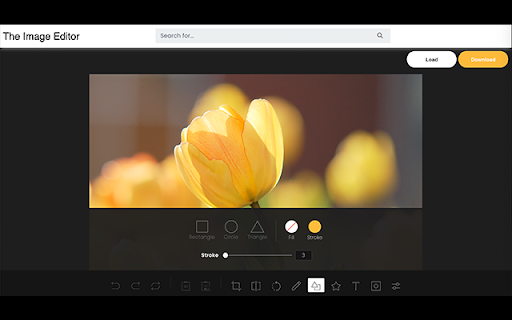

You can modify image text, image text, image watermark, rotation, filter, crop, flip, color. And get the DataURL of the picture. Right-click the picture to edit online! Edit pictures online, you can modify text, image text, image watermark, rotation, filter, crop, flip, color. And get the DataURL of the picture. Features Load image to canvas Undo/Redo (With shortcut) Crop Flip Rotation Free drawing Line drawing Shape Icon Text Mask Filter Image Filter

Photo Editor in Google Chrome™
Edit Photos and Images files in Chrome. Begin editing your photos and make them look better when you download and install this software. 1) Add rounded corners to your photos 2) Change the brightness of your photos 3) Change the contrast 4) Add Filters to the photo 5) Blur the photo if you want a more historical feel/look 6) Add a black vignette if you want to draw attention to the center of the photo Disclaimer: Please note this extension is NOT made by Google and is made by an independent development team. All copyrights belong to their respective owners. Google doesn’t endorse or sponsor this Chrome extension. Photo Editor in Google Chrome™ is not owned by, is not licensed by and is not a subsidiary of Google Inc.

Photo Editor
A simple in-browser photo editor - use this when you want to do some quick edits to your photos Use this free online tool to quickly and easily perform common photo editing tasks directly in your browser... Features: - edit images from your computer - edit images from a URL you enter - select an image in a browser tab, then choose "Edit Photo" from the right-click context menu - adjust brightness, contrast, saturation, change orientation, image scaling, apply presets and filters, crop and scale, add watermarks and signature. - provides links to other tools from LinangData from the More tools menu, including: XML Formatter; CSV - JSON Converter; Grammar, spelling and style checker; Calculator; Photo Exif Data Viewer; Weather Forecast; World Clock - It's free!

Image Editor Pro
A beautiful and powerful image editor for Chrome with advanced editing capabilities including filters, cropping, and more Image Editor Pro – Capture, Edit, and Share Images Without Leaving Your Browser Image Editor Pro turns Chrome into a full-featured screenshot editor and image annotator. Capture any web page, drop in a photo, or paste something from your clipboard—then highlight what matters in seconds with arrows, shapes, text, filters, cropping, and more. No external apps, no waiting. WHY INSTALL IMAGE EDITOR PRO? • “I just need to point out one thing, fast.” – Add arrows, rectangles, circles, or free-hand lines instantly. • “Opening Photoshop for a quick crop feels overkill.” – Smart Crop & Resize live right in Chrome. • “Explaining bugs or feedback is a mess.” – Annotated screenshots cut support and review cycles in half. • “Sharing edited images takes too many clicks.” – One-click Copy to Clipboard or Download (PNG, JPG, WebP). 1. Instant Annotate – Arrows, rectangles, circles, triangles, stars, emojis – Freehand Brush with adjustable size – Text tool (double-click to edit anytime) – Multi-select to move or delete objects together 2. Transform & Resize – Rotate Left / Rotate Right – Flip Horizontal / Flip Vertical – Drag handles or enter exact pixels; keep proportions unless you say otherwise 3. Creative Filters – Brightness, Contrast, Saturation – Hue rotation, Sepia, Vintage, Grayscale, Invert – Adjustable Blur and Opacity sliders with live preview 4. Smart Cropping – Click-drag to crop any region – Dashed outline shows your selection; press Enter to commit 5. Lightning-Fast Export – Copy to system clipboard – Save as PNG, JPG, or WebP (quality slider included) – Automatic file naming: page-title\_YYYY-MM-DD\_HH-MM.png PERFECT FOR • Product managers and QA – mark up bugs and UI tweaks • Teachers and trainers – create visual how-tos without extra software • Content creators – polish thumbnails, blog illustrations, or newsletters on the fly • Customer support – send clear annotated replies that delight users • Developers and designers – pixel-perfect feedback, faster hand-offs PRIVACY-FIRST All editing happens locally—images never leave your computer unless you choose to share. No analytics tracking, no ads. Required permissions: • activeTab – capture the current page when you click “Screenshot.” • storage – remember your last-used tool and export settings. 1. Capture – hit the extension icon or press Alt+Shift+S to grab the visible page. 2. Edit – drop arrows, crop, tweak brightness—live preview, no lag. 3. Share – copy or download; paste directly into Slack, Gmail, Jira, or docs. ROADMAP • Full-page scrolling capture • Blur / pixelate tool for sensitive info • Collaborative commenting and threaded feedback • Optional cloud sync Install Image Editor Pro today and replace half a dozen heavy apps with one lightweight Chrome sidekick. Save time, say it visually, and get back to what matters. Add to Chrome—it’s free, private, and levels-up your screenshots in under 30 seconds.

FotoFlexer - Online Photo Editor
FotoFlexer is a free, easy, and powerful online photo editor. A user-friendly photo editor that offers one-click tweaks, along with some advanced tools on par with desktop-class photo editing software. In the first version(ver 1.0) of FotoFlexer, it's included only the basic tools, like resize, rotate, crop, transform, draw, include text, shapes, stickers, frames, add filters, etc. - cartoonizer - remove background tool - human touch-ups - batch processing - more graphics, overlays, frames, shapes, and stickers - and many more
