
koellablckildiakdjcchdfnagjfbpbh

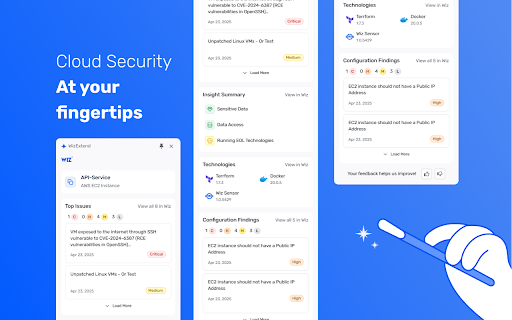

Get real-time security alerts and context-aware insights in your cloud portal. Cloud Security That Works Where You Do Get real-time security alerts and context-aware insights—right inside your cloud and code workflows. The Wiz Chrome extension now supports AWS, Azure, GCP, GitHub, and GitLab, bringing comprehensive security visibility across your cloud and development environments. KEY CAPABILITIES: • Chrome Side Panel Integration - View security issues without switching tabs • Context-Aware Insights - Get security information relevant to specific cloud services • Deep-Dive Analysis - Understand issues, implications, and recommended actions • Technology Detection - Identify technologies running on compute instances • Multi-Cloud Support - Address critical issues directly in all major cloud consoles • Answer “What are my most critical security issues?” right from your workflow • Jump directly to affected resources with a single click Built for Developers, SREs, Cloud Security Engineers, Analysts, and CISOs. Free for all Wiz customers. ABOUT WIZ Wiz transforms cloud security for customers – Trusted by more than 50% of Fortune 100 companies – by enabling a new operating model. With Wiz, organizations can democratize security across the development lifecycle, empowering them to build fast and securely. Its Cloud Native Application Protection Platform (CNAPP) drives visibility, risk prioritization, and business agility, and is #1 based on customer reviews.

AWS Extend Switch Roles
Extend your AWS IAM switching roles. You can set the configuration like aws config format Switch role history does not remain only five maximum on the AWS Management Console. This extension gives you show all of switch roles from a browse menu by loading your aws configuration. ### Simple Configuration The simplest configuration is for multiple **target roles** when you always intend to show the whole list. **Target roles** can be expressed with a `role_arn` or with both `aws_account_id` and `role_name`. * `color` - The RGB hex value (without the prefix '#') for the color of the header bottom border and around the current profile. * `region` - Changing the region whenever switching the role if this parameter is specified. * `image` - The uri of an image to use on top of any color attribute supplied. The color and image are not mutually exclusive. ### Complex Configuration More complex configurations involve multiple AWS accounts and/or organizations. - If your account is aliased, you specify `aws_account_alias` in **base account**. - A **target role** is associated with a **base account** by the **target role** specifying a `source_profile`. - As above, **target roles** can be expressed with a `role_arn` or with both `aws_account_id` and `role_name` and can optionally pass the optional parameters. - If `target_role_name` is set in **base account**, the value is provided as the default role name for each **target roles**. ``` [organization1] aws_account_id = your-account-alias If you sign-in a base account, target roles of the other base accounts are excluded. For more information, please visit the homepage.

rockstar
rockstar adds a bunch of great features to Okta, such as: Export Objects to CSV, including: Users, Groups, Group Members, Group Rules, Directory Users, Apps, App Users, App Groups, App Notes, Network Zones, YubiKeys, Mappings, Admins... User home page: Show SSO (SAML assertion...) People page: enhanced search Person page: show login/email and AD info, show user detail, enhance menus/title, manage user's admin roles, verify factors, set password Groups page: search using regular expressions (like wildcards) Active Directory page: show OU tooltips, export OUs Identity Providers page: show SAML certificate expiration date System Log: Expand All and Expand Each Row API: API Explorer, Pretty Print JSON Many: enhanced menus rockstar runs in your browser, it doesn't send your data anywhere. Note: This extension was not created by Okta. It is not supported by Okta. It is an unofficial extension created by the community.

Login Recorder for Burp Suite
Improve your Burp Suite scan coverage by manually capturing how to perform complex actions on your website. Login Recorder for Burp Suite is a Chrome extension that enables you to record complex navigation sequences, such as SSO logins, using your browser. You can then import the recording into Burp Suite Professional and Burp Suite DAST so that any future scans of the website can replicate your recorded actions. This can improve your Burp Suite scan coverage by increasing the attack surface that the Scanner is able to audit effectively. To record an action sequence: 1. Click the Login Recorder for Burp Suite extension icon at the top right. 2. Click start recording. 3. Load the web page where you want to begin capturing and carry out the action sequence. 4. Click the extension icon to stop recording and click copy to clipboard to save the data from the recording to your clipboard in JSON format. 5. Paste the JSON from your clipboard into Burp Suite. Note that this extension works by recording clicks, pasted data, and keystrokes. To ensure that your action sequence is recorded properly, please avoid using any autocomplete functionality. The recorded data on your clipboard will be automatically cleared when you paste it into Burp Suite.

Rapid7 AppSec Plugin
The Rapid7 AppSec plugin works with Rapid7 Application Security and AppSpider dynamic application security testing solutions to improve application scanning coverage and assist in validating vulnerabilities with these capabilities: Macro Recording - Use the plugin to record macros required by Application Security and AppSpider Enterprise when selecting the Macro Authentication scan configuration. Macro Authentication enables the crawling engine of Application Security and AppSpider to authenticate with complex login workflows. Vulnerability Validator - Use the vulnerability validator in conjunction with the Attack Replay feature in Application Security and AppSpider. This feature of the Chrome plugin enables users to replay and edit recorded traffic generated during an Application Security or AppSpider scan. Bootstrap Authentication - The Chrome plugin is required to use AppSpider Enterprise's Bootstrap Authentication feature, which gives the user the ability to interactively login to the target application during an active scan. Used for login workflows that require human interaction for example 2FA (Two-factor authentication). Traffic Recorder - Record the interactions (like HTTP GET and POST requests) between the front end application and the back end server in a Traffic File. Application Security can replay these interactions to authenticate into your application. For support related to this plugin, please contact chrome_plugin@rapid7.com
