
chjepkekmhealpjipcggnfepkkfeimbd
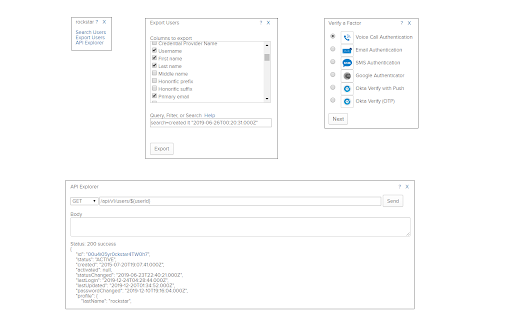
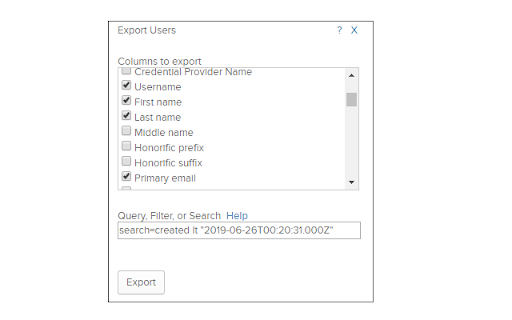
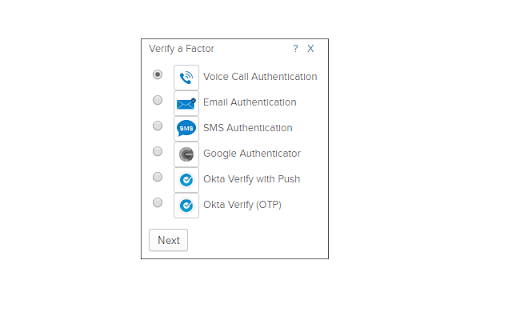

rockstar adds a bunch of great features to Okta, such as: Export Objects to CSV, including: Users, Groups, Group Members, Group Rules, Directory Users, Apps, App Users, App Groups, App Notes, Network Zones, YubiKeys, Mappings, Admins... User home page: Show SSO (SAML assertion...) People page: enhanced search Person page: show login/email and AD info, show user detail, enhance menus/title, manage user's admin roles, verify factors, set password Groups page: search using regular expressions (like wildcards) Active Directory page: show OU tooltips, export OUs Identity Providers page: show SAML certificate expiration date System Log: Expand All and Expand Each Row API: API Explorer, Pretty Print JSON Many: enhanced menus rockstar runs in your browser, it doesn't send your data anywhere. Note: This extension was not created by Okta. It is not supported by Okta. It is an unofficial extension created by the community.

WizExtend
Get real-time security alerts and context-aware insights in your cloud portal. Cloud Security That Works Where You Do Get real-time security alerts and context-aware insights—right inside your cloud and code workflows. The Wiz Chrome extension now supports AWS, Azure, GCP, GitHub, and GitLab, bringing comprehensive security visibility across your cloud and development environments. KEY CAPABILITIES: • Chrome Side Panel Integration - View security issues without switching tabs • Context-Aware Insights - Get security information relevant to specific cloud services • Deep-Dive Analysis - Understand issues, implications, and recommended actions • Technology Detection - Identify technologies running on compute instances • Multi-Cloud Support - Address critical issues directly in all major cloud consoles • Answer “What are my most critical security issues?” right from your workflow • Jump directly to affected resources with a single click Built for Developers, SREs, Cloud Security Engineers, Analysts, and CISOs. Free for all Wiz customers. ABOUT WIZ Wiz transforms cloud security for customers – Trusted by more than 50% of Fortune 100 companies – by enabling a new operating model. With Wiz, organizations can democratize security across the development lifecycle, empowering them to build fast and securely. Its Cloud Native Application Protection Platform (CNAPP) drives visibility, risk prioritization, and business agility, and is #1 based on customer reviews.

Delinea Web Password Filler
Access Platform and Secret Server managed credentials directly from your browser. The Delinea Web Password Filler (WPF) browser extension manages credentials for web sites and web applications using Delinea's flagship vaulting solution to save, manage and autofill credentials. WPF can be used by customers that use the Delinea Platform, Delinea Secret Server Cloud or Delinea Secret Server on-premise vaults. WPF supports enterprise single sign-on (SSO) using several mechanisms like Integrated Windows Authentication, SAML, and OpenID. It also supports MFA options such as the Delinea Mobile App, Duo, TOTP authenticator apps, email, FIDO2/YubiKey and others. WPF goes beyond basic password management by seamlessly integrating with the Delinea vault’s advanced credential sharing workflows like approval-before-access, exclusive time-limited checkout/checkin access, MFA-on-access, etc. WPF can also be configured to record user-activity to meet audit and compliance needs.

Clockwise (deprecated)
This extension is no longer supported. Please uninstall it. Clockwise is an AI-powered calendar assistant that builds better and more productive schedules – designed to alleviate the stress of calendar management for busy professionals. Powered by automation and AI, Clockwise rapidly calculates the best time for meetings, tasks, and deep work – all based on your preferences. Clockwise works across individuals, teams, and entire companies, and it gets smarter and more powerful as more people use it.

SAML Chrome Panel
Extends the Developer Tools, adding support for SAML Requests and Responses to be displayed in the Developer Tools window This is an Open Source SAML debugger for Chrome. It operates as another panel in the Chrome Developer Tools section, which monitors the traffic in the current active tab. This panel is trying to replicate what the Firefox version of SAML Tracer does as there wasn't a good enough one (or any) for Chrome at the time of writing this. GitHub Repo: https://github.com/milton-lai/saml-chrome-panel Feel free to branch and help make this even better! It is designed to display all network traffic, along with the request and response data. If there is a SAML request or response, then it will grab the message, format it nicely and show it to you in another tab. Updates: - Set links to open in the same browser -- There is a new feature to "Scrub" the links in the current page. Basically, it will update all anchor tags and set their target attribute to equal '_self'. This should address the issue of having SAML transactions opening up in new tabs and such. This is the best implementation I could think of as I'm unable to listen to all traffic on all tabs. - Import and export the network traffic. -- It imports and exports the traffic on the browser in a JSON format. - Toggle showing SAML traffic. Please note that at the moment, I've only looked at OpenAM Redirect and POST SAML transactions (as that is what I've got access to). If there are others which are working, please let me know. If there are SSO frameworks that are not working, then also please let me know and I'll try to get it working (e.g. SOAP). Thanks to @jasonwzs (https://github.com/jasonwzs) and @AlmogBaku (https://github.com/AlmogBaku) for contributing Update (2020-07-18): -- Updated internal libraries. -- Reduced extension size. -- Minor code cleanup. -- Increased SAML font size. Update (2017-11-19): -- Added toggle limit of 500 network requests, to keep memory footprint smaller. -- Added Search option for the SAML tab.
