
mnmlipalillmakdiildpclhocfgcddnp


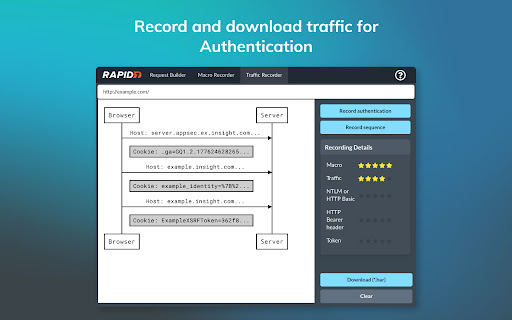
The Rapid7 AppSec plugin works with Rapid7 Application Security and AppSpider dynamic application security testing solutions to improve application scanning coverage and assist in validating vulnerabilities with these capabilities: Macro Recording - Use the plugin to record macros required by Application Security and AppSpider Enterprise when selecting the Macro Authentication scan configuration. Macro Authentication enables the crawling engine of Application Security and AppSpider to authenticate with complex login workflows. Vulnerability Validator - Use the vulnerability validator in conjunction with the Attack Replay feature in Application Security and AppSpider. This feature of the Chrome plugin enables users to replay and edit recorded traffic generated during an Application Security or AppSpider scan. Bootstrap Authentication - The Chrome plugin is required to use AppSpider Enterprise's Bootstrap Authentication feature, which gives the user the ability to interactively login to the target application during an active scan. Used for login workflows that require human interaction for example 2FA (Two-factor authentication). Traffic Recorder - Record the interactions (like HTTP GET and POST requests) between the front end application and the back end server in a Traffic File. Application Security can replay these interactions to authenticate into your application. For support related to this plugin, please contact chrome_plugin@rapid7.com

Vulners Web Scanner
Tiny vulnerability scanner based on vulners.com vulnerability database. Passively scan websites while you surf internet! Tiny vulnerability security scanner based on vulners.com vulnerability database. It provides you ability to passively scan websites that you surf, on known vulnerabilities.

Plugin Vulnerabilities
Adds warning message to WordPress Plugin Directory pages when plugins are from developer we have released security advisories for. One of the little understood realities of security issues with WordPress plugins is that the insecurity of them is not evenly spread across those plugins. Instead, many developers are properly securing their plugins and others get them properly secured when alerted they haven’t done that, while other plugin developers either are unable or unwilling to properly secure their plugins. With the latter group, among the issues we have seen, are developers who have introduced new serious vulnerabilities that are substantially similar to vulnerabilities that they know have been exploited in their plugins. In situations where we become aware of developers who have shown that inability or unwillingness to properly secure their plugin, we are releasing advisories to warn customers of our service and the wider WordPress community of the risk of utilizing those developers' plugins. This extension adds a notice on the pages of the WordPress Plugin Directory for the plugins from those developers.

Breakbot
Quickly add disruptive unicode, naughty strings, and more to your clipboard. Save yourself from googling for RTL characters, Zalgo, general unicode naughtiness, the EICAR string, and more - Breakbot makes them available for quick copying to the clipboard. With a fast search and one-click copy, fuzzing and pen testing is just a little bit easier (and no more copy-paste-type-paste-type to check if you got that RTL character copied correctly!) Just search and click the one you want to copy, or strike enter to copy to top result. Launch the popup with +B. Add your own strings at https://github.com/jkingsman/Breakbot.

SAML-tracer
A debugger for viewing SAML messages A tool for viewing SAML and WS-Federation messages sent through the browser during single sign-on and single logout.
