
kobenknfegiliklakiflgfddjiolpiph
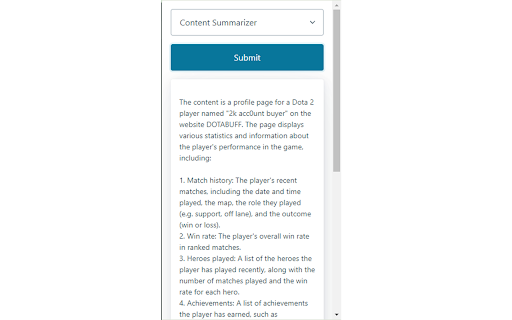
Summarizes web content with an open-source LLM service (Shale-Serve API). This is an extension that summarizes website content with an open-source LLM through the Shale-Serve API. It can also be used as a code explainer for any individual piece of code or repository on GitHub. To use it, simply click the extension to summarize the whole web page, or select some text on the web page first and then click the extension to summarize a sub-portion of the web page. The Shale-Serve API queries an open-source large language model that is widely used. For more details, please visit https://shaleprotocol.com.

Bullet Points: summarize Web pages with GPT-3
Extract three key points from every Web page to quickly understand its contents. Reduce the time needed to read news and articles. Bullet Points is a browser extension that allows you to quickly summarize any Web page you are browsing into three bullet points. With Bullet Points, you no longer have to read long articles or news pieces. Instead, the extension will extract the three main points from the text and provide them in an easy-to-read format, allowing you to quickly gain an understanding of the overall content without having to read through it in its entirety. Bullet Point uses a powerful GPT-3 artificial intelligence model to scan each page, extracting the most relevant information and condensing it into these three points. The result is a concise summary of what’s on the page that can be consumed quickly and easily. This makes it especially useful for busy professionals who need to stay up-to-date with their industry but don't have time to read every article they come across. It also works great as a research tool for students who need quick summaries of articles or other texts for their studies. By using Bullet Points, they can get an overview of what's contained within each page without having to spend time reading through all of it. This can save them valuable time when doing research projects or studying for exams. Using this extension couldn't be easier - just install it onto your browser browser and click the Bullet Points icon when you're on a page that you want to summarize. It will then do its magic, automating the summarization process so that you get three bullet points in seconds. You can also summarize any linked page by right-clicking on the link and choosing the "Summarize" option. After reading the page summary you can decide whether you want to follow the link to read the full page. Finally, you can also select any amount of text on the page and let the extension summarize just the text you've selected. Bullet Points can also be a great help for those who have trouble understanding long texts due to language barriers or reading difficulties. The extension simplifies complex information into an easy-to-understand format, allowing anyone to quickly understand what’s being presented on the page without having to read through it all themselves. In addition to this, Bullet Points also makes it easier for people who are short on time but still want to stay up-to-date with their industry by providing them with quick summaries of articles or news pieces. By having longer texts condensed into three concise bullet points, they can gain an understanding of the content without having to read through it all in detail. Overall, Bullet Points is an excellent browser extension for anyone who wants a quick summary of any Web page. It’s very easy to use and requires no manual input, making it a great choice for busy professionals, students, or those with language barriers or reading difficulties. With just one click, Bullet Points will provide you with three concise bullet points that summarize the content of any page.

Summarize.wtf - AI Copilot
Summarize any webpage or video with a click. Transform any online content into compact, tweet-length summaries, or dive a bit deeper with medium to long summaries—all at the click of a button. Why Summarize.wtf? Summarize.wtf built a proprietary summarization engine to cut through the clutter and deliver the essence of documents and web pages, right when you need it – regardless of length. Powered by GPT4, our Chrome extension makes it effortless to understand, share, and engage with content more efficiently. 🔥 Key Features: • NEW: Summarize YouTube videos • Instantly summarize the active web page you’re on • Choose between short, medium, and long summaries • One-click to copy your generated summary • Share your insights directly to Twitter with a simple click • Privacy – we only access pages that you request summarization on

GPT Digest
A Chrome extension that displays the Summery of the page using chat GPT GPT Digest is here to help you understand the web content you come across every day. With ChatGPT 4 integration, you can get summaries of pages no matter where you are - and it's absolutely free! No ChatGPT API required either. Plus, if you're willing to pay for extra features, you'll get the full author's background and credibility & authority score. Gain a full understanding of any topic with interactive Q&A with ChatGPT. Get up to speed quickly and never miss out on a detail again. Don't spend your time blindly browsing the internet - GPT Digest has all the tools you need to make sense of any page quickly and efficiently for an unbeatable reading experience. Features: - Use the power of ChatGPT 4 to get summaries of pages you browse. - Free to use anywhere! No geo-restrictions. - ChatGPT API is not required. - (Paid) Understand the core concepts in the article explained by ChatGPT. - (Paid) Get full author's background and credibility & authority score. - (Paid) Fully understand the topic you are reading about with interactive Q&A with ChatGPT. Q: How many free pages can I summarize before subscribing to the Pro version? A: As a new user, you can summarize a limited number of web pages for free. After reaching this limit, you must upgrade to our Pro version to continue enjoying the summarization service. Q: What are the benefits of upgrading to the Pro version? A: With the Pro version, you'll enjoy unlimited web page summarization, regular summary reports, and the ability to summarize private pages, making your browsing experience even more efficient and personalized. Q: How do I upgrade to the Pro version? A: To upgrade to the Pro version, install the Chrome addon, navigate to settings, and follow the instructions to complete the upgrade process. Q: How does the summarization process work? A: Our service uses advanced ChatGPT technology to analyze web content and generate concise, accurate summaries of the main points, allowing you to understand the core information on a page quickly. Q: Can I customize the length of the summaries? A: Yes, you can adjust the summary length according to your preference by accessing the plugin settings and selecting your desired summary length. Q: How do I summarize a private web page? A: With the Pro version, you'll have the ability to summarize private pages. Simply navigate to the private page and click on the plugin icon. The summary will be generated without compromising your privacy. Q: Will my data be secure when using this service? A: We take data security very seriously. Our service ensures that your personal information and browsing history remain private and secure. We do not store the original content. Q: What if I need help or have questions about the service? A: Our customer support team is always available to help you with any questions or concerns. You can reach us through the contact form on our website or by emailing contact@gptdigest.ai .

Briefy: AI summarizer with visual views for webpages, YouTube, PDFs
Summarize all kinds of content with just 1 click. Build your knowledge base, and chat with it just like with a human. Transform the way you consume information with Briefy! ✨ Powered by AI, Briefy quickly summarizes complex texts into structured summaries with key insights, detailed items, tables, mindmaps, and more. Multiple languages are supported. We offer both Chrome and Safari extensions. Whether you're browsing news, reading papers, or skimming videos, easily get the key points with just 1 click on both desktop and mobile phones! 🚀 🌟 How to Use It: 1️⃣ Add the extension to your Chrome. 2️⃣ Sign in with your email address. 3️⃣ Open any webpage with text and click Briefy's magic button on the page for an instant summary. 💥 Our Best Features: 🖱️ Key points with 1 click To get the summary, you only need to click the Briefy magic button on the page. No more tedious copying, pasting, or app switching! 🪄 Overview, table, mindmap views Briefy goes beyond conventional summaries, offering insights through key points, tables, and mindmap views. Dive deeper into texts in seconds! 💬 Chat with your content Dive deeper into summarized content by asking specific questions. Briefy provides detailed, context-aware answers, ensuring you grasp every aspect of the information and make knowledge interactive. 🔗 Refer back to the source content Easily navigate to the source material for a more comprehensive understanding. Cross-check and explore detailed information, ensuring a thorough grasp of the subject matter. 💡Build your own knowledge base Your external brain to save, review, find, and share your previous summaries. Maximize understanding by searching only the verified and reliable information you've saved with Universal Search in your knowledge base. 🌐 Inline summary translation Get inline translations of the summary in Premium and Ultra plans. Choose your preferred language and enhance comprehension and reading speed! 💫Adjustable summary preferences Choose the level of detail—concise, medium, or detailed—and read the output in your preferred language. Whether it's English, Japanese, Spanish, or more, Briefy customizes summaries to suit your needs across all views. ⬆️ Export summaries in various formats Effortlessly copy or download your summaries in Markdown, TXT, PNG, or CSV formats. Whatever summary view you choose, Briefy makes exporting content seamless and flexible to fit your exact needs. 📧 Contact Us: Have questions about using Briefy? Reach out to us at hello@briefy.ai – we're always ready to assist. Your feedback drives our innovation. A great product meets its users' needs, and we're committed to doing just that. Feel free to send us your suggestions and thoughts as well! 🔨 Changelog: 2.2.7: Feb 07, 2025 - Updated credits calculation method for better accuracy - Polished the UI elements and squashed some bugs 2.2.5: Jan 08, 2025 - Enhanced mind map summarization with improved visualization - Polished the UI elements and squashed some bugs 2.2.2: Oct 16, 2024 - Supported exporting summaries to Markdown, TXT, PNG, CSV files - Polished the UI elements and squashed some bugs 2.2.0: Sep 14, 2024 - Introduced Summary Preference: summarizing in your preferred level of detail and output language - Supported summarizing YouTube videos in Overview view 2.1.0: Jun 17, 2024 - Introduced brand new Overview view as a replacement for the List view - Supported summarizing and saving PDF files to Briefy Knowledge Base - Supported referencing to source content in Briefy Knowledge Base - Supported historical context in Ask - Polished the UI elements and squashed some bugs 2.0.0: May 10, 2024 - Introduced Briefy Knowledge Base where summaries are saved, reviewed, queried, and shared - Supported saving summaries to Briefy Knowledge Base - Supported sharing summaries with permalinks - Polished the UI elements and squashed some bugs 1.10.0: Apr 8, 2024 - Supported summarizing YouTube videos - Supported summarizing any text content with web summarizer - Supported summarizing long content of up to 400K characters - Supported charging multiple Briefys for summarizing longer content - Added upsell dialog for Briefy for Gmail - Refactored content parsing logic for better performance - Polished the UI elements and squashed some bugs 1.9.0: Mar 5, 2024 - Supported rendering summaries in Markdown - Supported subscription with annual plans - Fixed UI misalignment on some websites - Polished the UI elements and squashed some bugs 1.8.4: Jan 25, 2024 - Reorganized extension menu for a better interface - Polished the UI elements and squashed some bugs 1.8.0: Jan 2, 2024 - Supported reference to original content - Supported "asking questions" to the content and added a quick menu with possibly-asked questions - Supported copying summary in Markdown format in all views - Supported regenerating summary - Reorganized function buttons and grouped them into the bottom-left corner - Supported new output languages: Thai, Simplified Chinese, and Traditional Chinese - Supported choosing summary view in the popup menu - Polished the UI elements and squashed some bugs 1.7.0: Dec 13, 2023 - Supported summarizing content in Table view - Supported summarizing content in Mindmap view - Supported expanded table and mindmap into full screen - Supported extracting the main idea of content into a new section in List view - Supported moving the floating Briefy button to anywhere on both sides of the browser window - Supported moving the Briefy window to anywhere in the browser window - Moved the floating Briefy button to bottom-left corner by default - Polished the UI elements and squashed some bugs 1.6.0: Nov 22, 2023 - Introduced a set of new and better structured plans for different levels of Briefy usage - Supported translating summaries into frequently used languages, inline with the original language - Fixed frequent crashes caused by the service worker on iOS/iPadOS Safari - Fixed failure to infer time and location from the original content - Polished the UI elements and squashed some bugs 1.5.0: Oct 19, 2023 - Supported summarizing Gmail threads - Supported new output languages: Spanish, Russian, Ukrainian, Turkish - Supported signing in with Apple - Improved algorithm for content capturing. Now more websites are supported. - Polished the UI elements and squashed some bugs 1.4.0: Oct 11, 2023 - Added a new feature to hide the Briefy magic button: - Hide this time - Hide on this website - Hide on all websites - Polished the UI elements - Squashed some bugs 1.3.0: Sept 22, 2023 - Enhanced Briefy magic button logic for improved user experience: - Embedded magic button now displays on content pages from most-visited websites in the world - Floating magic button now displays on content pages from other websites - Browser extension menu magic button now displays on the browser extension menu - Improved user guidance for downloading and installing browser extensions - Improved user guidance for learning how to use Briefy after installation - Squashed some bugs 1.2.0: Sept 15, 2023 - Supported specifying output language in Japanese - Added a new interface for the extension action button - Improved the experience of the magic button and user menu - Squashed some bugs 1.1.2: Sept 13, 2023 - Fixed an issue where the magic button was rendered on unexpected web pages 1.1.0: Sept 6, 2023 - Supported stream response for faster loading speed - Supported displaying time saved by Briefy - Optimized user onboarding flow - Fixed an issue where the magic button was not rendered on Medium posts - Squashed some bugs 1.0.0 - Supported basic summarization with bullet points, hashtags, and sentiment - Supported signing up/in with Google accounts
