
pkfcbbmdnpgfdjoghgochfkljhihgiac


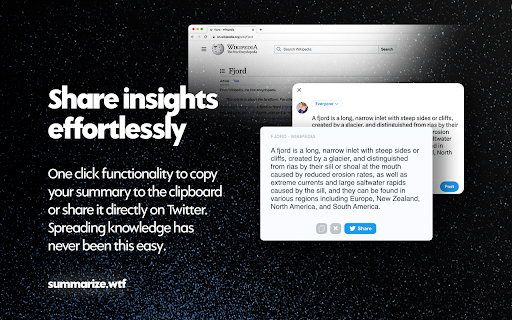

Summarize any webpage or video with a click. Transform any online content into compact, tweet-length summaries, or dive a bit deeper with medium to long summaries—all at the click of a button. Why Summarize.wtf? Summarize.wtf built a proprietary summarization engine to cut through the clutter and deliver the essence of documents and web pages, right when you need it – regardless of length. Powered by GPT4, our Chrome extension makes it effortless to understand, share, and engage with content more efficiently. 🔥 Key Features: • NEW: Summarize YouTube videos • Instantly summarize the active web page you’re on • Choose between short, medium, and long summaries • One-click to copy your generated summary • Share your insights directly to Twitter with a simple click • Privacy – we only access pages that you request summarization on

YouTube Summary with ChatGPT & Claude
Automatically summarize articles, blogs, emails, and YouTube videos instantly with AI. SnipIt – AI That Reads the Internet for You SnipIt is your AI reading assistant and productivity browser extension. It helps you read faster, learn smarter, and save time on web content—right from your browser’s sidebar. – AI Summarizer – Instantly generate concise summaries of web pages, articles, research papers, and emails. – PDF Summaries – Instantly generate concise summaries of PDFs. – YouTube Video Summary – Quickly extract key points from videos without watching them in full. – Text-to-Speech (TTS) – Listen to summaries for multitasking or accessibility support. – Quiz Mode & Flashcards – Reinforce learning with AI-generated quizzes and study tools. – Multi-Language Support – Summarize content in your preferred language. – Explain Like I’m 5 – Get simplified explanations for complex topics. – Easy Sharing – Share summaries via email, social media, or copy with one click. – Personal Stats – Track summaries created and time saved. – Accessibility First – Designed for inclusivity with TTS and simplified content features. – Boost Productivity – Learn more in less time and improve content retention. – 30 Monthly Summaries – Basic AI Summarization for web pages, research, and emails – Language Selection for multilingual users – Usage Stats and History – Getting Started Guide with step-by-step onboarding Pro Features (Upgrade for Full Access) – Unlimited Summaries – PDF Summaries – Faster AI Processing – Smarter, More Contextual Summarization – Advanced Text-to-Speech Functionality – AI-Generated Quiz Mode & Flashcards – Priority Customer Support and Early Access to New Features – Click the SnipIt icon in your browser to launch the sidebar. – Select "Summarize This Page" to generate instant insights. – Customize results with language options, TTS, and simplified explanations. – Learn, review, and share—all from one tool. Ideal For – Students & Researchers – Summarize academic content and enhance learning. – Professionals – Process reports, emails, and news more efficiently. – Lifelong Learners – Stay informed and improve comprehension. – Anyone Reading Online – Save time and retain more from digital content.

Summarize: AI-Powered Text Summary Tool
Instantly summarize any webpage with a sleek, modern AI tool. Get concise summaries in seconds and even listen to them! Unlock the power of AI with our cutting-edge Chrome Extension Webpage Text Summarizer. Using advanced large language models (LLMs) like ChatGPT, our extension effortlessly transforms long and complex web content into concise, readable summaries. Whether you're a student, professional, or just someone who loves to stay informed, our summarizer will save you time and enhance your productivity. * AI-Powered Summarization: Leverage the power of AI to generate accurate and coherent summaries of any webpage content. * Large Language Models: Utilizes state-of-the-art LLMs, including ChatGPT, to ensure high-quality text summarization. * User-Friendly Interface: Easy to use with a clean, intuitive interface designed for a seamless user experience. * Versatile Usage: Ideal for summarizing articles, research papers, news stories, blogs, and more. * Customizable Settings: Adjust summarization length and other parameters to suit your specific needs. Efficiency: Save time by quickly understanding the main points of lengthy articles and documents. Accuracy: Depend on AI and ML technologies to deliver precise summaries that capture the essence of the original text. Convenience: Summarize text with just a few clicks directly from your Chrome browser. Innovation: Stay ahead with a tool that uses the latest advancements in AI and machine learning. Perfect For: Students and Researchers: Quickly summarize academic papers and research articles. Professionals: Digest lengthy reports and industry news faster. Content Creators: Extract key information for content curation and creation. Avid Readers: Stay updated with quick summaries of your favorite blogs and news sites. Install the Extension: Add the Webpage Text Summarizer to your Chrome browser. Navigate to Any Webpage: Open the webpage you want to summarize. Click to Summarize: Click the extension icon and let the AI do the rest. Read Your Summary: Instantly receive a concise summary that highlights the main points. Transform how you read and digest web content with our Chrome Extension Webpage Text Summarizer. Experience the future of text summarization with AI and LLM technology today. Install now and start summarizing smarter!

Ask The Page - AI Assistant & Summarize
Ask the page, send screenshots to your AI tools, and optimize your workflow. This extension makes it easy to ask questions, send content, and capture screenshots directly from any webpage to ChatGPT, Claude, and other AI tools. It’s completely free, allowing you to optimize your workflow with just one click. No more manual copying, pasting, or screenshotting. Simply use Ask The Page to instantly interact with your AI chat applications. Key Features: - Summarize any webpage or YouTube video, or send prompts with a single click. - Capture and send screenshots of any section directly to your AI tools with ease. - Works smoothly across many websites, letting you summarize content or interact with videos effortlessly. - Completely free, acting as a bridge between your browser and AI tools like ChatGPT or Claude. - Instantly send content using the ALT + Q shortcut or by clicking the extension icon. Use Cases: - Quickly summarize complex or lengthy content, extract key insights, and perform deep analysis—perfect for students, professionals, and more. - Easily analyze visual data like charts and designs by sending screenshots to AI tools, getting explanations or suggestions in seconds. - Ideal for researchers, journalists, data experts, and investors to process and summarize large datasets, gaining valuable insights quickly. - Accelerate routine tasks, better understand detailed information, and enhance decision-making across various industries. Ask The Page saves you time by streamlining research, content gathering, and interaction with AI tools. It helps you make the most of ChatGPT, Claude, and other AI chat applications, making your web browsing experience more efficient and productive.

Summarizing tool
Summarizing tool by summarizingtool.io is an AI-based tool that summarize long text into the truncated one. Summarizing tool also called Summarizer is a free Chrome addon that can help you create simpler, more attractive version of your content. Both students and professionals can benefit from this extension. The online Text Summarizer helps to summarize the content for an educational career or official use. It is developed by using the latest AI technology to give accuracy and efficiency for making an overview of the article. Here are some justifications for using this tool. Because you have to read every word of the book, creating manual summaries takes time. On the other hand, you can use this tool to quickly create a summary of your material. Our tool is based on artificial intelligence since it is quite adept at identifying which textual passages are crucial and which are not. As a result, it provides an in-depth summary of the content that appears to be human-authored. Free for everyone: No monthly subscription is required to use this tool. Tool is free to use for everyone.
