
jplmenmeefpebcnpbefgefkednemdenl

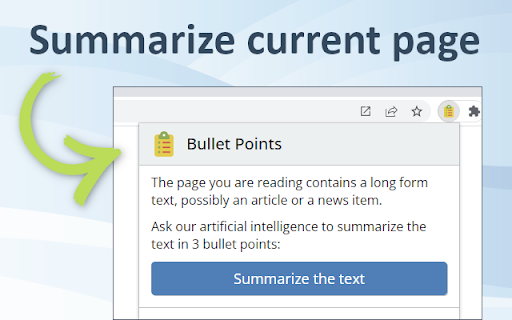
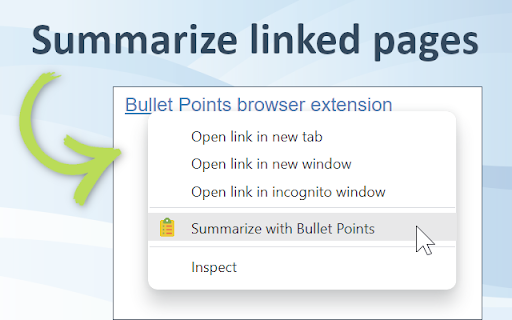
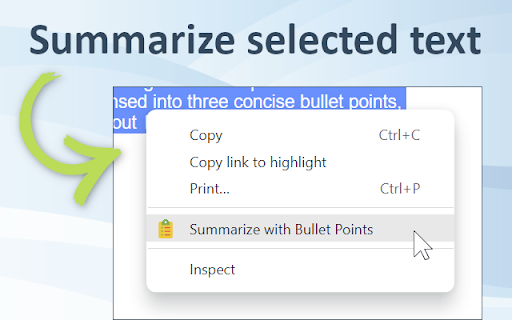
Extract three key points from every Web page to quickly understand its contents. Reduce the time needed to read news and articles. Bullet Points is a browser extension that allows you to quickly summarize any Web page you are browsing into three bullet points. With Bullet Points, you no longer have to read long articles or news pieces. Instead, the extension will extract the three main points from the text and provide them in an easy-to-read format, allowing you to quickly gain an understanding of the overall content without having to read through it in its entirety. Bullet Point uses a powerful GPT-3 artificial intelligence model to scan each page, extracting the most relevant information and condensing it into these three points. The result is a concise summary of what’s on the page that can be consumed quickly and easily. This makes it especially useful for busy professionals who need to stay up-to-date with their industry but don't have time to read every article they come across. It also works great as a research tool for students who need quick summaries of articles or other texts for their studies. By using Bullet Points, they can get an overview of what's contained within each page without having to spend time reading through all of it. This can save them valuable time when doing research projects or studying for exams. Using this extension couldn't be easier - just install it onto your browser browser and click the Bullet Points icon when you're on a page that you want to summarize. It will then do its magic, automating the summarization process so that you get three bullet points in seconds. You can also summarize any linked page by right-clicking on the link and choosing the "Summarize" option. After reading the page summary you can decide whether you want to follow the link to read the full page. Finally, you can also select any amount of text on the page and let the extension summarize just the text you've selected. Bullet Points can also be a great help for those who have trouble understanding long texts due to language barriers or reading difficulties. The extension simplifies complex information into an easy-to-understand format, allowing anyone to quickly understand what’s being presented on the page without having to read through it all themselves. In addition to this, Bullet Points also makes it easier for people who are short on time but still want to stay up-to-date with their industry by providing them with quick summaries of articles or news pieces. By having longer texts condensed into three concise bullet points, they can gain an understanding of the content without having to read through it all in detail. Overall, Bullet Points is an excellent browser extension for anyone who wants a quick summary of any Web page. It’s very easy to use and requires no manual input, making it a great choice for busy professionals, students, or those with language barriers or reading difficulties. With just one click, Bullet Points will provide you with three concise bullet points that summarize the content of any page.

InstantGPT - ChatGPT Powered Assistant
Access ChatGPT instantly! Summarize articles with one click. InstantGPT is a chrome extension that utilizes the power of OpenAI's… Access ChatGPT instantly! Summarize articles with one click. InstantGPT is a chrome extension that utilizes the power of OpenAI's ChatGPT to provide quick and helpful information on demand. The extension can be easily accessed by using the keyboard shortcut 'Ctrl Shift S', which brings up the assistant for users to ask questions and receive responses. Additionally, the extension allows users to control the API parameters in the settings, providing a personalized experience. A key feature of this extension is the ability to summarize any text on a web page by highlighting the text, right-clicking, and selecting 'Summarize'. A pop-up window will then appear with a summary of the selected text. To use the extension, users must provide their own API key, which can be obtained for free from the OpenAI website.

Full Picture: research, analyze with ChatGPT
Read faster, understand better, research deeper: use ChatGPT to summarize, explain, check bias and get insights on news and articles Full Picture is a browser extension that uses OpenAI's GPT-3 technology to help you evaluate the text you are reading and make informed decisions about it. It allows you to quickly and easily see the various angles of any text, article, or news item you come across. It is designed to equip you with the tools you need to assess the credibility and accuracy of the information they are consuming. First, it helps you to understand the text by quickly summarizing it in easy-to-understand three bullet points. After that, it analyzes the text looking for unsupported claims, biases, imbalanced reporting, potential risks and underrepresented points of view. It also assigns a general rating on how reliable the text is. This allows you to quickly assess the quality and reliability of every text you are reading. Finally, Full Picture provides six search keywords that can be used in Google to find information that the article is missing or misrepresents. This helps you gain a more in-depth understanding of the text you are reading. Full Picture is powered by OpenAI's GPT-3, the latest and most powerful development in natural language processing technology. This state-of-the-art technology enables Full Picture to quickly and easily summarize large texts, analyze for bias and imbalanced reporting, assign ratings, and provide search keywords for further investigation. GPT-3 is a powerful artificial intelligence system capable of understanding and generating natural language. It is able to recognize key words, phrases, and topics, allowing it to accurately summarize any text into easy-to-understand bullet points. Once Full Picture has summarized the text, it will analyze the text and provide a report on any biases, imbalanced reporting, and underrepresented points of view that it finds. It then assigns a general rating on how imbalanced the text is, which helps you quickly assess the quality and reliability of the text they are reading. After that, it provides you with additional keywords that can be used to perform Google searches to find more information to supplement the article. In today’s world, it is essential to be able to recognize bias and imbalanced reporting. With the rise of fake news and the prevalence of misinformation, it is more important than ever to be able to identify when texts and articles are not presenting the full story. Bias and imbalanced reporting can lead to misinterpretations and false conclusions, which can have serious implications on our society. Being able to recognize and analyze bias helps us make informed decisions and form educated opinions based on facts, not false assumptions. GPT-3 s an incredibly powerful tool that can be used to quickly and accurately assess the accuracy and reliability of any text. Full Picture harnesses this power to make it easier for anyone to uncover the truth behind any text they come across. With GPT-3, Full Picture is able to provide you with the tools you need to make informed decisions and form educated opinions, making it easy to quickly and easily assess the credibility and accuracy of any text you come across. By providing summaries, analyses, ratings, and search keywords, it helps you uncover any omitted information or imbalanced reporting in the texts you are reading. This helps you stay informed and make educated decisions, rather than forming conclusions based on false information. It is a great tool for anyone who wants to be better informed and make sure they are basing their opinions on accurate information. Full Picture is an invaluable tool for many different groups of people, such as: * Journalists, political commentators, and students. Journalists can use it to uncover the truth behind any story they are covering, making sure that they are reporting facts accurately and without bias. Political commentators can use it to evaluate news stories and articles to ensure that they are forming accurate opinions. Students can use it to evaluate the articles and texts they read in their classes and better understand the information they are consuming. * Educators and researchers. Educators can use this extension to teach their students how to assess the accuracy and credibility of any text they encounter. Researchers can use it to uncover any omitted information or imbalanced reporting in the texts they are reviewing. * Business owners, entrepreneurs, and investors. Business owners can use it to evaluate the accuracy of any news or articles related to their industry, so they can make informed decisions and plan accordingly. Entrepreneurs can use it to uncover any omitted information or imbalanced reporting in any texts they encounter, so they can make informed decisions when starting their business venture. Investors can use it to better understand the news and stories related to their investments, so they can make educated decisions and protect their investments. * Lawyers, judges, and legal professionals. Lawyers can use it to evaluate any texts they come across in their cases, so they can make accurate and informed decisions. Judges can use it to assess the accuracy of any texts related to court cases, so they can make informed decisions when ruling on cases. Legal professionals can use it to uncover any omitted information or imbalanced reporting in any texts related to their work, so they can better understand the facts and make informed decisions. * Activists and advocacy organizations. Activists can use it to uncover any omitted information or imbalanced reporting related to their cause, so they can make educated decisions and better fight for their cause. Advocacy organizations can use it to evaluate any texts related to their organization, so they can make informed decisions and better advocate for their cause. * Health care professionals, who can use it to evaluate any texts related to their field, so they can make informed decisions and stay up to date on the latest developments in their field. They can use it to uncover any omitted information or imbalanced reporting in any texts they encounter, so they can make accurate decisions and provide the best care to their patients. * Scientists and researchers. They can use it to evaluate any texts related to their field, so they can make accurate and informed decisions. They can use it to uncover any omitted information and imbalanced reporting, so they can make informed decisions when conducting their research. * Law enforcement and security professionals. They can use it to evaluate any texts related to their field, so they can make informed decisions and better protect the public. They can use it to uncover any omitted information or imbalanced reporting, so they can make informed decisions and better protect the public from crime and other potential threats. Finally, Full Picture is beneficial to anyone who wants to stay informed and make educated decisions. It provides users with the tools they need to assess the accuracy and reliability of any text they come across, allowing them to form their own opinions and make informed decisions. Full Picture also allows you to share your findings with friends and family. This helps spread accurate information and make sure that everyone is informed and making educated decisions. It is available for free and is fully compatible with the Chrome browser. This makes it accessible to anyone with an internet connection, ensuring that everyone can be informed and make educated decisions. It is a great tool for anyone who wants to stay up-to-date on current events and form their own opinions without being influenced by biased reporting. GPT-3's natural language processing capabilities allow Full Picture to quickly and accurately understand the text it is analyzing. GPT-3's natural language processing capabilities make it an invaluable tool for Full Picture - not only does it make it possible to quickly and accurately analyze any text, it also makes it possible to provide users with the tools they need to stay informed and make educated decisions. Overall, Full Picture is an extremely helpful tool for anyone who wants to be better informed. It is designed to make it easy to evaluate the accuracy of any text, article, or news item users come across. It quickly summarizes the text and provides ratings and search keywords to help users uncover the truth. It is user-friendly and designed to be used by anyone, regardless of their technical knowledge. With Full Picture, users can quickly and easily make informed decisions and form educated opinions.

PI Summarize
Chrome extension adding a right-click option 'Summarize' to get text summaries using ChatGPT, Gemini or Claude Chrome extension adding a right-click option 'Summarize' to get text summaries using ChatGPT, Gemini or Claude This extension adds a right-click option when text is selected on any webpage. After clicking 'Summarize' the extension redirects to ChatGPT, Google Gemini or Claude and enters the selected text to the AI engine and initiates the request. This way you may only read the short, summarized content, which will make your life much easier. In settings (Clicking the Extension link in Extension toolbar), you can toggle or set: ✅ Summarize with ChatGPT (Context Menu) ✅ Summarize with Google Gemini (Context Menu) ✅🆕 Summarize with Claude (Context Menu) ✅ Get PI Prompts Chrome Extension link (Context Menu) ⚙️ Desired length of the summarized text (one line, one paragraph, two paragraphs or three paragraphs) 📢 Summarize is more powerful with 'PI Prompts' free extension, which adds a right hand side panel to ChatGPT, Google Gemini or Claude to access your prompt library. Please note that currently there are the following input character limits:

GPTx
ChatGPT-powered Chrome Extension, Elevates Browsing Experience and Productivity. Introducing GPTX - the powerful Chrome Extension - that leverages ChatGPT to elevate your browsing experience and make daily tasks effortless. GPT-generated results can improve search accuracy, efficiency, user experience, creativity, accessibility, trust and credibility, and convenience. The use of GPT-generated results alongside traditional Google results can provide several benefits. Showing both types of results can increase the accuracy and relevance of the information presented to the user, as the GPT-generated results can provide additional context and information that may not be present in the traditional results. This can also improve the efficiency of the search, allowing users to find the information they need faster. Including GPT-generated results can also enhance the user experience by adding diversity and novelty to the search results. This can make the search process more engaging and enjoyable for the user. The GPT-generated results can also provide users with new ideas and perspectives, fostering creativity and inspiration. Additionally, the inclusion of GPT-generated results can increase the accessibility of the search experience, as they can provide information and context that may not be easily accessible through traditional results. This can make the search experience more inclusive for users with different needs and abilities. Showing GPT-generated results alongside traditional results can also increase trust and credibility in the information presented, as it provides users with a more comprehensive picture of the information they are seeking. Finally, the GPT-generated results can provide users with quick and easy access to additional information, increasing the convenience of the search experience.
