
caicahkimjnhcepnhnipgbcbigdpeifi
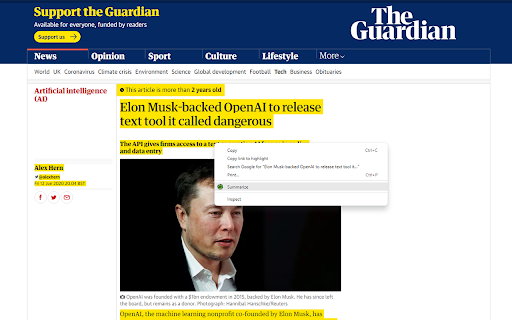
Chrome extension adding a right-click option 'Summarize' to get text summaries using ChatGPT, Gemini or Claude Chrome extension adding a right-click option 'Summarize' to get text summaries using ChatGPT, Gemini or Claude This extension adds a right-click option when text is selected on any webpage. After clicking 'Summarize' the extension redirects to ChatGPT, Google Gemini or Claude and enters the selected text to the AI engine and initiates the request. This way you may only read the short, summarized content, which will make your life much easier. In settings (Clicking the Extension link in Extension toolbar), you can toggle or set: ✅ Summarize with ChatGPT (Context Menu) ✅ Summarize with Google Gemini (Context Menu) ✅🆕 Summarize with Claude (Context Menu) ✅ Get PI Prompts Chrome Extension link (Context Menu) ⚙️ Desired length of the summarized text (one line, one paragraph, two paragraphs or three paragraphs) 📢 Summarize is more powerful with 'PI Prompts' free extension, which adds a right hand side panel to ChatGPT, Google Gemini or Claude to access your prompt library. Please note that currently there are the following input character limits:

Summarize the Internet
Displays a summary of the text or article on the current page. Clicking the taskbar button will summarize the current page in a popup. This summarizer stands out from others by focusing on the writer's choice of words to extract their most important points while filtering out weak arguments, speculation and asides. (Also available for Firefox)

ChatGPT, Bing & Bard For Chrome: Kursor
Discover an unparalleled web browsing experience with Kursor, the comprehensive solution for all your online communication needs. Summarize, translate, rephrase, correct grammar, and create content with just one click. Experience the future of web surfing with Kursor, powered by GPT-AI ! Kursor utilizes the power of OpenAI's GPT- AI to revolutionize your browsing, ensuring seamless integration and the latest technology. 💸 100% Free and Unlimited Use Kursor is entirely free to use, with no restrictions on the number of searches you can perform. 🖱️ One-Click Functionality Effortlessly select any text on the web and access Kursor's powerful features like summarizing, translating, rephrasing, and grammar correction with just one click. 🔎 ChatGPT for LinkedIn: Gain valuable insights into job opportunities by seamlessly integrating LinkedIn's job data, helping you stay informed and connected in the professional world. 🌐 50+ Language Translations Translate text into over 50 languages, breaking down language barriers and accessing content from around the globe. 🎭 10+ Tonalities for Rephrasing Rephrase text in more than 10 different tonalities, giving your content a unique and customized feel. 💬 AI-Driven Chat Ask questions and resolve queries instantly with our AI chat window powered by ChatGPT. 📝 Versatile Composition Functionality Compose emails, messages, paragraphs, tweets, articles, or blog posts with specified objectives, length, and tone. 🔥 Easy Access to Third Window Open the third window effortlessly using cmd + shift (for Mac) / ctrl + shift (for Windows). ⚡ Swift Response Time Enjoy smooth and timely responses with our seamless integration of GPT technology. 📧 Contact Us for Support Reach out to our team anytime at contact@kursor.in for any assistance or inquiries. Install Kursor now and elevate your web browsing experience with the power of ChatGPT!

PI Prompts · Prompt Library for LLM platforms
The 'PI Prompts' Chrome extension is a powerful tool designed to enhance your experience with LLM platforms like ChatGPT, Gemini… The 'PI Prompts' Chrome extension is a powerful tool designed to enhance your experience with LLM platforms like ChatGPT, Gemini etc. The extension simplifies your workflow by eliminating the need for constant copy-pasting of prompts. It comes with convenient options to download and upload prompts in JSON format, so you can share your collection with your friends or even create task specific collections. PI Prompts work across a wide range of major AI platforms (including OpenAI ChatGPT, Gemini and Grok), including both well-established and newer ones. Main Features of PI Prompts: ✅🆕You can now login to you Google account and backup your prompts, so you could reach them by logging in on your other devices ✅🆕Close button added: you could hide the panel anytime ✅🆕More Easy to setup for first timer users. Just download the linked prompts.json (free) and drop it to the showed area ✅ As you start writing your prompt in the input box (as normally), this extensions quickly filters your right panel by showing the connected prompts ✅ If you click one of the prompts on the PI Prompt panel, it inserts the text into input box, alternatively if you quickly want to insert the top prompt in the panel, just click the "Tab" ✅ You can download and upload your prompt list anytime, even adding external prompt lists in JSON format ✅ You can edit and delete prompts directly on the panel ✅ Your prompts will be synced between your devices, where you use Chrome ✅ If you highlight a prompt on any website, with a right-click you could add it instantly to your Prompt Library ✅ Now works with multiple Chrome browser profiles (Nov. 2025 updated) How This Extension Will Alter The LLM Interfaces? ➕ An "Add button" next to the Submit at the bottom bar, so you can add new prompts to your panel anytime ➕ A PI Panel that appears on the right hand side of the websites Why Is This Prompt Extension Better Than Others? 💪 It's intuitive and seamlessly integrates with all platforms 💪 Easy to use both for newcomers and professionals 💪 Created with ❤️

Summary Webpage - Summarize Youtube videos | AI - Assistant
Summarize any webpage or Youtube video using AI and save time. Get the summary. Summary Webpage is a free Chrome Extension that lets you quickly access the summary of the YouTube videos you are watching or any articles. Use this extension to save time and learn quicker. The ultimate tool for easy and efficient web page summarization! With just a few clicks, you can now summarize any web page or Youtube video. What is special about the extension? • Summarizes any website with AI. • Summarizes the transcript of any Youtube Video. • Uses templates to modify the result for study, science or journalistic purposes. • Copy button - for quickly copying and pasting text Extension works by extracting readable content from the webpage and sending it to AI with the prompt to produce a summary that highlights the key information. Also, you can quickly view and access the summary of the video by clicking the summary buttons on the video thumbnail while browsing videos on YouTube. With the Summary, you'll save time, stay informed, and never have to wade through lengthy content again. Try it out today and see just how much more efficient your reading and research can be! Save your time. Learn more in less time!
