
pkpcekmmpgpaiedfchfdmcimogogbeje

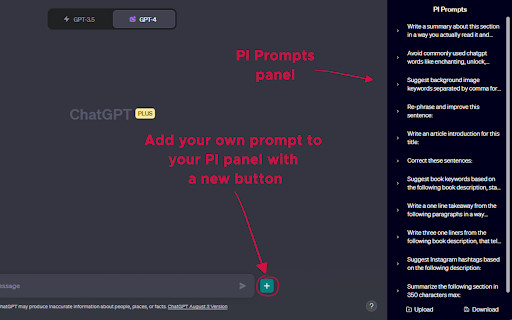
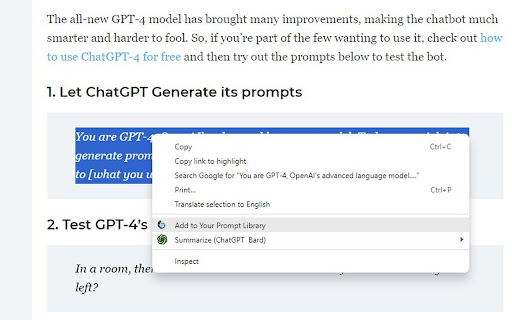
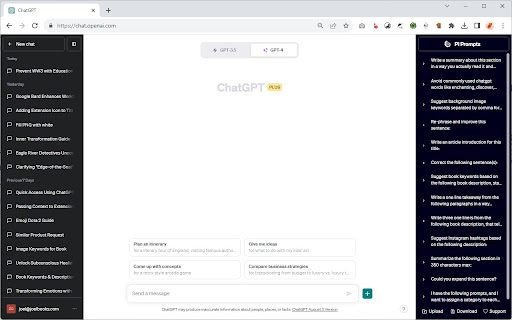
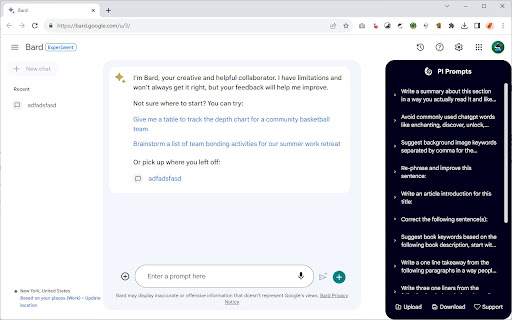
The 'PI Prompts' Chrome extension is a powerful tool designed to enhance your experience with LLM platforms like ChatGPT, Gemini… The 'PI Prompts' Chrome extension is a powerful tool designed to enhance your experience with LLM platforms like ChatGPT, Gemini etc. The extension simplifies your workflow by eliminating the need for constant copy-pasting of prompts. It comes with convenient options to download and upload prompts in JSON format, so you can share your collection with your friends or even create task specific collections. PI Prompts work across a wide range of major AI platforms (including OpenAI ChatGPT, Gemini and Grok), including both well-established and newer ones. Main Features of PI Prompts: ✅🆕You can now login to you Google account and backup your prompts, so you could reach them by logging in on your other devices ✅🆕Close button added: you could hide the panel anytime ✅🆕More Easy to setup for first timer users. Just download the linked prompts.json (free) and drop it to the showed area ✅ As you start writing your prompt in the input box (as normally), this extensions quickly filters your right panel by showing the connected prompts ✅ If you click one of the prompts on the PI Prompt panel, it inserts the text into input box, alternatively if you quickly want to insert the top prompt in the panel, just click the "Tab" ✅ You can download and upload your prompt list anytime, even adding external prompt lists in JSON format ✅ You can edit and delete prompts directly on the panel ✅ Your prompts will be synced between your devices, where you use Chrome ✅ If you highlight a prompt on any website, with a right-click you could add it instantly to your Prompt Library ✅ Now works with multiple Chrome browser profiles (Nov. 2025 updated) How This Extension Will Alter The LLM Interfaces? ➕ An "Add button" next to the Submit at the bottom bar, so you can add new prompts to your panel anytime ➕ A PI Panel that appears on the right hand side of the websites Why Is This Prompt Extension Better Than Others? 💪 It's intuitive and seamlessly integrates with all platforms 💪 Easy to use both for newcomers and professionals 💪 Created with ❤️

OneClickPrompts
One Click Prompts for AI chat interfaces Tired of typing the same instructions into AI chats? OneClickPrompts adds a simple menu of your custom prompts right inside the chat window. Create a button for any prompt you use often—like "respond in a markdown table" or "act as a senior developer"—and just click it instead of typing. Convenient menu for editing prompts. You can see how it works on video. Has multi-profile prompt library functionality and tries to count tokens! FREE | Open Source Works in All Major AI Chats: This extension works on the most popular AI chat websites: ChatGPT, Claude, Gemini, and others! (Store policy prevents listing them here, but the full, updated list of supported sites is on the GitHub page.) 🔥Now with token counter for ChatGPT and most sites! (Well, it 𝘢𝘱𝘱𝘳𝘰𝘹𝘪𝘮𝘢𝘵𝘦𝘴 tokens, so it is not precise, but with better precision than other extensions I tried. Enable counter in modules and it will work. Settings allow you to select one of FIVE prediction models with calibration, or just turn it on and forget about it! You can also count tokens for what you write and for what is already in chat thread separately) What It Actually Does: ✅ Custom Prompt Buttons Create buttons for any text you want. Use an emoji or a few characters for the label so you can find it quickly and click. Click the button to put the text in the input box. Or press hotkey. ✅ Floating Panel & Prompt Queue Click the '🔼' button to open a floating panel you can drag anywhere on the screen. Inside, you'll find the Prompt Queue. This lets you: Add multiple prompts to a list. Send them one by one with a delay you can set. Useful for tasks that require several steps, like get news updates once an hour or something like that - and each prompt is controlled by you. ✅ Profiles Organize your buttons into different sets using profiles. Create one for coding, one for writing, one for a specific project, etc. Switch between them with a dropdown. ✅ Keyboard Shortcuts If you want, you can enable shortcuts (Alt + 1-9) to trigger your first nine buttons without using the mouse. ✅ More Customization: Auto-Send: Each button can be set to automatically submit after inserting the text. Holding Shift reverses this behavior. | Separators: Add visual lines between buttons to keep them organized. Backup/Restore: Save your entire setup (profiles and buttons) to a JSON file and load it back later or on another computer. Modules: Modules: 🛜Cross chat prompt sharing: Want to send a message to all chats you have opened? Just type your prompt, and then, either click on the button ⬆️ that will send prompt to ALL open tabs (Each tab can block incoming messages via Shift-click!) or use the store and paste prompt buttons: can be better than copy-pasting as does not clutters clipboard. To use you will have to activate it in settings under "Modules", and you choose either broadcast option or store-send option. 🔢Token approximator: like best effort token counter, displays token usage in chat on a webpage. For Tinkerers: Edit CSS Selectors: If a site update breaks the button placement, you can go into the advanced settings and edit the CSS selectors yourself to fix it.... or place in other place you want. The Important Stuff: 🔒 Private: Your prompts and settings never leave your computer. They are stored locally in your browser. There is no tracking, no accounts, and no data sent to any server. 🌐 Open-Source: The code is public on GitHub. You can check it yourself to see how it works. ⚡ Simple: while this extension has a lot of settings, you don't have to use them. You can only use what you need and leave other settings untouched. ⁉️How to Use: Install the extension. Click the icon in your toolbar to open settings. Create a button. It will show up in your next chat session. Support & Feedback If something doesn't work, try reloading the page. If it's still broken, please open an issue on GitHub. I appreciate bug reports and suggestions. GitHub: https://github.com/MaxITService/OneClickPrompts

Syncia - Power of ChatGPT on any website
Syncia is a browser extension that allows you to use Open AI's GPT in any website. Syncia enables users to chat with ChatGPT by opening a sidebar on any website by using the shortcut ctrl+shift+x. In addition, it provides a floating menu underneath any selected text on any website that allows users to generate text summaries, check grammar issues, and customise text length so on ! 🦾 Features 🗨️ Chat with ChatGPT through a sidebar. 🔑 Use your own Open AI API key. 📜 Quick menu underneath any selected text which allows you to summarise, simplify language, translate, and more. 🗂️ Allows to store custom prompts and use them with quick menu. 💯 Fully customisable settings page. 🔐 Secure and fully Free and open source forever. (Please consider giving this project a star 🌟 and contributing 💖 to support the project.) For more info check out https://github.com/Royal-lobster/Syncia Note: If shortcut is not working, Enter "chrome://extensions/shortcuts", under Syncia set new keyboard shortcut for "Open the sidebar"

PromptSave: Discover, Save & Share Prompts
Beautifully save your Chat GPT, mid-journey, Bing, or any other AI prompts you use & easily within your reach. Beautifully save your Chat GPT, Mid-Journey, Stable Diffusion, or any other AI prompts you use. Right click and save anywhere on the internet to add a prompt to a folder. Create reusable templates with variables and organize them with folders, colors, and icons to make them easily accessible. The best part is that it's compatible with all AI tools, making it a one-stop solution for all your AI workflow needs. Whether you're a digital artist, copywriter, or productivity hacker, our extention will revolutionize your AI workflow, helping you keep your most-used prompts safe, organized, and looking great! ✅ Discover What's Trending ✅ Right Click & Save A Prompt Anywhere On The Internet ✅ Create reusable prompts ✅ Organize with folders, colors, & icons ✅ Works with all AI tools Share your prompts with your team or audience using public links Prompt Library

Promptris - Prompt Builder & Manager for ChatGPT & Claude
Build prompts with blocks. Save them. Use them anywhere. Promptris helps you create powerful prompts using simple building blocks. Combine inputs, structure your ideas, and apply them instantly in tools like ChatGPT, Claude, and more. 🧩 Prompt Builder (blocks-based) Create prompts from multiple inputs and combine them into one powerful message. Move, edit, and structure them like blocks — now with drag & drop support. 🔤 Variables Use dynamic variables in your prompts like {{name}}. Define them once and reuse across your prompt blocks to customize prompts without rewriting. 💾 Save & Organize Store your prompts and sessions locally. Organize them with folders, tags, and search to quickly find what you need. 🔎 Search & Filter Search sessions by name and filter by tags. Easily navigate large collections of prompts. ⚡ Use Anywhere Send your prompts directly to ChatGPT, Claude, or other AI tools. No more copy-paste chaos. 🧲 Capture from Anywhere Select text on any website and instantly send it to Promptris. A popup lets you create a new prompt block from selected content. 🎯 Full Control Toggle inputs on and off. Decide exactly what goes into your final prompt. 🧠 Session Memory Keep your prompt history and reuse previous ideas to maintain consistent workflows. 📄 File Support Attach files and include them in your prompt context. Everything updates dynamically. 🔄 Import / Export (JSON) Export and import your sessions using JSON. Reliable and structured for complex setups. 🔒 Local-first All your data stays in your browser. No accounts. No syncing. No backend. 🔥 What’s New in 1.0.0 • Drag & drop prompt blocks • Variables support ({{name}}) • Capture text from any website • Search and tag-based filtering • JSON import/export replacing CSV
