
gfckpfgipkbjhaofhfijkdmgopcoinhe
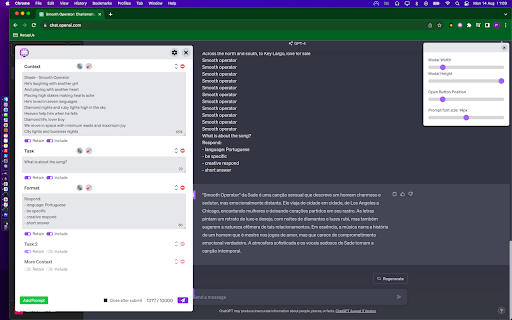

Build prompts with blocks. Save them. Use them anywhere. Promptris helps you create powerful prompts using simple building blocks. Combine inputs, structure your ideas, and apply them instantly in tools like ChatGPT, Claude, and more. 🧩 Prompt Builder (blocks-based) Create prompts from multiple inputs and combine them into one powerful message. Move, edit, and structure them like blocks — now with drag & drop support. 🔤 Variables Use dynamic variables in your prompts like {{name}}. Define them once and reuse across your prompt blocks to customize prompts without rewriting. 💾 Save & Organize Store your prompts and sessions locally. Organize them with folders, tags, and search to quickly find what you need. 🔎 Search & Filter Search sessions by name and filter by tags. Easily navigate large collections of prompts. ⚡ Use Anywhere Send your prompts directly to ChatGPT, Claude, or other AI tools. No more copy-paste chaos. 🧲 Capture from Anywhere Select text on any website and instantly send it to Promptris. A popup lets you create a new prompt block from selected content. 🎯 Full Control Toggle inputs on and off. Decide exactly what goes into your final prompt. 🧠 Session Memory Keep your prompt history and reuse previous ideas to maintain consistent workflows. 📄 File Support Attach files and include them in your prompt context. Everything updates dynamically. 🔄 Import / Export (JSON) Export and import your sessions using JSON. Reliable and structured for complex setups. 🔒 Local-first All your data stays in your browser. No accounts. No syncing. No backend. 🔥 What’s New in 1.0.0 • Drag & drop prompt blocks • Variables support ({{name}}) • Capture text from any website • Search and tag-based filtering • JSON import/export replacing CSV

FutureWrite AI for Writing & More w/ ChatGPT
Free-Boost writing w/ AI! FutureWrite w/ ChatGPT for emails & more. Say bye 2 writer's block & hello 2 smarter,faster writing. Boost writing w/ AI! FutureWrite w/ ChatGPT for emails & more. Say bye to writer's block & hello to smarter, faster writing. FutureWrite is the ultimate writing assistant for professionals. With its AI-powered technology and easy-to-use interface, it helps you write smarter and succeed faster. From crafting perfect cover letters and LinkedIn summaries to writing job descriptions, email responses, and capturing meeting notes, FutureWrite has got you covered. Say goodbye to writer's block and hello to efficient, effective, and flawless writing. Unlock your full potential with FutureWrite and Write Smarter & Succeed Faster! Seamless integration with popular platforms such as Gmail and LinkedIn. With its integration into the Gmail email reply window, FutureWrite.AI appears right next to the send button, allowing you to easily compose and edit your emails without ever leaving your inbox. Similarly, in LinkedIn, FutureWrite.AI appears next to the Job Apply button, making it easy to craft the perfect cover letter or summary for your job applications. Free for Ever: FutureWrite.AI is a 100% free writing assistant that can be used by anyone, anytime, anywhere. Best Writing Assistant: FutureWrite.AI beats all other writing assistants in the market with its advanced features and ease of use. Integration: Seamlessly integrates with popular platforms like Gmail and LinkedIn, appearing next to the send button in the Gmail email reply window and next to the Job Apply button in LinkedIn, allowing you to easily compose and edit emails and craft the perfect cover letter or summary without ever leaving the platform. Works in Every Webpage: FutureWrite.AI works seamlessly in every webpage, ensuring that you never have to switch between different tools while writing. All Languages Supported: FutureWrite.AI supports all languages, making it accessible to professionals from all over the world. Secured and Privacy Built-in: FutureWrite.AI takes your privacy and security seriously. The tool is built with robust security features to ensure that your data is safe and secure. Created by Professionals for all Professionals: FutureWrite.AI was created by a team of professionals who understand the needs of other professionals. The tool is designed to make your life easier and help you succeed in your career. No Need for Chat GPT Account: Unlike other writing assistants, FutureWrite.AI does not require you to have a Chat GPT account to use the tool. Works Independently: FutureWrite.AI is a standalone tool that works independently, allowing you to use it on any device or platform. You can now auto-generate contextual responses to tweets on the Twitter App. 🐦💬 All current users of the FW Chrome extension will have access to the Tweet Response feature. 🖥️🔗 Simply select the reply option on any tweet that you’d like to reply to. 👉💬 Click on the FutureWrite icon on the reply input field. 🖊️🔮 FutureWrite’s context window will open. In this window, you need to provide an input prompt about what you’d like to do with the context. You can either manually input your context prompt or select from the following hints in the dropdown. 🪟❓ Congratulations – For tweets about achievements 🎉🏆 Retweet – For tweets that can be re-posted 🔄📢 Agree – For tweets you agree with 👍😄 Disagree – For tweets you disagree with 👎😤 Ask More – For tweets about insufficient information 🤔❓ Expand More – For tweets seeking advice or opinions 🗣️📈 Select Generate AI Response and select one from the 5 drafts generated. The selected response will be auto-filled into the reply input field. 🤖✉️

PI Prompts · Prompt Library for LLM platforms
The 'PI Prompts' Chrome extension is a powerful tool designed to enhance your experience with LLM platforms like ChatGPT, Gemini… The 'PI Prompts' Chrome extension is a powerful tool designed to enhance your experience with LLM platforms like ChatGPT, Gemini etc. The extension simplifies your workflow by eliminating the need for constant copy-pasting of prompts. It comes with convenient options to download and upload prompts in JSON format, so you can share your collection with your friends or even create task specific collections. PI Prompts work across a wide range of major AI platforms (including OpenAI ChatGPT, Gemini and Grok), including both well-established and newer ones. Main Features of PI Prompts: ✅🆕You can now login to you Google account and backup your prompts, so you could reach them by logging in on your other devices ✅🆕Close button added: you could hide the panel anytime ✅🆕More Easy to setup for first timer users. Just download the linked prompts.json (free) and drop it to the showed area ✅ As you start writing your prompt in the input box (as normally), this extensions quickly filters your right panel by showing the connected prompts ✅ If you click one of the prompts on the PI Prompt panel, it inserts the text into input box, alternatively if you quickly want to insert the top prompt in the panel, just click the "Tab" ✅ You can download and upload your prompt list anytime, even adding external prompt lists in JSON format ✅ You can edit and delete prompts directly on the panel ✅ Your prompts will be synced between your devices, where you use Chrome ✅ If you highlight a prompt on any website, with a right-click you could add it instantly to your Prompt Library ✅ Now works with multiple Chrome browser profiles (Nov. 2025 updated) How This Extension Will Alter The LLM Interfaces? ➕ An "Add button" next to the Submit at the bottom bar, so you can add new prompts to your panel anytime ➕ A PI Panel that appears on the right hand side of the websites Why Is This Prompt Extension Better Than Others? 💪 It's intuitive and seamlessly integrates with all platforms 💪 Easy to use both for newcomers and professionals 💪 Created with ❤️

Power Prompt For ChatGPT & OpenAi
Power Prompt is a Chrome Extension for ChatGPT/OpenAi Power Users is a cutting-edge Chrome extension that takes your Ai interaction to the next level. With this extension, you can maximize the potential of the state-of-the-art language model and experience a seamless and efficient conversation. The Power Prompt v1 beta allows you to choose from different models, load and save prompt templates, set temperature and prompt length and tokens. Source code and instructions available at https://github.com/ruvnet/powerprompt

Open Prompt Manager
Open Source Prompt Manager for ChatGPT, Claude, Gemini, Grok and more. --- Free, open-source prompt manager. Save, organize, and load your AI prompts across ChatGPT, Claude, Gemini, Grok, and other LLMs - with full privacy. Organize your best prompts, switch between models instantly, and streamline your workflow. Whether you’re a prompt engineer, researcher, or just an AI enthusiast, Open Prompt Manager gives you the tools to manage your prompt library with speed and simplicity. - Multi-service compatibility: Works with ChatGPT, Claude, Gemini, Grok, and 15 other LLMs. - **NEW** : Custom website support : now supports any website you want to use it on :) - Create your prompt library : Save, tag, and organize your prompts for quick access. - One-click prompts: Get your prompts sent in a single click. - Variables support: Create reusable prompts with dynamic placeholders. - Import / Export: Backup or share your prompts with others. - Lightweight & private: No login required, no data collection, no hidden costs. - Customizable UI: Auto dark-mode, hot-corner trigger, keyboard shortcuts, and more. - 100% free & open source, transparent and community-driven. - Works everywhere: Compatible with ChatGPT, Claude, Gemini, Grok, and 15 other LLMs. - Privacy-first: No data leaves your browser. - Boost productivity: Save time by organizing your prompts once and reusing them anywhere. - Keep a library of ChatGPT prompts for writing, coding, marketing, or learning. - Quickly switch between LLMs prompts for side-by-side benchmarking - Store prompts for customer support, content creation, or research workflows. - Share prompt collections with teammates via import/export. Open Prompt Manager runs entirely locally in your browser. No logins, no accounts, no tracking. Your prompts belong to you — always. 👉 Install Open Prompt Manager today and simplify your AI workflow with a free, open-source prompt manager built for the future of LLMs.
