
kndiflkclichoaichjidffmdachdpjhn

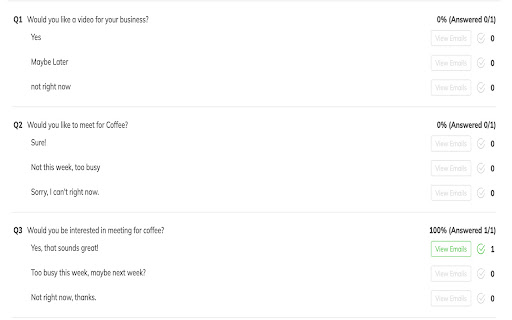


Easy Reply is a powerful and convenient Gmail extension that simplifies the process of getting others to respond to your emails. Easy Reply makes it easy for others to respond to your emails. Provide your recipients with a selection of pre-written responses, making it quick and easy for them to reply to your emails. This can be particularly useful for salespeople seeking to engage with prospects or anyone who wants to streamline email communication and get quick responses. With Easy Reply, you can save time and effort while still getting the answers you need.

Simplify Gmail
Make Gmail simpler, more capable, and more respectful Brought to you by the co-founder and design lead for Google Inbox, Simplify Gmail is a browser extension for desktop Gmail that boosts productivity, strengthens privacy, and reduces️ stress by: ✔️ BETTER DESIGN: Hundreds of improvements (small and large) to streamline, simplify, and enhance Gmail’s design and functionality. Hide the features you don’t use, customize the ones you do including setting the list and message width and fonts. ✔️ BUNDLES: Group conversations with the same label or category into a single row in your inbox for easier bulk reading and processing. ✔️ SAVED SEARCHES: Add commonly used searches or bookmark any message to your nav for easy access. Simplify includes 24 useful searches by default like Travel, Purchases, Archived, Attachments, Notes to self, PDFs, Photos, and more. ✔️ PAUSE INBOX: Pause new mail or hide the inbox entirely for deep focus. Optionally disable notifications when the inbox is paused or hidden. ✔️ BLOCK TRACKERS: Simplify blocks over 250 email spy trackers (more than any other tracker blocker extension). ✔️ KEYBOARD SHORTCUTS: Navigate faster with your arrow keys, Enter (to open, then to reply), and Escape (close a message, then to return to inbox). Use familiar shortcuts like Ctrl+A / ⌘A to select all or Ctrl+Z / ⌘Z to undo. Press "?" in Gmail to see all shortcuts. Also includes advanced shortcuts like [ I ] to reply to an intro and move the sender to BCC. ✔️ DARK MODE: Auto-switch with OS with options to invert all of Gmail’s UI and some or all messages. ✔️ GROUP BY DATE: Group messages list by date with bulk actions to one-click archive or delete. ✔️ INBOX ZERO BACKGROUND: Choose a different background to get when you reach inbox zero. ✔️ AUTO-CC/BCC: Set addresses to add to every new message and/or reply And much more... Comes with a free 1-month trial after which a paid plan is required. Learn more and sign up when you're ready at https://simpl.fyi/plans You should always be super careful what extensions or apps you use with your email. ✔️ Simplify always puts your security and privacy first. ✔️ The code for Simplify is entirely stored on your computer (no remote code) and is for the sole purpose of improving and enhancing Gmail's user interface and functionality. ✖️ Simplify does NOT request full access to your email (no API permissions required). ✖️ None of your data is collected, stored, or sent to Simplify. ✖️ Simplify has no tracking or analytics software. ✖️ Simplify will never have ads. Ever. Simplify's products have no ads, no analytics, no trackers, no cookies, and do not send or receive personal information of any kind from your account or device. Your privacy and the security of your account and data is of the utmost importance to us. We aim to make software worth paying for and taking the strictest stance on privacy possible. Our full privacy policy is at https://simpl.fyi/privacy You can send feedback or report issues via https://simpl.fyi/support (I usually respond within one business day). Note that there are over 100,000 unique combinations of Gmail’s options, features, and user states. Add in other 3rd party add-ons, different languages, browsers, screen sizes, and more and it grows to over a billion. Simplify strives to support them all, along with the more popular 3rd party extensions and add-ons. I wrote more about the complexity of building on top of Gmail here: https://on.simpl.fyi/p/complexity-of-simplify

Gmail Email Thread Reverse
A quick, easy, one-click way to reverse the messages in Gmail email threads and conversations! Here is what you can do with this extension: - 🔒 Securely reverse your Gmail Threads and Conversations - 📧 Have your most recent email / message appear at the top of the page - 🥽 Feel safe knowing this extension is safe, GDPR compliant, and follows Google's Privacy Policy and Terms of Service For those of us who use Gmail, it can be frustrating when you're part of a group thread or long thread and you have to scroll all the way to the bottom of the page to see the most recent email or message. With this extension, the most recent email or message will appear at the top of your threads and conversations. Nothing else is required: just install it and your threads and conversations will have your messages appear in reverse order (also known as reverse chronological order). #️⃣ v1.0.0 This is the initial release, with support for the new Google Chrome Manifest Version (version 3)

Into Gmail
Powerful Outlook & Gmail extension to compose, reply, fix spelling & grammar, translate, rephrase email messages with one click. Relax while AI composes your emails for you Into Gmail is a powerful and user-friendly Chrome extension that utilizes ChatGPT to compose and reply to your email messages with just one click. In addition, Into Gmail corrects spelling and grammar errors, rephrases sentences, and translates emails quickly. With Into Gmail, you can boost your productivity and free up time to relax. Take a deep breath and let Into Gmail take care of your email communication needs.

BYE! Gmail Extension
The most effective and affordable solution to completely block and clean out unwanted emails in any corner of Gmail. Annoyed that unwanted emails, even "blocked" or "filtered" in Gmail, are still in your spam or trash for 30 days? BYE! Extension is the most effective and affordable solution to completely block and clean out unwanted emails in any corner of Gmail. No more blocked email in trash and spam folders. ---BYE! Effective Blocking--- Once the extension is on, the extension detects and clears out any blocked email from the system to achieve effective blocking. ---One Click Spam and Trash Cleaning--- Our one-click cleaning exempts you from the hassles and worries of going into your trash and spam folders and being exposed to unwanted emails. ---Cheaper than a Cup of Coffee--- Priced as low as $45.99 a year, we give you safety and ease when it comes to Gmail management ---Safe, Secure and Private--- We guarantee that your email data and info will not be shared or sold to any third party. We adhere to Google API Services User Data Policy, including the Limited Use requirements. --Version 0.1.7 Resolved some design anomalies caused by the extension on other webpages.
