
adcfjjelnhpmgldpodkdknapjlcdcnce


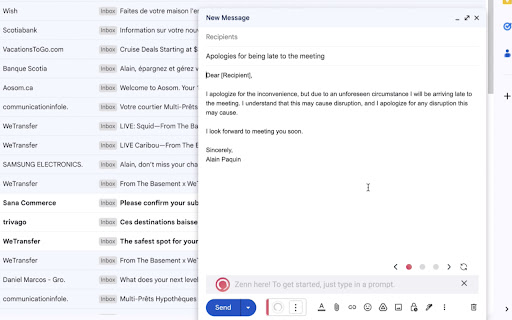

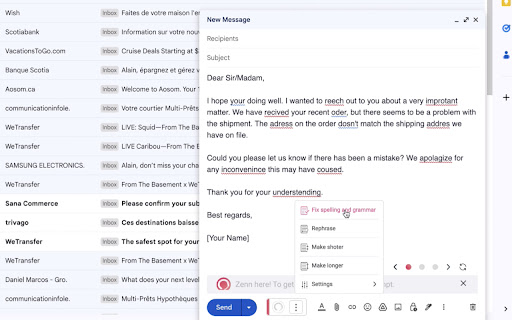
Powerful Outlook & Gmail extension to compose, reply, fix spelling & grammar, translate, rephrase email messages with one click. Relax while AI composes your emails for you Into Gmail is a powerful and user-friendly Chrome extension that utilizes ChatGPT to compose and reply to your email messages with just one click. In addition, Into Gmail corrects spelling and grammar errors, rephrases sentences, and translates emails quickly. With Into Gmail, you can boost your productivity and free up time to relax. Take a deep breath and let Into Gmail take care of your email communication needs.

GPT Everywhere (correctify.ai)
Use ChatGPT in any textbox in the Web Privacy-friendly Chrome extension to generate contents using OpenAI API, with your own Token. All sites are supported, even Gmail or Google Sheets.

Gmail Notes - Quick Notes for Email
Add notes to your Gmail, integrated with Gmail, you can quickly insert multiple notes to each conversation. Manage all your notes in one place. Preview notes, re-edit note, set note colors, navigate to related email conversations, or delete notes. If you have a better idea or changed your mind, just click the "Edit" button to modify your notes. New Features coming soon. Soon, you will be able to add notes when composing and replying to a conversion. and export all your notes to PDF. How are people using the extension? - Mark your important emails and collect them with well-organized "stickers". - Manage to-do lists, packing lists, and other important things from email conversations. - Take private notes for specific emails or conversations. It's very useful when you want to remember something from the email without forwarding it. - Write down your ideas about a subject or brainstorm for a project. - Clean up your thoughts or gather ideas when you compose a new email or reply to one. - Customer service staff can quickly search and copy templates from notes, only need to modify them slightly to send emails. More exciting ways to use it, waiting for you to discover... Please refer to the following link for the privacy policy https://www.workaddons.com/privacy

MailChimp Templates for Gmail™ by cloudHQ
Import and integrate MailChimp templates into Gmail Integrate your Mailchimp email templates directly into Gmail™ for seamless access and increased productivity! This extension allows you to: ✅ Import Mailchimp email templates to Gmail™ ✅ Send your MailChimp template via Gmail™ without leaving the Mailchimp editor ✅ No more sending emails from impersonal "no-reply@url.com" email addresses; they are sent from your email address ✅ After importing your Mailchimp email templates into Gmail, you can access them in your new Gmail email template library without ever leaving Gmail. Whether you're a sales professional, small business owner, designer, marketer or anyone needing access to their Mailchimp templates, this app simplifies the process and keeps you productive. This is your solution to conveniently send high quality, personalized emails. ~~~ Key Features ~~~ 🌟 Import your Mailchimp templates directly into Gmail™. 🌟 Send your Mailchimp templates using your email, without ever leaving Mailchimp. 🌟 Unlimited template storage for Premium Plan users. 🌟 Quick and easy installation, works in Chrome and Microsoft Edge without consuming space on your computer. 🌟 5-Star ratings by our highly satisfied users. 1. Install the extension. 2. Go to https://admin.mailchimp.com/templates/ 3. Choose the template you want to send. 4. You will see a "Gmail" icon next to your template. Click on it and your template will show in your Gmail email compose window. 5. Send your email using your own Gmail address, without leaving Mailchimp. Mailchimp Templates in Gmail by cloudHQ is perfect for: 🎯 **Small Business Owners** who appreciate the convenience of sending customized emails right from their Gmail. 🎯 **Designers and Marketers** who love to send visually stunning emails from their Gmail without leaving Mailchimp. No more switching between platforms or impersonal emails. Start improving your productivity with Mailchimp Templates in Gmail by cloudHQ. cloudHQ. Helping your productivity, 1 click at a time. cloudHQ website: https://www.cloudhq.net/ App website: https://www.mailchimp-templates.com Pricing: https://www.mailchimp-templates.com/pricing Support page: https://support.cloudhq.net/?s=mailchimp Blog: https://blog.cloudhq.net

Scribbly AI: ChatGPT Email Assistant
Scribbly – AI-powered email writing for busy professionals Scribbly is an AI-powered email writing assistant for busy professionals. It is compatible with the web versions of Gmail and Outlook. Write emails 10x faster with AI-powered content suggestions on Gmail or Outlook that are context-specific, professionally written, and sound just like you. 📧 Hit inbox zero faster – Write and send emails more efficiently, so you can clear your inbox quicker. 🚀 Streamline repetitive email tasks – Scribbly can identify & respond to commonly asked questions, meaning less repetitive email-writing for you. 🔝 Elevate your communication – Wave goodbye to second-guessing your writing and say hello to polished & professional-sounding emails. 💡 Make better decisions – Scribbly’s AI allows you to pick from multiple ways to respond, helping you make better decisions. 📝 Say goodbye to writer’s block – Let Scribbly handle the tedious task of email writing by giving it some basic context and have it write entire emails for you from scratch. 1️⃣ Select an email you want to reply to – Scribbly will analyse the text and provide you with personalised & contextually accurate response suggestions. 2️⃣ Select an option that best represents how you want to respond to the email. 3️⃣ Choose an email response drafted by Scribbly based on your selected intention. Make any necessary changes and press send! 4️⃣ Or guide Scribbly! Provide Scribbly with some context and see the magic happen. Level up your email writing. Send responses 10x faster & never struggle with a full inbox again. Try our free Scribbly Chrome Extension today! We’re constantly working on updates and improvements to make your Scribbly experience even better. If you have questions or feedback, we would love to hear from you at hello@scribbly.ai
