
emmdlhdabimooaadedpcdllojcfggkhg
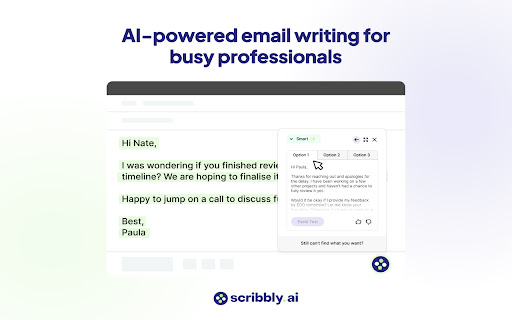
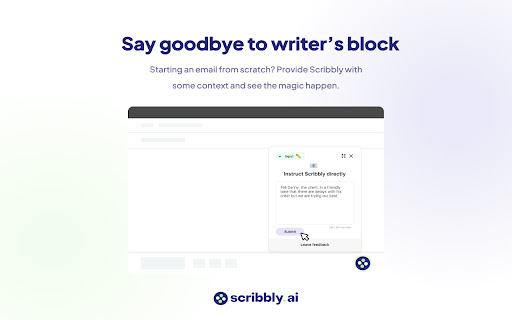


Scribbly – AI-powered email writing for busy professionals Scribbly is an AI-powered email writing assistant for busy professionals. It is compatible with the web versions of Gmail and Outlook. Write emails 10x faster with AI-powered content suggestions on Gmail or Outlook that are context-specific, professionally written, and sound just like you. 📧 Hit inbox zero faster – Write and send emails more efficiently, so you can clear your inbox quicker. 🚀 Streamline repetitive email tasks – Scribbly can identify & respond to commonly asked questions, meaning less repetitive email-writing for you. 🔝 Elevate your communication – Wave goodbye to second-guessing your writing and say hello to polished & professional-sounding emails. 💡 Make better decisions – Scribbly’s AI allows you to pick from multiple ways to respond, helping you make better decisions. 📝 Say goodbye to writer’s block – Let Scribbly handle the tedious task of email writing by giving it some basic context and have it write entire emails for you from scratch. 1️⃣ Select an email you want to reply to – Scribbly will analyse the text and provide you with personalised & contextually accurate response suggestions. 2️⃣ Select an option that best represents how you want to respond to the email. 3️⃣ Choose an email response drafted by Scribbly based on your selected intention. Make any necessary changes and press send! 4️⃣ Or guide Scribbly! Provide Scribbly with some context and see the magic happen. Level up your email writing. Send responses 10x faster & never struggle with a full inbox again. Try our free Scribbly Chrome Extension today! We’re constantly working on updates and improvements to make your Scribbly experience even better. If you have questions or feedback, we would love to hear from you at hello@scribbly.ai

Compozee - ChatGPT Email Writer
Compozee is the AI assistant powered by Chat GPT that takes your writing to the next level. ⏱️Unlimited Access - Write as many emails as you need without capacity issues. ✉️Fine-tuned for Emails - Compozee is fine-tuned specifically for email communication. 😇Easy to Use - Write better emails with ease, thanks to our intuitive and user-friendly interface. ⌛Save time: No more spending hours agonizing over the perfect email. Compozee's AI takes care of the heavy lifting, leaving you free to focus on what really matters. 💻Boost your confidence: Writing the perfect email can be daunting, especially if you're not a natural wordsmith. Compozee's is designed to help you feel more confident in your writing. ⬆️Improve your results: Whether you're trying to land a new job, win a new client, or simply stay in touch with your contacts, Compozee can help you achieve your goals by ensuring that your emails are clear, concise, and effective. 📜News in popup: Compozee provides a news popup that displays information about the most recent product releases and improvements. This allows users to stay informed about new features and updates without having to leave their current browsing session.

Email GPT
Write email with AI Introducing the AI Email Writer for Gmail! With this chrome extension, writing an email has never been easier. Powered by OpenAI, you can now generate professional, coherent and personalized emails in a matter of seconds. Simply activate the extension while composing an email in Gmail and let our AI do the work. Say goodbye to writer's block and save time by using our AI to craft the perfect email. Whether you're sending a quick message or a detailed report, our extension will make sure that your email stands out. Download the AI Email Writer for Gmail today and experience the power of AI-generated emails!

replyai.app - AI for emails
AI assisted email replies for gmail How it works: When you compose a reply to an email 4 buttons ("Agree", "Decline", "Specify", "Clear") are added next to the "Send" button that you can use as shown in the screenshot. "Clear" only cleans the response, whereas the other 3 are used as inputs to the AI. When you click "Agree" we feed the AI with the contents of the email and tell it to write a response that agrees to it. When you click "Decline" we feed the AI with the contents of the email and tell it to write a response that declines to it. For "Specify" you need to write a text in the response field of how you want the AI to reply. e.g. "schedule call tomorrow at 17:00", or "decline in a funny way". Then we feed the AI with the contents of the email and how you specified the answer to be and AI writes a response.

Email Whisperer - GPT AI Email Writer
Email Whisperer - Write emails with ai Email Whisperer is an innovative Chrome extension designed to seamlessly integrate with both Gmail and Outlook, transforming the way you compose emails. Say goodbye to the daunting blank page and hello to efficiency, accuracy, and confidence in your email communications. Intelligent Email Drafting: With Email Whisperer, you no longer have to start from scratch. Our AI-driven technology suggests complete email drafts based on the context and purpose of your message. Whether you're drafting a professional request, a warm greeting, or a detailed report, Email Whisperer offers tailored suggestions to get you started. Advanced Spell Check: Beyond basic spell checking, Email Whisperer provides comprehensive proofreading tools. Our extension catches not just spelling mistakes, but also grammatical errors, awkward phrasings, and even tone inconsistencies. Ensure your emails are not only error-free but also perfectly polished. Seamless Integration: Email Whisperer works within your Gmail or Outlook interface, providing a smooth and uninterrupted experience. There's no need to switch between apps or disrupt your workflow. With just a click, you can activate our drafting and proofreading features right where you write your emails. Customizable Suggestions: Tailor Email Whisperer to your unique writing style and preferences. Customize the level of assistance you receive, from full email drafts to gentle nudges for improving your grammar and spelling. Privacy-Preserving: We understand the importance of confidentiality in email communication. Email Whisperer is designed to respect your privacy, with all suggestions generated on-the-fly and no content stored or analyzed beyond what is necessary for immediate assistance. Add Email Whisperer to Chrome from the Chrome Web Store. Log into your Gmail or Outlook account and compose a new email. Enjoy automatic drafting and spell-check suggestions as you type. Elevate Your Email Game: With Email Whisperer, you can focus on conveying your message, leaving the nuances of drafting and proofreading to us. Enhance your productivity, improve your writing, and communicate with confidence. Install Email Whisperer today and experience a smarter, faster way to handle your email correspondence.
