
dbdbfkaihieniemdbonidjemkfhoiioc
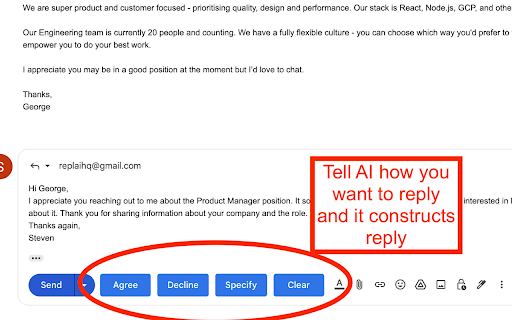
AI assisted email replies for gmail How it works: When you compose a reply to an email 4 buttons ("Agree", "Decline", "Specify", "Clear") are added next to the "Send" button that you can use as shown in the screenshot. "Clear" only cleans the response, whereas the other 3 are used as inputs to the AI. When you click "Agree" we feed the AI with the contents of the email and tell it to write a response that agrees to it. When you click "Decline" we feed the AI with the contents of the email and tell it to write a response that declines to it. For "Specify" you need to write a text in the response field of how you want the AI to reply. e.g. "schedule call tomorrow at 17:00", or "decline in a funny way". Then we feed the AI with the contents of the email and how you specified the answer to be and AI writes a response.

Gmail AI Email Assistant - Mailmeteor
Meet an inbox that organizes itself, drafts replies for you, and writes alongside you. All without leaving Gmail. Mailmeteor for Gmail helps you save hours every day in your inbox. It brings powerful features to your Gmail workflow, such as: 🏷️ Auto-labels emails to help you focus 📝 Auto-drafts replies in your tone 💌 Mail merge directly from Gmail ✔ Email tracker to know when your emails are opened ⏰ Inbox time to monitor your time spent on emails 🗂️ Search and export emails in one click Most features are free to use. Upgrade to send more emails, get additional AI credits, and access advanced features, like email tracking, attachments, Autopilot, and more. - Best-rated add-on for Gmail - 7 million users on Google Sheets, rated 4.9/5 - Trusted by teams at Spotify, Uber, Pinterest, Shopify, and Change.org - Recommended by Google This extension works exclusively in Gmail, where your work happens. No need to add extra tools or switch to a different dashboard or SaaS. ➤ AI Email Assistant, including email categorization, drafts replies, email writer, and more. ➤ Email Tracker to know when your emails are opened or clicked ➤ Mail merge inside Gmail ™. We maximize your email deliverability and send emails directly from Gmail ™. ➤ Follow up with ease in Gmail ™. Send automated follow-ups in one click, without your recipients knowing. ➤ Designed to respect your privacy. ✓ AI Email Assistant built into Gmail ✓ Mail merge, with analytics ✓ Email Tracker (opens and clicks) ✓ Auto follow-up: send a reminder when not opened, not replied… ✓ Bounces detection: make sure you don’t follow up to dead email addresses ✓ Hubspot / CRM integration ✓ CSV emails export ✓ Available in English Once you've installed this extension, you'll be invited to enable AI Email Assistant features immediately. Alternatively, you can enable it by following these steps: 1. Access the Settings > Add-ons > Mailmeteor settings 2. Turn on the AI Email Assistant feature 3. Fine-tune the email categorization, pre-drafts, and other settings. Once enabled, your AI Email Assistant will: - organize your inbox, with smart labels - draft replies to important emails (to respond) - help you write emails faster Once you've installed this extension, here's how to send mass emails in your Gmail inbox: 1. Select the "Campaigns" tab, underneath Inbox / Starred / Sent 2. Click on "New campaign" 3. Write your email and select recipients 4. Once you're ready, send yourself a test email or preview 5. Click "Send emails" Your recipients will receive the emails just as you would have sent them, and your emails remain accessible in the "Sent" tab of your Gmail account. Once you’ve installed this extension for Gmail, here’s how to follow up in Gmail: 1. Compose a new message as usual 2. Instead of clicking on “Send”, click on the caret and select “Send with a follow-up” 3. Select a follow-up template or write a new message 4. Define when the follow-up should be sent (e.g. 3 days later, if no reply) 5. Click send SUPPORT AND DOCUMENTATION You will learn: ⚑ The best time to follow up with a prospect ⚑ A wide selection of email templates ⚑ Gmail best practices to improve your deliverability And also, everything you need to know before doing a mass mailing in Gmail ™, such as: ⚑ How to send mass emails in Gmail ™ ⚑ How to send mass customized emails with Gmail ™ ⚑ How to send a mass email without showing addresses in Gmail ™ ⚑ How to use your Gmail ™ contact list to send emails ⚑ Why Mailmeteor is better than Gmass, Lemlist, Yamm, Streak and Mailsuite FREE FOR EDUCATION Have a .EDU email address? Mailmeteor provides free licenses for students and staff, as part of its Education Program. Learn more: https://mailmeteor.com/education-program Mailmeteor turns your Gmail inbox into a complete email marketing solution: ✪ Follow up with ease to make sure your recipients reply ✪ Templates to reuse your best follow-up messages ✪ Skip following up when the recipient replies ✪ Bounce detection: remove invalid email addresses ✪ Mailmeteor Dashboard to do even more with your emails You can use Mailmeteor in many different ways. Here are some examples: ➤ Sales & Marketing: to boost your conversion and re-engage your leads at scale ➤ Customer care: to make sure a ticket is closed ➤ Finance: to put an end to unpaid invoices ➤ Marketing: personalized thank-you emails to HR recruiters, crowdfunding supporters, Product Hunt, business angels, friends & family. ➤ Job hunt: follow-up after an interview and make sure the recruiter doesn’t forget about you ➤ PR: Bump your email to the top of journalists' or influencers' inboxes. ➤ Email No Code: follow up with prospects without a line of code ➤ Events: Inviting people to an event (webinar, wedding, job-dating, fair, conference, meetup...) and reducing no-shows by sending a reminder shortly before the event. Here are the features we have built thanks to your feedback: ✓ Send newsletters in Gmail ✓ Multi follow-ups & email sequence ✓ Follow-up with images & attachments ✓ Templates management to write emails faster ✓ Open & Click Tracking ✓ More follow-up triggers, such as open/no-open ✓ Cold emailing & Mail merge in Gmail Mailmeteor complies with privacy laws (especially GDPR) to protect your data. Learn more about how we respect your privacy in our Privacy Policy in our Security center: https://mailmeteor.com/security Mailmeteor is audited by Google every year for optimal security. We're CASA Tier 3 compliant, with SOC 2 certification in progress. Gmail and Google are trademarks of Google Inc. Use of these trademarks is subject to Google permissions.

SimplyMail - AI Email Assistant for Gmail
AI-powered Gmail assistant. Get instant email summaries, smart categories, task extraction, and AI replies. Save hours on email. Transform Your Gmail Experience with AI-Powered Email Intelligence SimplyMail is your intelligent email assistant that helps you work smarter, not harder. Analyse, summarize, and manage your Gmail inbox with advanced AI—all with your explicit consent and complete privacy control. Smart Email Analysis Instant Summaries: Get the key points of any email in seconds Thread Summarization: Understand long email conversations at a glance Auto-Categorization: Automatically classify emails by type and priority Task Extraction: Pull action items from emails automatically AI Writing Assistant Smart Replies: Generate professional email responses with customizable tone Draft New Emails: Create emails from simple prompts Email Shortening: Condense lengthy emails while preserving key information Tone Control: Choose from Professional, Friendly, Direct, Confident, Formal, or Warm tones Privacy-First Design No Automatic Processing: All AI features require your explicit click—we never analyze emails without permission User Consent Required: Full control over when and how your emails are processed Secure Authentication: Protected by enterprise-grade Supabase authentication No Data Storage: Your email content is never stored on our servers How It Works Install SimplyMail and open Gmail Click the SimplyMail icon when viewing any email Choose your action: summarize, categorize, extract tasks, or generate a reply Get instant AI-powered results Free & Pro Plans Free Plan: Daily usage limits All core features included Perfect for light email users Perfect For Busy professionals managing high email volumes Teams who need to respond quickly and professionally Anyone who wants to save time on email management Remote workers juggling multiple conversations Executives who need email summaries fast Requirements Works exclusively with Gmail (mail.google.com) Chrome browser Free account registration

Scribbly AI: ChatGPT Email Assistant
Scribbly – AI-powered email writing for busy professionals Scribbly is an AI-powered email writing assistant for busy professionals. It is compatible with the web versions of Gmail and Outlook. Write emails 10x faster with AI-powered content suggestions on Gmail or Outlook that are context-specific, professionally written, and sound just like you. 📧 Hit inbox zero faster – Write and send emails more efficiently, so you can clear your inbox quicker. 🚀 Streamline repetitive email tasks – Scribbly can identify & respond to commonly asked questions, meaning less repetitive email-writing for you. 🔝 Elevate your communication – Wave goodbye to second-guessing your writing and say hello to polished & professional-sounding emails. 💡 Make better decisions – Scribbly’s AI allows you to pick from multiple ways to respond, helping you make better decisions. 📝 Say goodbye to writer’s block – Let Scribbly handle the tedious task of email writing by giving it some basic context and have it write entire emails for you from scratch. 1️⃣ Select an email you want to reply to – Scribbly will analyse the text and provide you with personalised & contextually accurate response suggestions. 2️⃣ Select an option that best represents how you want to respond to the email. 3️⃣ Choose an email response drafted by Scribbly based on your selected intention. Make any necessary changes and press send! 4️⃣ Or guide Scribbly! Provide Scribbly with some context and see the magic happen. Level up your email writing. Send responses 10x faster & never struggle with a full inbox again. Try our free Scribbly Chrome Extension today! We’re constantly working on updates and improvements to make your Scribbly experience even better. If you have questions or feedback, we would love to hear from you at hello@scribbly.ai

AnswerAI - Homework AI Tutor & Study Helper
Your AI assistant ChatGPT Plugin.Answer questions and get AI answers quickly,write emails,articles,chatbot,learning assistant. Ask anything and learn everything with one of the leading AI educational apps for student success. Answer.AI is the only app that is there for students both in and out of the classroom, and revolutionizing the way you learn. With Answer.AI's web extension, your screen will become a powerhouse of personalized education and learning. You can screenshot or highlight any question on your browser and get step-by-step solutions, generate brainstorming drafts for any type of writing, chat with AskAI about tough concepts, master complex math questions with Geometry mode, and more. With over 6 million users, our mission is to help our evergrowing community achieve their milestones and crush their goals both in and out of the classroom. 🥳Here are some features you can look out for: 📍Upload a screenshot for instant answers Easily upload a screenshot of your question, and Answer.AI will analyze it to provide accurate answers—perfect for complex math problems and more. 📍Ask and Answer Click the Answer.AI icon to initiate a real-time conversation, or select any text on a webpage to receive detailed answers instantly. No matter the complexity, Answer.AI offers clear explanations. 📍Writing Assistant Answer.AI also serves as an AI-powered writing assistant, helping you create high-quality content in seconds, making it perfect for essays, articles, and more. 📍Smart Homework Solutions Submit your questions and get step-by-step solutions, ensuring you not only get the correct answer but understand the underlying concepts. 📍Highlight and Solve Answer.AI works on any website you visit and integrates smoothly into your Chrome browser. Simply highlight text or use the extension to get answers quickly and efficiently. 🌟 Getting Started: 1️⃣ Click the Answer.AI icon on your screen to start a conversation. 2️⃣ Highlight text on any webpage, click the Answer.AI icon, and receive an answer immediately. 🧑💻 How to use the Chrome Extension: 1️⃣ Click the "Add to Chrome" button. 2️⃣ Log in to your Answer.AI account. 3️⃣ Start using Answer.AI! You can open the Answer.AI sidebar anytime you need help. Answer.AI offers both free and premium versions. Free users receive limited access, while premium users enjoy enhanced features and unlimited usage. 📍What platforms does Answer.AI support? Answer.AI is available on iOS and Android (download via the Apple Store or Google Play), as well as a Chrome extension for Windows and Mac users. 💯Ready to upgrade your learning experience? Install Answer.AI today and leave your feedback—your suggestions help us continue to innovate. You can contact us at support@answerai.pro or go to our website, https://answerai.pro for more info. We love hearing from you!
