
gjkkbbbjdcdickanchomafbcddjgpnpn
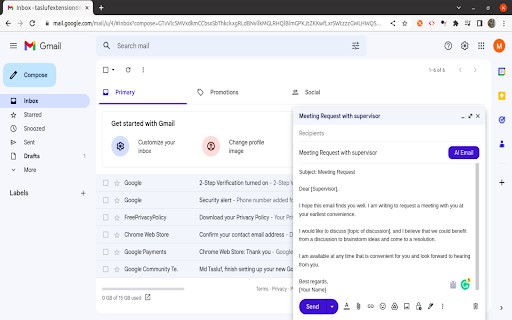
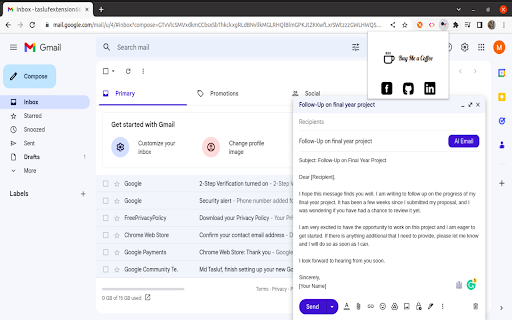

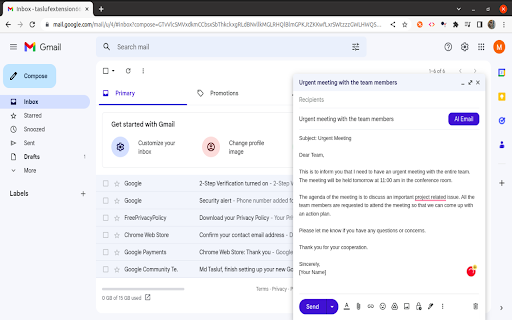
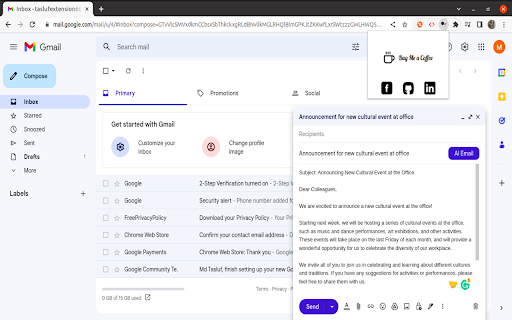
Write email with AI Introducing the AI Email Writer for Gmail! With this chrome extension, writing an email has never been easier. Powered by OpenAI, you can now generate professional, coherent and personalized emails in a matter of seconds. Simply activate the extension while composing an email in Gmail and let our AI do the work. Say goodbye to writer's block and save time by using our AI to craft the perfect email. Whether you're sending a quick message or a detailed report, our extension will make sure that your email stands out. Download the AI Email Writer for Gmail today and experience the power of AI-generated emails!

Official AI Email Writer for Gmail by WriteMail.ai
Free AI email writer for Gmail. Generate professional emails instantly. ChatGPT-powered replies in 35+ languages. No signup needed. 🔥 AI EMAIL WRITER FOR GMAIL - GENERATE PROFESSIONAL EMAILS IN SECONDS Stop wasting hours on email. WriteMail.ai is a free AI email assistant that generates perfect emails directly inside Gmail. Get ChatGPT-level quality without leaving your inbox. Trusted by 320,000+ users across WriteMail products worldwide. 5-star rated on the Chrome Web Store ⭐ Unlike generic AI writers that force you to copy-paste between tabs, WriteMail works where you actually write emails — inside Gmail. INSTANT AI EMAIL GENERATION Turn bullet points into polished emails. No prompts needed, no learning curve. Click. Generate. Send. • Start from a short outline or message idea • Reply to emails with context-aware AI • Generate subject lines that get opens WORKS IN 35+ LANGUAGES Perfect grammar and cultural nuances in English, Spanish, French, German, Japanese, and 30+ more. Native-quality emails even if English isn’t your first language. 4 PROFESSIONAL TONES Match your email to the situation: • Professional — For clients and executives • Friendly — For colleagues and partners • Formal — polished corporate tone & official messages • Casual — For quick internal messages CUSTOM LENGTH & STYLE • Concise (2–3 sentences) • Detailed (full paragraphs) • Add emojis or keep it formal • Match your personal writing style VOICE INPUT Dictate your message instead of typing. WriteMail turns your voice into a clean, professional email in seconds. QUICK REPLIES Reply faster than ever: • Click Reply in Gmail • AI scans the conversation context • Get smart, ready-to-send reply suggestions instantly CONTEXT-AWARE REPLIES AI reads your email thread and suggests relevant, logical responses. No more “I hope this email finds you well” generic openers. 🛠 HOW IT WORKS 1. Open Gmail and click Compose (or Reply) 2. Click the WriteMail.ai icon 3. Type a few bullet points or a short description of your message 4. Click “Generate” — your email appears in a few seconds 5. Review, edit if needed, and send ⚡ WHY BETTER THAN CHATGPT FOR EMAIL ChatGPT is powerful, but it wasn’t built for email. Here’s why WriteMail wins: WRITEMAIL.AI — built for email ✔ Native Gmail integration ✔ Reads email threads ✔ Generates full formatted emails ✔ Works in 1 click CHATGPT — built for general text ✖ No Gmail integration ✖ Manual copy & paste ✖ Requires prompting ✖ Not formatted as emails Your data stays protected: • Email text is processed only to generate content • We don’t sell data or share it with advertisers • Personal info is stored only for account access • You can request access or deletion anytime • Protected with enterprise-grade security measures We don’t use your emails to train AI models — your data stays yours. Get started completely free: • 10 AI-generated emails per month in the Gmail extension • 5 AI-generated emails per month in the WriteMail web app • Access to core features • No credit card required • Never expires 👥 WHO USES WRITEMAIL.AI • Sales professionals writing cold outreach • Customer support teams handling 100+ emails/day • Executives with packed inboxes • Non-native English speakers • Anyone who spends too much time on email ⚙ INSTANT SETUP 1. Click “Add to Chrome” (takes 3 seconds) 2. Open Gmail 3. Generate your first email 4. Join 320,000+ professionals saving hours on email No signup required for first use. Just install and write. 📦 WHAT YOU GET • Monthly limits apply (10 emails in Gmail extension, 5 in web app) ⸻ FREE — $0/mo • 10 emails/month in Gmail extension • 5 emails/month in WriteMail web app • Basic customization • Standard generation speed • Multilingual support • Gmail integration 🟣 Great for: occasional emailing, first-time users testing AI REGULAR — $6.95/month • 50 emails/month • Basic customization • Standard generation speed • Multilingual support • Gmail integration 🟣 Great for: freelancers, students & individuals who email weekly BASIC — $11.95/month (Most Popular) • 150 emails/month • Standart customization • Faster generation speed • Email history & reuse • Smart Mail Assistant • One-Click Email Send 🟣 Great for: daily emailers, sales professionals, managers PRO — $19.95/month • 500 emails/month • Advanced customization options • Fastest generation speed • Priority support • API access • Multiple email logins 🟣 Great for: power users, support teams, heavy sales roles CUSTOM — Looking for more email generation options? Contact us to discuss personalized tariff plans crafted just for you! Q: What is WriteMail.ai? WriteMail.ai is an AI-powered email writing tool that helps you write better emails, faster. It uses advanced artificial intelligence, trained on a massive dataset of emails, to generate relevant, engaging, and effective emails for any situation. Q: Is my data secure? A: Yes. Email data is used only to generate content and may be temporarily stored for core functionality (e.g., history or billing), but it is never sold, shared with advertisers, or used to train AI models. Q: Can I try before signing up? A: Yes — you can generate emails without creating an account. Q: Do you support languages other than English? A: Yes — 35+ languages including Spanish, French, German, Japanese, Portuguese, Korean, Arabic, and more. Q: How do I cancel my premium plan? A: You can cancel anytime in your account settings. Click “Add to Chrome” now and write your first AI-powered email in the next 30 seconds.

Gmail-GPT
Automate Professional Email Reply Creation with Gmail-GPT's voice-powered email technology Impress your colleagues, clients, and superiors with professional and polished email responses, in seconds. Create high-quality professional emails in seconds with GMAIL-GPT's AI-powered voice assistant. Welcome to Gmail GPT, the revolutionary new Chrome extension that will change the way you use Gmail. Gmail GPT is the ultimate Gmail productivity tool that seamlessly integrates with Gmail to help you write more efficient and effective responses. With just a click of a button, you can use advanced natural language processing capabilities to generate automatic replies for your emails. Join the future of email communication with GMAIL-GPT's FIRST voice-powered email technology. 100% free and privacy friendly Delivers superior response quality, surpassing other market competitors Effective on all websites, with exceptional performance on Gmail Supports a wide range of languages for versatile usage Offers free, privacy-focused solutions for maximum user protection. Efficient Communication No more staring at the screen trying to come up with the perfect response, let Gmail GPT do the work for you. Gmail GPT reads your emails and generates relevant, personalized responses that will save you time and increase your productivity. Save Time Gmail GPT allows you to focus on the tasks that matter, by automating the tedious task of writing responses to emails. With our extension, you can spend less time typing and more time doing the things that you love. Easy to Use The extension is easy to install and use. Simply download the extension from the Chrome store and sign in to your Gmail account. Once you are set up, simply click the Gmail GPT button when you are composing an email and let the extension do the rest. Note: This extension is not an official extension from OpenAI . It is an independent creation of a developer, who uses OpenAI Resources to provide the service. Using Gmail GPT is easy and straightforward. Here's a step-by-step guide on how to get started: Step 1: Install the extension from the Chrome store. Step 2: Open Gmail Page. Step 3: Open an email for which you want to generate an automatic reply. Step 4: Click on the Gmail GPT button located near the send button. Step 5: Click on the "Generate" button to generate the response of the mail. Step 6: Click on the "Insert" button to insert and copy the response into the email. Revolutionize your email game with Gmail GPT (Chat GPT for Gmail). Try it now and experience the difference it makes in your workday!

Mailyr: Write Emails with GPT-5, Claude, and Gemini
ChatGPT Mailyr: Write emails using GPT-5, Claude, and Gemini. Boost productivity with AI-powered email writing. Stop staring at a blank cursor. Mailyr is the advanced AI email writer designed to help you craft professional, flawless messages directly inside Gmail. Powered by top-tier models like GPT-5, Claude, and Gemini, this extension seamlessly integrates into your workflow to save you hours of writing time every week. ➤ Overview Writing shouldn't take up half your day. Whether you need to reply to a client, draft a formal request, or clean up a messy note, this tool acts as your personal editor and copywriter. Unlike basic helpers, the extension leverages the world's most powerful technology to understand context, tone, and nuance, ensuring your messages always sound human and professional. ➤ Why Choose This Extension? • Write 10x Faster: Turn a few bullet points into a fully written, polished message in seconds. • World-Class Models: We do not limit you to one brain. Switch between GPT-5, Claude Sonnet, Gemini, and GPT-4o-mini to find the perfect style for your needs. • Seamless Gmail Integration: No copying and pasting from external chat windows. The assistant lives right inside your Gmail compose window—just click the sparkles icon. • Privacy First: Your data stays yours. We do not store, sell, or share your emails, prompts, or responses. ➤ Key Features • Smart Drafting: Simply describe what you want to say, and watch the software generate a coherent, grammatically correct draft. • Tone & Length Customization: Need to sound professional for a boss or casual for a colleague? Adjust the settings with a single click (Premium). • Scholar-Level English: Perfect for non-native speakers or anyone wanting to elevate their writing vocabulary and grammar. • Instant Insertion: Add the generated text directly into your message body with one click. ➤ How it Works 1. Install: Add the extension to Chrome. 2. Compose: Open Gmail and click Compose or Reply. 3. Activate: Click the sparkles icon in the toolbar. 4. Prompt: Type a short description of your intent (e.g., "Ask for a meeting next Tuesday at 2 PM"). 5. Send: Receive a polished draft. Review, insert, and hit send! ➤ Plans & Pricing Free Version: • Get started immediately with 14 lifetime credits. • Access to the standard, reliable OpenAI 4o-mini model. • Perfect for testing the waters and occasional drafting. Premium Version: • Unlock High-End Models: Full access to GPT-5, Claude Sonnet, and Gemini. • High Volume: Generate up to 250 emails per month. • Full Control: Custom tone and length settings. • Premium Speed: Experience lightning-fast generation on dedicated servers. ➤ Privacy & Trust We take your digital privacy seriously. This tool operates with a strict privacy policy ensuring that your content remains confidential. We are fully compliant with Chrome Web Store security standards. ➤ Get Started Ready to transform the way you communicate? Install Mailyr now and experience the best AI email writer for Gmail. For more information or to view a demo, visit our official website at: getmailyr.com

Scribbly AI: ChatGPT Email Assistant
Scribbly – AI-powered email writing for busy professionals Scribbly is an AI-powered email writing assistant for busy professionals. It is compatible with the web versions of Gmail and Outlook. Write emails 10x faster with AI-powered content suggestions on Gmail or Outlook that are context-specific, professionally written, and sound just like you. 📧 Hit inbox zero faster – Write and send emails more efficiently, so you can clear your inbox quicker. 🚀 Streamline repetitive email tasks – Scribbly can identify & respond to commonly asked questions, meaning less repetitive email-writing for you. 🔝 Elevate your communication – Wave goodbye to second-guessing your writing and say hello to polished & professional-sounding emails. 💡 Make better decisions – Scribbly’s AI allows you to pick from multiple ways to respond, helping you make better decisions. 📝 Say goodbye to writer’s block – Let Scribbly handle the tedious task of email writing by giving it some basic context and have it write entire emails for you from scratch. 1️⃣ Select an email you want to reply to – Scribbly will analyse the text and provide you with personalised & contextually accurate response suggestions. 2️⃣ Select an option that best represents how you want to respond to the email. 3️⃣ Choose an email response drafted by Scribbly based on your selected intention. Make any necessary changes and press send! 4️⃣ Or guide Scribbly! Provide Scribbly with some context and see the magic happen. Level up your email writing. Send responses 10x faster & never struggle with a full inbox again. Try our free Scribbly Chrome Extension today! We’re constantly working on updates and improvements to make your Scribbly experience even better. If you have questions or feedback, we would love to hear from you at hello@scribbly.ai
