
bmnbmnemfpcjabgdljjanmloeciofedg


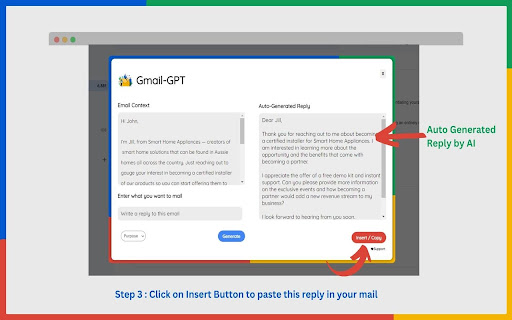
Automate Professional Email Reply Creation with Gmail-GPT's voice-powered email technology Impress your colleagues, clients, and superiors with professional and polished email responses, in seconds. Create high-quality professional emails in seconds with GMAIL-GPT's AI-powered voice assistant. Welcome to Gmail GPT, the revolutionary new Chrome extension that will change the way you use Gmail. Gmail GPT is the ultimate Gmail productivity tool that seamlessly integrates with Gmail to help you write more efficient and effective responses. With just a click of a button, you can use advanced natural language processing capabilities to generate automatic replies for your emails. Join the future of email communication with GMAIL-GPT's FIRST voice-powered email technology. 100% free and privacy friendly Delivers superior response quality, surpassing other market competitors Effective on all websites, with exceptional performance on Gmail Supports a wide range of languages for versatile usage Offers free, privacy-focused solutions for maximum user protection. Efficient Communication No more staring at the screen trying to come up with the perfect response, let Gmail GPT do the work for you. Gmail GPT reads your emails and generates relevant, personalized responses that will save you time and increase your productivity. Save Time Gmail GPT allows you to focus on the tasks that matter, by automating the tedious task of writing responses to emails. With our extension, you can spend less time typing and more time doing the things that you love. Easy to Use The extension is easy to install and use. Simply download the extension from the Chrome store and sign in to your Gmail account. Once you are set up, simply click the Gmail GPT button when you are composing an email and let the extension do the rest. Note: This extension is not an official extension from OpenAI . It is an independent creation of a developer, who uses OpenAI Resources to provide the service. Using Gmail GPT is easy and straightforward. Here's a step-by-step guide on how to get started: Step 1: Install the extension from the Chrome store. Step 2: Open Gmail Page. Step 3: Open an email for which you want to generate an automatic reply. Step 4: Click on the Gmail GPT button located near the send button. Step 5: Click on the "Generate" button to generate the response of the mail. Step 6: Click on the "Insert" button to insert and copy the response into the email. Revolutionize your email game with Gmail GPT (Chat GPT for Gmail). Try it now and experience the difference it makes in your workday!

FutureWrite AI for Writing & More w/ ChatGPT
Free-Boost writing w/ AI! FutureWrite w/ ChatGPT for emails & more. Say bye 2 writer's block & hello 2 smarter,faster writing. Boost writing w/ AI! FutureWrite w/ ChatGPT for emails & more. Say bye to writer's block & hello to smarter, faster writing. FutureWrite is the ultimate writing assistant for professionals. With its AI-powered technology and easy-to-use interface, it helps you write smarter and succeed faster. From crafting perfect cover letters and LinkedIn summaries to writing job descriptions, email responses, and capturing meeting notes, FutureWrite has got you covered. Say goodbye to writer's block and hello to efficient, effective, and flawless writing. Unlock your full potential with FutureWrite and Write Smarter & Succeed Faster! Seamless integration with popular platforms such as Gmail and LinkedIn. With its integration into the Gmail email reply window, FutureWrite.AI appears right next to the send button, allowing you to easily compose and edit your emails without ever leaving your inbox. Similarly, in LinkedIn, FutureWrite.AI appears next to the Job Apply button, making it easy to craft the perfect cover letter or summary for your job applications. Free for Ever: FutureWrite.AI is a 100% free writing assistant that can be used by anyone, anytime, anywhere. Best Writing Assistant: FutureWrite.AI beats all other writing assistants in the market with its advanced features and ease of use. Integration: Seamlessly integrates with popular platforms like Gmail and LinkedIn, appearing next to the send button in the Gmail email reply window and next to the Job Apply button in LinkedIn, allowing you to easily compose and edit emails and craft the perfect cover letter or summary without ever leaving the platform. Works in Every Webpage: FutureWrite.AI works seamlessly in every webpage, ensuring that you never have to switch between different tools while writing. All Languages Supported: FutureWrite.AI supports all languages, making it accessible to professionals from all over the world. Secured and Privacy Built-in: FutureWrite.AI takes your privacy and security seriously. The tool is built with robust security features to ensure that your data is safe and secure. Created by Professionals for all Professionals: FutureWrite.AI was created by a team of professionals who understand the needs of other professionals. The tool is designed to make your life easier and help you succeed in your career. No Need for Chat GPT Account: Unlike other writing assistants, FutureWrite.AI does not require you to have a Chat GPT account to use the tool. Works Independently: FutureWrite.AI is a standalone tool that works independently, allowing you to use it on any device or platform. You can now auto-generate contextual responses to tweets on the Twitter App. 🐦💬 All current users of the FW Chrome extension will have access to the Tweet Response feature. 🖥️🔗 Simply select the reply option on any tweet that you’d like to reply to. 👉💬 Click on the FutureWrite icon on the reply input field. 🖊️🔮 FutureWrite’s context window will open. In this window, you need to provide an input prompt about what you’d like to do with the context. You can either manually input your context prompt or select from the following hints in the dropdown. 🪟❓ Congratulations – For tweets about achievements 🎉🏆 Retweet – For tweets that can be re-posted 🔄📢 Agree – For tweets you agree with 👍😄 Disagree – For tweets you disagree with 👎😤 Ask More – For tweets about insufficient information 🤔❓ Expand More – For tweets seeking advice or opinions 🗣️📈 Select Generate AI Response and select one from the 5 drafts generated. The selected response will be auto-filled into the reply input field. 🤖✉️

Letterbot AI
AI email assistant — generate emails, replies, subject lines, summaries, and grammar fixes in 13 languages. Write better emails in seconds. Letterbot AI lives inside your Gmail compose window — just click the robot icon in the toolbar and let AI do the writing. 📧 Write Email — Describe what you want to say, and AI writes the full email for you ↩️ Smart Reply — Paste an incoming email and describe your intent. AI drafts a contextual reply 💡 Subject Line Generator — Get 3 subject line suggestions for any email 📋 Email Summary — Condense long emails into concise bullet points ✏️ Grammar Correction — Fix spelling, grammar, and punctuation mistakes instantly 📈 Sales Email — Generate persuasive cold outreach and sales pitches 13 Languages: English, German, Spanish, French, Portuguese, Croatian, Japanese, Korean, Chinese (Simplified & Traditional), Arabic, Hindi, and Russian. 5 Writing Tones: Formal, Casual, Friendly, Polite, or Respectful — match the right tone for every situation. Works Inside Gmail: No switching tabs. Letterbot adds a button directly to your Gmail compose toolbar. Click it, pick a tool, type your prompt, and generate. Hit "Insert" to paste the result straight into your email. Template Library: Don't know where to start? Choose from ready-made templates: follow-up after no reply, meeting request, thank-you after interview, polite complaint, project status update, resignation notice, and more. Smart Reply Context: When replying to an email, Letterbot automatically extracts the conversation thread so the AI knows what you're responding to. Get started for free. Upgrade anytime at letterbot.ai.

Auto Gmail - ChatGPT AI for email inbox
Auto Gmail connects to your Gmail inbox and uses your data and ChatGPT to draft email responses to every inbound message Auto Gmail connects directly to your inbox, trains on all your past email data to learn how you write and who you are and drafts email responses automatically to every inbound message you receive. It is the best way of saving hours every day. Instead of improving your productivity with shortcuts or apps like Superhuman, simply let our AI learn about you and answer all your emails instead of you. You don't need to click or instruct the AI, it works on mobile and desktop and writes emails even when you're not in Gmail. Upon opening your inbox, you'll see the new drafts, ready to be sent. Your inbox contains everything you ever sent and therefore a big part of your knowledge. Stop repeating the same things and let Auto Gmail do the work. You stay in the driver seat of course and no email is ever sent without you actually hitting that "Send" button. Upon installation, drafts will appear even on the mobile app, allowing you to answer faster while on the go. You can instruct the AI and give it additional context such as links you'd like it to use (calendar links, tutorials, product pages and so on). Under the hood, Auto Gmail works by connecting to the Gmail API and uses ChatGPT (GPT 4) and Llama-3 to draft email answers. For context, the most similar emails are passed along to help ChatGPT draft the most relevant answers. Auto Gmail retrains every few days on your latest messages to stay up to date on new knowledge you sent per email. For people sending many emails, we have a Max plan at $47/mo

Type-in | ChatGPT email assistant | GPT-3
Type-in is a gmail plugin generates and replies to emails quickly and easily from keywords! using GPT-3 known as ChatGPT… Type-in is a gmail plugin generates and replies to emails quickly and easily from keywords! using GPT-3 known as ChatGPT technology. With Type-in, you can create fully customized emails tailored to your specific needs in a fraction of the time it would take you to write them out manually. The app also allows you to reply to emails with just a few keywords, saving you time and energy. So if you're looking for a way to quickly and easily generate and respond to emails, Type-in is the perfect choice for you! For questions and cooperation contact: type-in@outlook.com
