
edphfmoligaekgklpebmackopmdpehpn


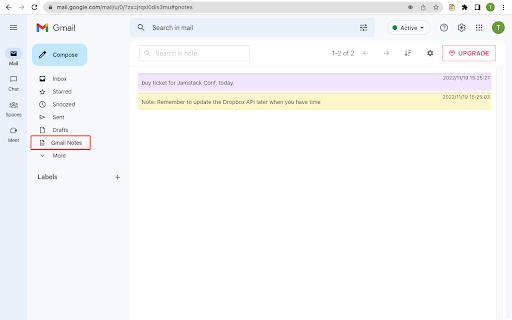
Add notes to your Gmail, integrated with Gmail, you can quickly insert multiple notes to each conversation. Manage all your notes in one place. Preview notes, re-edit note, set note colors, navigate to related email conversations, or delete notes. If you have a better idea or changed your mind, just click the "Edit" button to modify your notes. New Features coming soon. Soon, you will be able to add notes when composing and replying to a conversion. and export all your notes to PDF. How are people using the extension? - Mark your important emails and collect them with well-organized "stickers". - Manage to-do lists, packing lists, and other important things from email conversations. - Take private notes for specific emails or conversations. It's very useful when you want to remember something from the email without forwarding it. - Write down your ideas about a subject or brainstorm for a project. - Clean up your thoughts or gather ideas when you compose a new email or reply to one. - Customer service staff can quickly search and copy templates from notes, only need to modify them slightly to send emails. More exciting ways to use it, waiting for you to discover... Please refer to the following link for the privacy policy https://www.workaddons.com/privacy

Checker Plus for Gmail™
Get notifications, read, listen to or delete emails without opening Gmail and easily manage multiple accounts. 🛠️ Trusted developer with a suite of highly rated extensions 🚀 Lightning-fast email previews, alerts, and smart tools 🔔 Push notifications and background alerts 🧠 Voice notifications — hear your emails read aloud (perfect for multitasking or accessibility) 🧩 Works with multiple Gmail & Google Workspace accounts 🔄 Real-time sync across inboxes, labels, and custom filters 🆕 Tons of options, features, and regular updates ✨ Option to quickly reply & compose emails with AI using prompts in any language 🆘 Access to an extensive FAQ and fast, personal tech support 🧱 Now supports the Chrome side panel 🧑🍳 Your suggestions help shape new features 🎁 Extra features unlocked with any contribution 📥 Read, archive, mark as read, or delete — right from the popup 🔇 Add your own notification sounds or voices

Gmail Notifications
Gmail Notifications: Simple notifier for gmail. Check gmail inbox and get instant alerts in any tab—no switching. 🌟 Stay on top of your inbox like a pro with Gmail Notifications – the easiest and fastest way to keep track of your messages without leaving your current tab. No more endless switching or wondering how do I check my email – now you can check my email instantly, right from your browser. 📬 With our smart notifier for gmail, you’ll always know when something important lands in your inbox. View the last 10 unread messages directly in your toolbar, see who sent them, read the subject lines, and open them in Gmail with one click. This badge checker for gmail makes your workflow smoother than ever. 🔔 Get real-time gmail desktop notifications that keep you informed no matter what you’re doing. Whether you’re working, gaming, studying, or relaxing, you’ll get a clear notification gmail the moment a message arrives. No more searching how to get notifications from gmail – our extension does it for you. 1️⃣ Live unread counter in your browser toolbar 2️⃣ Instant preview of the last 10 unread emails 3️⃣ Quick one-click access to your Gmail inbox 4️⃣ Customizable gmail notification sound for each alert 5️⃣ Minimalist, clutter-free design for full focus ⏳ Need to concentrate? Activate Do Not Disturb mode to temporarily pause notifications from gmail. When you’re ready, switch it back on and your gmail notif will flow in without missing a beat. 📢 If you regularly check my gmail or quickly check gmail inbox while working, this tool will save you time and keep you productive. Email notifications appear instantly so you can decide whether to act now or later. 🔊 Turn on gmail email sound notification to make sure you hear every new message. Our clean, professional email notification sounds mean your notification of gmail stands out without being distracting. ⚙️ Customize notifications for maximum productivity: ➤Turn notification sounds on or off ➤Turn on visual notification animation ➤Set up do not disturb mode ➤ Fine-tune notification email settings for any workflow 📥 Setup is instant: install and turn on gmail desktop notifications immediately. Your notif gmail will run quietly in the background, always ready. 💡 Key reasons to use Our Extension daily: • Reliable email notifications in real time • Instant message previews through the gmail notifier icon • Control over how you see notifications gmail • Fast access to Gmail from anywhere in Chrome • Adjustable notifications on gmail for any schedule 1. Saves time – no repetitive inbox checking 2. Keeps you focused – notifications on gmail are subtle yet effective 3. Boosts efficiency – quick notification email access means faster replies 💬 Whether you manage clients, handle urgent projects, or just keep in touch with friends, you can rely on notification gmail to keep your communication flowing. 🎯 You’ll never miss a critical update again. The unread email notification icon updates live, showing exactly how many messages are waiting. One click takes you straight to Gmail so you can act immediately. 🚀 This extension is more than a gmail notification tool – it’s your personal assistant for email management. From work emergencies to personal invites, you’ll always know when something arrives. 📈 At a glance, you get: • gmail notif for each new email • Both visual and sound email notifications • A quick Do Not Disturb toggle for quiet time • Instant visual notification of gmail without delay • Clear gmail email sound notification for important messages 🌐 Ideal for anyone who often wonders how to check my email or needs a quick way to check my gmail during the day. Whether you prefer visual alerts, sound alerts, or both, you can adapt it to your style. 📂 Business users benefit from faster response times, while casual users enjoy effortless check gmail inbox access without cluttering their screen. The combination of email notification sounds and desktop alerts makes communication seamless. ⚡ Even in a busy workspace, you can keep notifications from gmail under control. Just enable Do Not Disturb during meetings or deep work sessions, and bring alerts back instantly when you’re ready. 🛠 With our extension, you have total control: • Adjust notifications gmail frequency • Decide how your notification email appears • Enable or disable unread email notification icon visibility • Configure email notification to match your schedule 💼 Start today and see how much easier email can be. Install Gmail Notifications, turn on desktop notifications gmail, set your preferences, and enjoy a smarter, faster, cleaner way to manage your messages. Your gmail notifier will become an essential part of your workflow.

Record Voice Messages in Gmail - Beep
Record, send, and listen to transcribed audio messages and voice notes all within Gmail. It's the faster, friendlier way to email. Beep for Gmail is a voice notes, audio messages, and speech-to-text Chrome extension for Gmail. Record, send, and listen to transcribed voice messages directly inside Gmail without leaving your inbox. Instead of typing long replies, you can respond with voice notes that feel more personal, more natural, and much faster to create. Beep helps you send audio messages in Gmail while keeping the speed and convenience of email. With built-in transcription and speech-to-text support, your voice messages are also easier to review, understand, and reference. Voice messages combine the warmth and clarity of a phone call with the convenience of email. You can explain more, communicate tone more clearly, and respond faster than typing out long replies. That means less procrastination, fewer delayed responses, and more human communication. ✨ What you can do with Beep for Gmail • Record and send voice notes directly in Gmail • Add audio messages and spoken replies to emails in seconds • Use built-in transcription to make voice notes easier to review and understand • Insert a shareable audio player directly into your email • Replay messages anytime with full recording history • Use smart context to remember where recordings were created in the recording history • Set optional expiration dates to automatically delete recordings after a chosen time • Restrict recordings to your organization or domain for more control and privacy • Communicate more clearly with tone, nuance, and personality ⚙️ How it works 1. Install the Chrome extension. 2. Open Gmail. 3. Click the red microphone button next to Send to start recording. 4. Beep inserts a voice note and audio player into your email, ready to send. That’s it. No switching tabs, no extra upload steps, and no need to schedule a call just to explain something clearly. Beep includes transcription and speech-to-text support so your voice notes are easier to search, review, reference, and understand. This makes audio messages more accessible and more useful for both senders and recipients. 🙋🏾♀️ Who it’s for 👩🏿💻 CEOs, Entrepreneurs, and Business Owners When you have constant decisions, follow-ups, and requests coming in, voice notes help you reply faster and communicate more clearly without getting stuck writing long emails. 👨🏽💼 Sales Reps Voice messages help add a personal touch, stand out in crowded inboxes, and build stronger connections with prospects and customers. 👨🏫 Teachers and Educators Give clearer, friendlier feedback to students, parents, and colleagues. Voice helps communicate tone better and saves time compared with writing long responses. 👩💻 Marketers and Finance Professionals Summarize ideas, reports, updates, and next steps faster with voice instead of drafting lengthy email replies. 👷♀️ Project Managers and Product Managers When you are juggling details across teams, voice notes help you communicate context, nuance, and urgency more quickly. 🧑💼 Life Coaches Send more personal follow-ups, encouragement, accountability check-ins, and coaching reflections in a format that feels warm, direct, and human. 👵 Seniors or People with Accessibility Needs Typing can be difficult or time-consuming. Voice notes make responding easier, faster, and more natural. 🔒 Extra features • Full recording history • Smart context for easier organization • Optional expiration dates • Domain-restricted sharing • Embedded audio player in Gmail Beep helps make Gmail faster, more human, and better for communication through voice. Disclaimer: This app is not affiliated with or officially endorsed by Google or Gmail in any way.

Gmail Email Thread Reverse
A quick, easy, one-click way to reverse the messages in Gmail email threads and conversations! Here is what you can do with this extension: - 🔒 Securely reverse your Gmail Threads and Conversations - 📧 Have your most recent email / message appear at the top of the page - 🥽 Feel safe knowing this extension is safe, GDPR compliant, and follows Google's Privacy Policy and Terms of Service For those of us who use Gmail, it can be frustrating when you're part of a group thread or long thread and you have to scroll all the way to the bottom of the page to see the most recent email or message. With this extension, the most recent email or message will appear at the top of your threads and conversations. Nothing else is required: just install it and your threads and conversations will have your messages appear in reverse order (also known as reverse chronological order). #️⃣ v1.0.0 This is the initial release, with support for the new Google Chrome Manifest Version (version 3)
