
gbcidhndggjlgichmgddokokdfinjaop
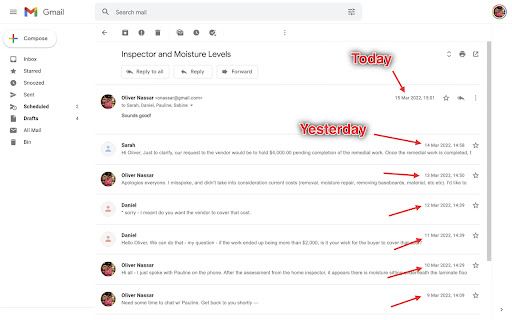
A quick, easy, one-click way to reverse the messages in Gmail email threads and conversations! Here is what you can do with this extension: - 🔒 Securely reverse your Gmail Threads and Conversations - 📧 Have your most recent email / message appear at the top of the page - 🥽 Feel safe knowing this extension is safe, GDPR compliant, and follows Google's Privacy Policy and Terms of Service For those of us who use Gmail, it can be frustrating when you're part of a group thread or long thread and you have to scroll all the way to the bottom of the page to see the most recent email or message. With this extension, the most recent email or message will appear at the top of your threads and conversations. Nothing else is required: just install it and your threads and conversations will have your messages appear in reverse order (also known as reverse chronological order). #️⃣ v1.0.0 This is the initial release, with support for the new Google Chrome Manifest Version (version 3)

Gmail reverse conversation
The add-on reverse emails in conversation view. Gmail reverse conversation (thread) view. Do you like newest message on the top in conversation view? You can do it with this simple add-on. It reverse email order in thread. Somethings not working? Try refreshing the Gmail page before submitting an issue.

Resize Gmail Sidebar by cloudHQ
Now you can resize the label column in Gmail Gmail™ labels are a great way to stay organized, but your Gmail™ label names get hidden by the sidebar when their names are too long. Not anymore! With Resize Gmail Sidebar, you'll get all the space you need to reorganize your viewing space and become more efficient! You can easily slide your sidebar left or right, thereby increasing or decreasing your Gmail label view. Now you're in control of my inbox and can quickly locate the emails and information I need in my Gmail™ labels. cloudHQ. Helping your productivity, one step at a time. cloudHQ website: https://www.cloudhq.net/ App website:https://www.gmail-sidebar-resizer.com/ Pricing: https://www.gmail-sidebar-resizer.com/pricing (basically FREE but we offer paid support) Support page:https://support.cloudhq.net/category/browser-extensions/gmail-sidebar-resizer/ FAQ page: https://support.cloudhq.net/gmail-sidebar-resizer-faq-frequently-asked-questions/ Blog: https://blog.cloudhq.net

Gmail Reverse Convert By Sajeewa Dissanayake
Gmail Reverse Convertor By Sajeewa Dissanayake. This addon will reverse the mail view on conversation view. Just like outlook.

Gmail - Reply at the TOP
Move the reply/compose box to the top of conversation thread. Allows you to refer the latest response as you compose the reply. If you are frustrated of scrolling up and down while composing your email replies in Gmail, THIS IS THE EXTENSION YOU NEED! This will move the reply/compose box from the bottom of the page to the top of the page. You can now see the latest email in the thread as you type, without have to scroll up and down. This is especially loved by Outlook users who are used to the reverse chronological view. I developed this after I could not find any solution. After using it for a while, I have noticed a significant boost in email productivity ... no more scrolling for those long conversation threads! NOTE: Refresh/reopen the Gmail tab for the extension to start working.
