
decobpbjgkhldmhfgppalipeenloicgn

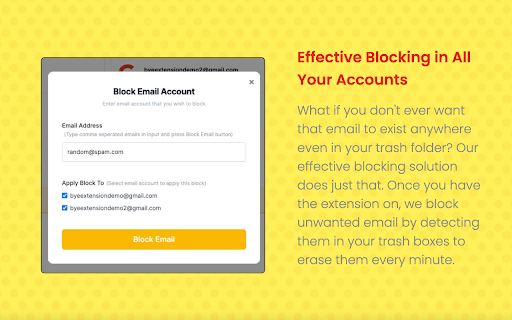
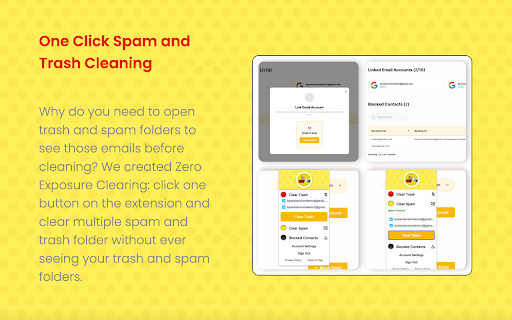

The most effective and affordable solution to completely block and clean out unwanted emails in any corner of Gmail. Annoyed that unwanted emails, even "blocked" or "filtered" in Gmail, are still in your spam or trash for 30 days? BYE! Extension is the most effective and affordable solution to completely block and clean out unwanted emails in any corner of Gmail. No more blocked email in trash and spam folders. ---BYE! Effective Blocking--- Once the extension is on, the extension detects and clears out any blocked email from the system to achieve effective blocking. ---One Click Spam and Trash Cleaning--- Our one-click cleaning exempts you from the hassles and worries of going into your trash and spam folders and being exposed to unwanted emails. ---Cheaper than a Cup of Coffee--- Priced as low as $45.99 a year, we give you safety and ease when it comes to Gmail management ---Safe, Secure and Private--- We guarantee that your email data and info will not be shared or sold to any third party. We adhere to Google API Services User Data Policy, including the Limited Use requirements. --Version 0.1.7 Resolved some design anomalies caused by the extension on other webpages.

Shakel-Table
chrome extension Looking for an easy way to convert your spreadsheets into beautiful tables? Look no further than our powerful extension! With just a few clicks, you can transform your spreadsheets into stunning, easy-to-read tables that are perfect for managing leads, sending SMS messages, and even reaching out to customers on WhatsApp. Our extension is incredibly user-friendly and easy to use, even if you have no previous experience with spreadsheets or table formatting. With a variety of customizable options, you can create tables that fit your unique needs and preferences, whether you're looking to organize your sales data or keep track of your contacts. In addition to its powerful table conversion capabilities, our extension also offers a variety of tools for managing your leads and communicating with your customers. With our easy-to-use campaign sequences, you can set up automated messaging sequences that will send SMS or WhatsApp messages to your leads at the perfect time. And if you need to send bulk messages to a large group of customers or leads, our extension has you covered. With just a few clicks, you can send messages to multiple recipients at once, making it easy to stay in touch with your entire audience. Best of all, our extension makes it easy to filter your leads based on their attitudes and preferences, so you can customize your messaging and ensure that you're reaching the right people at the right time. Whether you're looking to close more sales or simply stay in touch with your customers, our extension is the perfect tool for streamlining your communications and taking your business to the next level. So why wait? Install our extension today and start taking your spreadsheet game to the next level!

Block Sender
Block annoying emails in Gmail™. Say goodbye to unwanted newsletters, individuals, and other uninvited email senders. "Gmail does an excellent job of blocking spam, but sometimes you just want to go the extra mile and prevent some mail from ever reaching your account." - Lifehacker "If you’re looking to block unwanted emails, particularly from certain senders who send you unsolicited messages, an extension for Google Chrome called Block Sender is a great solution." - Make Tech Easier "Makes this process very easy and will prevent you from getting inundated with pointless emails" - Business Insider Do you get annoying email? With Block Sender for Gmail™, you can block any email permanently in one click and automatically send a fake error message back to the sender. No more complicated filters to setup. Works for email addresses, domains, subject line, keywords, and even IP addresses. Block anyone. Try a few blocks for free or upgrade to get advanced features like bounce back messages. POPULAR USES: - Block someone from harassing you with unwanted email. Send them a fake "This email address is incorrect" error message. - Block any newsletter you didn't subscribe for and never see it again. - Social networks or shopping sites sending you email you don't want to read? Block it in one click. FEATURES: - Adds a "Block" button compatible with your Gmail account. When you get a message you don't want, block the sender permanently. - Automatically create a fake "This email address doesn't exist" error message to appear in the other person's inbox. - Optionally send a "You were blocked" email when a blocked user contacts you - Create advanced blocks not natively supported by Gmail, like blocking via headers. - Anonymous: Blocked senders won't know that the messages they send you goes to your trash immediately, unless you want them to know. - Flexible: Edit or remove accidental blocks. - Freedom: Set your blocks to trash messages, permanently delete them, or have them skip the inbox and be archived. - Advanced Filtering: Block sub-domains, subjects, or even IP addresses when you upgrade. - Insightful: Flag future messages from the same domain. AND MANY MORE USES: - Getting a lot of notification messages from Facebook, Twitter, or social media services you signed up for? Block them all. - Set up simple filters without having to worry about the cumbersome options. - Fake your email death for those people you really don't want to talk to. Ever. Again. - Relationship ended horribly? Never see another message from your ex again. - Can't block a particular address? Flag all messages from certain domain names or even top-level domains like ".net". WORKS WITH: - Gmail™ - Google Apps™ PLANS & PRICING: Block Sender has a free plan and pro plans with higher usage limits. It is free to use Block Sender up to a limited number of blocking rules, but unlimited emails can be blocked. Upgrade to our monthly or yearly pro plans to enjoy premium features and 1000s of blocks. More information at: https://blocksender.io/ CHANGE LOG: v5.X Migrated to Manifest V3 extension type. v4.5.X Support Gmail's new UI / security features and improved error handling. v4.2.X Fixed bugs, improved block management, improved canned response support, and support for new Gmail UI. v4.0.X Better account support, email linking, and block management. v2.5 New languages supported and new fake email block features. v2.3 New menus for increasing the free block plan for new users. Bug fixes and improvements with automatic error email message. New languages supported. v2.2 New filters for upgraded users. Reorganized options page. Upgraded one-time free blocks to monthly free blocks for users who only block a few messages every month. v2.1 Added additional tutorial help options. Bug fixing for Gmail™ changes. v2.0 Updated UI and improved the extension architecture. Huge refresh with buttons and options page. Brand new clean design and multiple options for blocking subjects, email, or domains. v1.5 Fixed bugs with automatic archiving and blocking. Updated UI and parts of the extension for new Gmail™ changes plus recent blocks. v1.1 Added automatic message archiving, undo, and error messages plus additional blocking features. Gmail and Google Apps are trademarks of Google Inc. Use of these trademarks are subject to Google Permissions. Block Sender is not affiliated with Google or Gmail.

Gmail Mass Unsubscribe & Delete Emails - InboxPurge
Mass unsubscribe and delete unwanted emails in Gmail with one click. Trusted by thousands to clean inboxes fast! Is your Gmail inbox overwhelmed with spam and clutter? Struggling to mass unsubscribe or delete thousands of unwanted emails in Gmail? InboxPurge is the perfect Gmail cleanup tool, designed to help you regain control of your inbox in just a few clicks. What You Get with InboxPurge: ✔️ Gmail Unsubscribe Tool: Remove yourself from newsletters, spam, and unwanted emails with a single click—no more manual effort. ✔️ Mass Email Deletion: Quickly delete thousands of emails in bulk and clean your inbox. ✔️ Inbox Digest: Group your favorite newsletters by topic or preference for easy reading. ✔️ Unblock Senders: Regain control of your contact list with a simple unblock feature. ✔️ Gmail Action Bar Integration: Select emails and use InboxPurge to mass unsubscribe or delete clutter directly from Gmail’s toolbar. ✅ Install InboxPurge: Add the extension to your browser in seconds. ✅ Open the Sidebar: Use the intuitive Gmail sidebar to manage your emails. ✅ Mass Unsubscribe & Delete: Select unwanted emails, bulk unsubscribe and delete them with just one click. ⌛Save Time: Save time—skip the manual effort and clean up your Gmail inbox in minutes. 🔐100% Privacy Guarantee: InboxPurge processes all actions locally on your device, keeping your data secure. Take control of your Gmail inbox today. Install InboxPurge and experience the easiest way to unsubscribe, delete, and clean your inbox fast! 🚀 Gmail is a registered trademark of Google Inc. InboxPurge is not affiliated with Google.

Clear Mail for Gmail: Privacy first email cleaning
A powerful email cleaning app that works locally on your system, no need to sign away your Gmail auth token to a 3rd party Tired of an overflowing Gmail inbox? Clear Mail for Gmail is here to help! Clear Mail is designed to effortlessly clean your Gmail inbox while keeping your privacy intact. Here’s what makes it stand out: ➜ Works directly in your Gmail tab, no need to install a desktop app or go to another browser tab for managing your emails ➜ Privacy first approach to mail cleaning. How, you may ask? Read more about privacy down below ➜ Manage your emails through the intuitive concept of Mail Filters. Organize your Gmail like a pro. ➜ Get a report on who is sending you the most emails - Clear Mail allows you to sort emails by senders. Also figure out repetitive subject emails. Mass delete emails, move emails to a different label or simply organize and read similar emails at one place. It is all up to you! ➜ Declutter not just your Primary tab, but even the Promotions, Social, Updates, Forums tab as well ➜ Use the new features - 'Delete All on page' and 'Super Delete' buttons to automatically delete off your filtered emails NO CREDIT CARD REQUIRED! We offer a free version, which can be used with some weekly limits. Or you can subscribe to the full version, to remove all limits. ******************************************************************************** We are currently giving an early bird offer - 🎉 50% OFF for first 10 users - valid for limited time only. Check it out here: https://clearmailapp.com/pricing.html ******************************************************************************** IMP NOTE: Currently, Clear Mail (Generate Report) works with the languages - English (US), English (UK), French, German, Hindi, Italian, Polish, Portuguese (Brazil), Portuguese (Portugal), Russian and Spanish. For unsupported languages, it will throw an error. Please refer to this link for more details: https://clearmailapp.com/lang-support.html ✅ Install Clear Mail: Add extension to your Chrome browser. It takes only a few seconds ✅ Move to your Gmail tab and click on the Clear Mail icon. This will open the Clear Mail Popup. If required, you may get a message regarding refreshing your Gmail tab. Go ahead and press OK. ✅ On the Clear Mail popup, you will see 2 tabs - 'Clear mail' tab and 'Saved mail filters' tab. Down below, click on 'Generate Report' button, and wait for a few seconds for the automation to click through your 6 pages and collate your email metadata. ✅ The list of frequent email senders in descending order will be loaded to the 'Clear Mail' tab. Hit 'Start' or double-click on an item to start filtering out emails. Use 'Prev', 'Next' buttons as required. Use the 'Delete All on page' and 'Super Delete' buttons to quickly delete off your filtered emails. You can also save some mail filters under the 'Saved mail filters' tab, a sort of bookmark. These filters can be used anytime to filter your frequently received emails. For some advanced features like looking at the Generated report and loading the emails with repetitive subjects, click the 'Open Report' button on Clear Mail popup We recommend using Clear Mail once a week to organize and clean up your Gmail inbox. From financial details to personal conversations, emails contain the most sensitive information about you. Most email cleaning apps ask you to login to Gmail using OAuth, granting them an auth token that allows them to read and delete your emails. The problem here is that this token gets stored on a 3rd party server, out of your control. Yes, all these apps have their privacy policies. But there are still dangers of hackers, surveillance agencies, and internal bad actors (such as employees) stealing your auth token and gaining access to your private emails. Is There a Better Way? Yes, there is. Due to above privacy concerns, we use a different approach for email cleanup. Our software reads your email metadata locally and all processing happens locally on your device, ensuring that no data ever leaves your machine. The only information sent to our servers is your email address and name — for user registration. So, go ahead, clean your inbox with confidence, knowing that your data remains yours, untouched and unseen by anyone else. Sometimes, you may find that the 'Generate report' button doesn't do anything. Or the mail filters, on clicking, don't work. Please refresh your Gmail tab and these features should start working again. VERSION HISTORY 3.2.0 (Latest version) Asking user for rating. Simplified dialog box message for refreshing browser. 3.1.0 Added support for 4 more languages, improved dialog box messages, hence improved usability of the app 3.0.0 Major change: Clear Mail icon will always be enabled, and allow for moving user to existing Gmail tab or open a new tab with Gmail. Users were getting confused due to disabled Clear Mail icon and this will remove the users' confusion 2.6.0 Improved the dialog box messages and other minor UX improvements
