
kjnpkcndbjmheeenngfemcmcjfeahefa
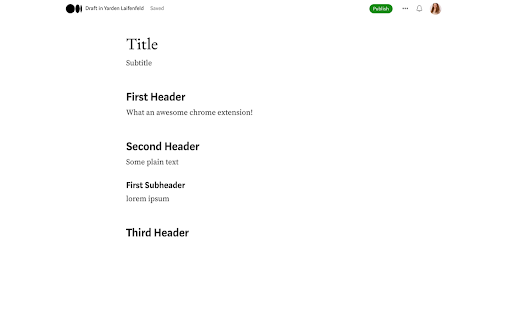
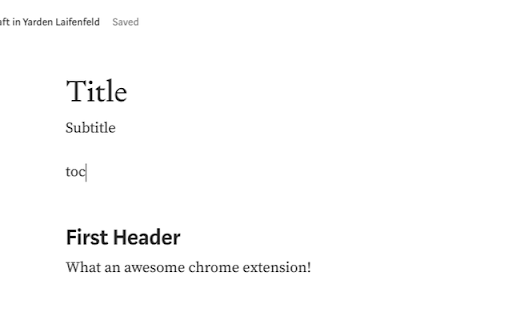
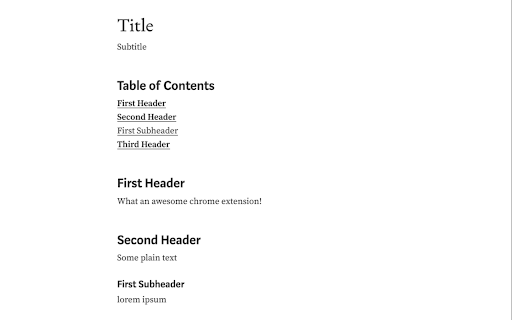
Add a table of contents to your medium blog post Want to easily create a table of contents for your medium blog post? This extension will do that for you! Simply install, write "toc" wherever you want to create the table of contents, click Generate and the extension will do the rest.

Active Group Users
Identify active group members and become the familiar face people reply to — in less time. Are you spending hours on Facebook… and still getting ignored? You’re doing what you were taught: Posting consistently. Commenting on people’s posts. Trying to “be visible.” But the replies never come. Not because you’re doing it wrong — but because people don’t reply to strangers. 🔥 Meet Active Group Users (AGU) — the smarter way to become recognizable on Facebook on purpose. AGU helps you stop guessing who to engage with and start nurturing the right people — consistently, intentionally, and in a fraction of the time. Instead of scrolling endlessly, AGU shows you who’s actually active inside the Facebook groups you’re already part of — so every comment you leave builds familiarity that compounds. With Active Group Users, you can: ✅ Identify the most active members in any Facebook group Focus only on people who are already posting and commenting — not inactive members. ✅ Get a daily list of 20–30 people to engage with So you always know exactly who to visit today — no randomness. ✅ See what they commented on (and where) Engage naturally on posts they already care about. ✅ Track your engagement over time Know when you last visited someone’s profile and how often you’ve interacted — so you space your visibility strategically. ✅ Know who’s becoming “hot” After enough intentional exposure, you’ll clearly see who’s warmed up and ready for a conversation. ✅ Add private notes for smarter follow-ups Keep context without relying on memory or spreadsheets. 💡 Yes — you could do all this manually. But it would mean spreadsheets, reminders, and constant guessing. AGU turns a proven familiarity-based strategy into a simple, manageable system — so you spend less time thinking and more time building real connections. Whether you’re: Active Group Users helps you turn everyday Facebook engagement into real conversations — without wasting hours in the feed. 👉 Install Active Group Users and start building familiarity that actually leads to replies.

Medium Blog Summarizer - Summr.io
AI Summary for your Medium Blog Post Are you tired of spending hours reading through lengthy articles on medium.com, trying to get the main points? Do you want a quick and easy way to understand the content of a blog post without having to read through the entire thing? Look no further! Our Chrome Extension for summarizing medium articles - Summr.io - Medium Blog Summarizer is here to help. With this extension, you can get a summary of any medium blog post with just one click of a button. Simply click the "Summarize" button within the Chrome browser and a summary of the blog post will be displayed. This is an incredibly useful tool for busy individuals who want to get information from the blog posts but may not have the time to read through every article in full. Not only is this extension convenient and time-saving, but it's also easy to use. Simply install it on your Chrome browser and you'll be ready to quickly and easily understand the main points of any medium blog post. Don't waste any more time struggling to understand lengthy articles – try our Chrome Extension for summarizing medium blog posts today!

Better TOC
Auto generate toc for readme, article, more, support llm Q&A

TOC of Medium
Create a table of contents on the edit screen of Medium. When you add this plugin, you can create a table of contents at the input position by pressing the Ctrl + t key! Also, you can copy a table of contents by clicking on the clipboard icon that appears in the upper right corner of the screen. You can embed a table of contents in an article by pasting it where you want to insert it. To update the table of contents, click on the clipboard icon again to copy the latest table of contents, or press Ctrl + t key at the position where you want to create the latest table of contents. How to use: https://medium.com/@nikaera/8c8d344313fe GitHub Repository: https://github.com/nikaera/toc-medium-extension
