
moeikogeobbcmheckflepdogdjdcahfk

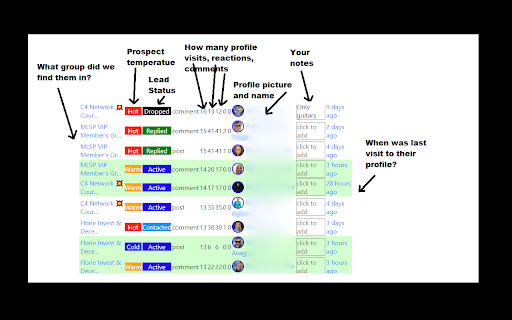
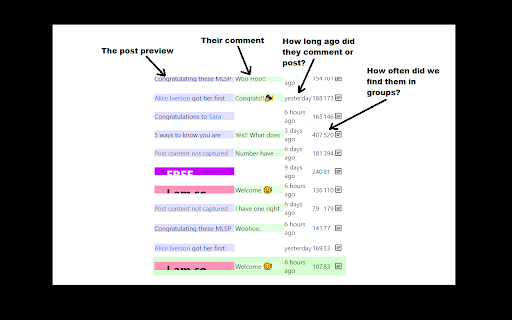

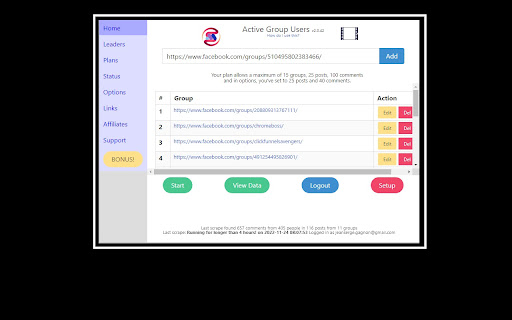
Identify active group members and become the familiar face people reply to — in less time. Are you spending hours on Facebook… and still getting ignored? You’re doing what you were taught: Posting consistently. Commenting on people’s posts. Trying to “be visible.” But the replies never come. Not because you’re doing it wrong — but because people don’t reply to strangers. 🔥 Meet Active Group Users (AGU) — the smarter way to become recognizable on Facebook on purpose. AGU helps you stop guessing who to engage with and start nurturing the right people — consistently, intentionally, and in a fraction of the time. Instead of scrolling endlessly, AGU shows you who’s actually active inside the Facebook groups you’re already part of — so every comment you leave builds familiarity that compounds. With Active Group Users, you can: ✅ Identify the most active members in any Facebook group Focus only on people who are already posting and commenting — not inactive members. ✅ Get a daily list of 20–30 people to engage with So you always know exactly who to visit today — no randomness. ✅ See what they commented on (and where) Engage naturally on posts they already care about. ✅ Track your engagement over time Know when you last visited someone’s profile and how often you’ve interacted — so you space your visibility strategically. ✅ Know who’s becoming “hot” After enough intentional exposure, you’ll clearly see who’s warmed up and ready for a conversation. ✅ Add private notes for smarter follow-ups Keep context without relying on memory or spreadsheets. 💡 Yes — you could do all this manually. But it would mean spreadsheets, reminders, and constant guessing. AGU turns a proven familiarity-based strategy into a simple, manageable system — so you spend less time thinking and more time building real connections. Whether you’re: Active Group Users helps you turn everyday Facebook engagement into real conversations — without wasting hours in the feed. 👉 Install Active Group Users and start building familiarity that actually leads to replies.

News Storyline
Know Thy History and Be Notified About Future A Chrome sidebar extension and companion newsletter that gives you an unbiased, context-rich timeline of any news story and quietly watches for what happens next—so you never miss a beat (or waste time scrolling). 📖 On-Demand Timelines in Your Sidebar • One-click access while you’re reading any article: hit the extension icon to slide open a concise, chronological view of past reports on that story. • Facts, not opinions: we aggregate across dozens of reputable outlets, stripping out commentary bias so you see the unvarnished sequence of events. • Top highlights only: instead of drowning you in every mention, we surface a handful of the most relevant milestones—headlines, timestamps, and sources—so you instantly understand “what led here.” 🤖 Background Story Scanning & Positive Alerts • Hands-free monitoring: once you’ve opened a timeline, our service continues scanning in the background for new developments on that very story. • Positive-only notifications: you decide what matters—receive alerts only when something significant (and positive) happens, so your inbox isn’t full of noise. • Peace of mind: no more endless manual refreshes or fear of overlooking a breaking update. 📰 Daily Newsletter & “New Developments” Bulletin • Daily digest delivered each morning: a simple roll-up of every event we tracked across your subscribed stories in the past 24 hours—no grouping, no spin. • On-demand “New Developments” email: when fresh updates arrive mid-day (for critical beats), we’ll ping you separately so you stay in the loop around the clock. 🔔 Story Subscriptions & Future Tracking • Subscribe in one click: any timeline can be turned into a “watched” story. From that moment on, we’ll keep you posted on each follow-up report. • Tailored alerts: choose your stories—finance, politics, tech, climate—and we do the rest, surfacing only the most impactful next chapters. 🔧 Platform & Integration • Chrome-based browsers supported (Chrome, Edge, Brave, Opera). • Privacy-first: minimal permissions, no tracking beyond the stories you opt in to follow. • Lightweight: sits quietly in your toolbar, loading only when you ask. Who It’s For • Journalists & analysts who need quick, neutral context before filing next headlines. • Researchers & students chasing down backstory and evolution of key events. • Curious readers who want more than a single outlet’s perspective—and zero surprises when the story moves on. Why Know Thy History? • Context at your fingertips—instantly see what happened before. • Stop missing updates—positive alerts mean you’ll always catch the next big development. • Save time & mental bandwidth—no more endless feeds or biased roundups. Install now and start each story with the past in view—and the future on your radar.

Apache KIE™ Serverless Workflow Editor for GitHub
Visualize and edit Serverless Workflow files using a graphical editor on GitHub Visualize and edit Serverless Workflow files using a graphical viewer and a custom Monaco editor on GitHub. This Chrome Extension augments GitHub and provides a brand new way to handle your Serverless Workflow files directly on the GitHub interface. With the extension installed, you visualize your workflow with a graphical viewer, helping you to have a better experience and edit your Serverless Workflow files with an enhanced editor with powerful features, which will boost your productivity. The same applies to visualizing your assets on Pull Request reviews! Some Open Source projects were vital for the development of this extension, and we would like to thank all of them, with highlights to: - CNCF Serverless Workflow SDK Typescript: for workflow parsing; - Mermaid: for workflow rendering and visualization; - Apicurio: for our service catalog integration; Apache KIE (incubating) is an effort undergoing incubation at The Apache Software Foundation (ASF), sponsored by the name of Apache Incubator. Incubation is required of all newly accepted projects until a further review indicates that the infrastructure, communications, and decision making process have stabilized in a manner consistent with other successful ASF projects. While incubation status is not necessarily a reflection of the completeness or stability of the code, it does indicate that the project has yet to be fully endorsed by the ASF. Some of the incubating project’s releases may not be fully compliant with ASF policy. For example, releases may have incomplete or un-reviewed licensing conditions. What follows is a list of known issues the project is currently aware of (note that this list, by definition, is likely to be incomplete): - Hibernate, an LGPL project, is being used. Hibernate is in the process of relicensing to ASL v2 - Some files, particularly test files, and those not supporting comments, may be missing the ASF Licensing Header - - Hibernate, an LGPL project, is being used. Hibernate is in the process of relicensing to ASL v2 - Some files, particularly test files, and those not supporting comments, may be missing the ASF Licensing Header If you are planning to incorporate this work into your product/project, please be aware that you will need to conduct a thorough licensing review to determine the overall implications of including this work. For the current status of this project through the Apache Incubator visit: https://incubator.apache.org/projects/kie.html

BBR Helper
This provides some advanced stats (game score, simple player rating and game box plus-minus) on multiple pages for NBA, WNBA, G-League, international leagues and college basketball. Including: - average stats by season on the player page - average stats by playoff series on the player page - average stats by player on the team_season page - average stats by player on the team_player page - average stats by player on the season_player page - single game/half/quarter stats by player on the game_boxscore page - single game and average stats on the gamelog and split pages - top 5 and top 20 average stats players on the season page - top 20 average stats players on the team_season page - top 20 average stats seasons rankings on the player page - top 50 career stats rankings on the player page - multiple stats rankings on the leader page - player awards column on team season page gBPM = (-0.55 * fga + 1.04 * fg3 + 1.39 * fg - 0.25 * fta + 0.79 *ft + 0.17 * orb + 0.27 * drb + 0.24 * (trb - orb - drb) + 1.34 * stl + 0.43 * ast + 0.64 * blk - 0.34 * pf - 0.95 * tov) / g """ , where orb is treated as 0.3 * trb and drb is treated as 0.7 * trb approximately when stats are not complete in early years.

OpenText Core SCA Select Extension
Open Source Select will help developers find and use the right open source and reduce friction between organisations and developers Open Source Select helps you find and use policy compliant and great open-source for any development project. The OpenText Core SCA Select Extension is a free plugin created with developers in mind, enabling you to check the health metrics and license information of an open source project at a glance. If you need more granular data, the extension can lead you to Open Source Select for more detailed information. The three types of metrics you can examine are: Community - How healthy the community around a project is. Popularity - Is it used by many? Is the usage declining? Security - How well does the maintainers apply security best practices. The extension now supports Start Left Policies. This lets you immediately see if the open source you are browsing is compliant with your company’s open source policy, without the need to import and scan code with Software Composition Analysis tools and common source code repositories and package registries such as GitHub, pypi, npmjs, nuget and many others are supported.
